EasyManua.ls Logo

Yamaha RX5 - General Error Messages; Buffer Full; Data Error

Yamaha RX5
81 pages
Print Icon
To Next Page IconTo Next Page
To Previous Page IconTo Previous Page
Loading...
68
Hino
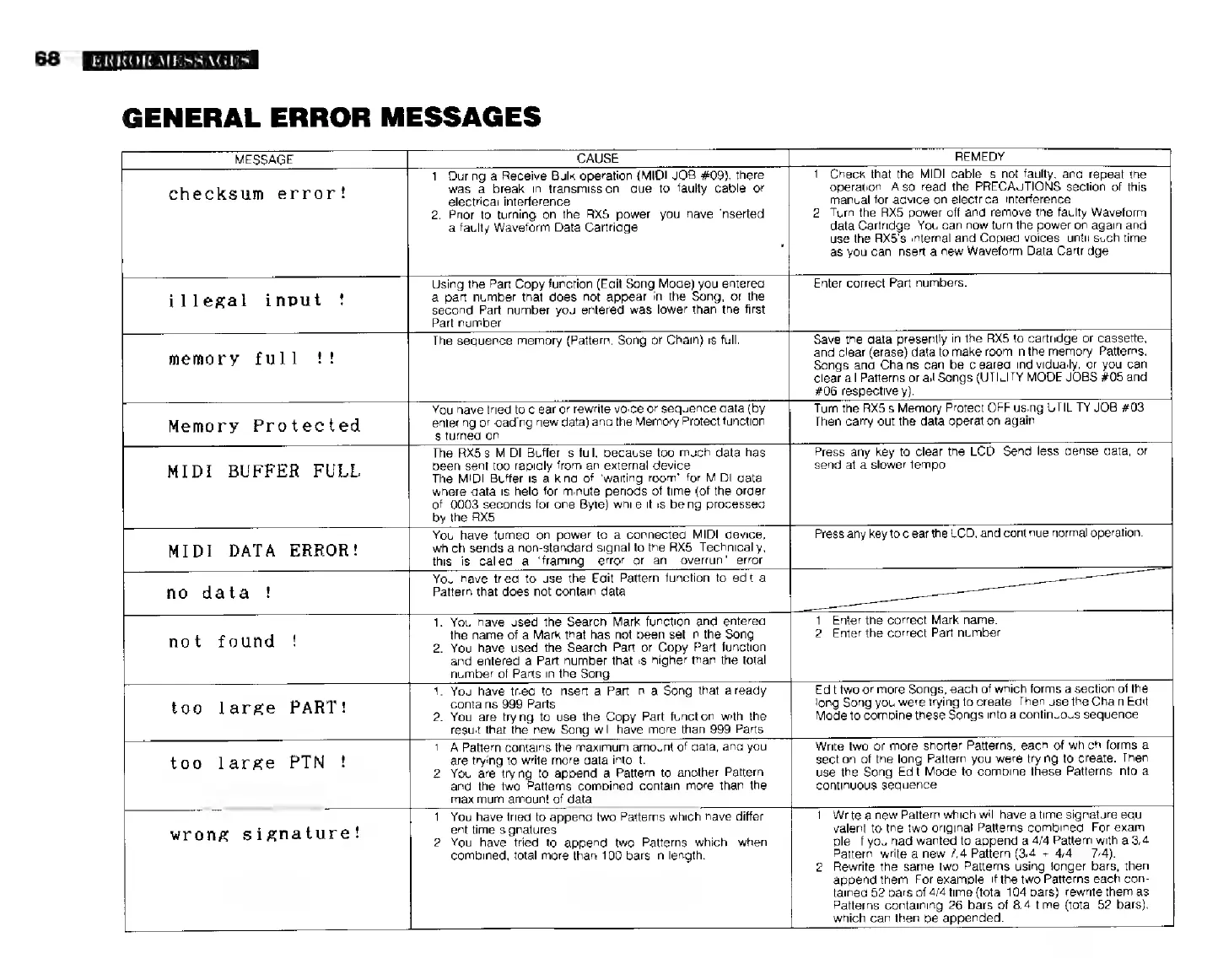
GENERAL
ERROR
MESSAGES
MESSAGE
CAUSE
checksum
error!
1,
During
a
Receive
Bulk
operation
(MIDI
JOB
#09},
there
was
a
break
in
transmission,
due
to
faulty
cable
or
electrical
interference.
2.
Prior
to
turning
on
the
RX5
power,
you
have
inserted
a
faulty
Waveform
Data
Cartridge.
REMEDY
1.
Check
that
the
MIDI
cable
is
not
faulty,
and
repeat
the
operation.
Also
read
the
PRECAUTIONS
section
of
this
manual
for
advice
on
electrical
interference.
2.
Turn
the
RX5
power
off
and
remove
the
faulty
Waveform
data
Cartridge.
You
can
now
turn
the
power
on
again
and
use
the
RX5's
Internal
and
Copied
voices,
until
such
time
as
you
can
insert
a
new
Waveform
Data
Cartridge
illegal
input
!
Using
the
Part
Copy
function
(Edit
Song
Mode)
you
entered
&
part
number
that
does
not
appear
in
the
Song,
or
the
second
Part
number
you
entered
was
lower
than
the
first
Part
number.
memory
full
!!
Enter
correct
Part
numbers.
The
sequence
memory
(Pattern,
Song
or
Chain)
is
full.
Memory
Protected
You
have
tried
to
clear
or
rewrite
voice
or
sequence
data
(by
entering
or
loading
new
data)
and
the
Memory
Protect
function
is
turned
on
MIDI
BUFFER
FULL
The
RX5's
MIDI
Buffer
is
full,
because
too
much
data
has
been
sent
too
rapidly
from
an
external
device.
The
MIDI
Buffer
is
a
kind
of
"waiting
room"
for
MIDI
data,
where
data
is
held
for
minute
periods
of
time
(of
the
order
of
.0003
seconds
for
one
Byte)
while
it
is
being
processed
by
the
RX5
Save
the
data
presently
in
the
RX5
to
cartridge
or
cassette,
and
clear
(erase)
data
to
make
room
in
the
memory.
Patterns,
Songs
and
Chains
can
be
cleared
individually,
or
you
сап
clear
all
Patterns
or
all
Sangs
(UTILITY
MODE
JOBS
#05
and
$06
respectively).
Turn
the
RX5's
Memory
Protect
OFF
using
UTILITY
JOB
#03
Then
carry
out the
data
operation
again
Press
апу
key
to
clear
the
LCD.
Send
less
dense
data,
or
send
at
a
slower
tempo.
MIDI
DATA
ERROR!
You
have
turned
on
power
to
a
connected
MIDI
device,
which
sends
a
non-standard
signal
to
the
АХ.
Technically,
this
is
called
a
“framing”
error
or
an
"overrun"
error.
Press
any
key
to
clear
the
LCD,
and
continue
normal
operation.
no
data
!
You
have
tried
to
use
the
Edit
Pattern
function
to
edit
а
Pattern
that
does
not
contain
data
not
found
!
1.
You
have
used
the
Search
Mark
function
and
entered
the
name
of
a
Mark
that
has
not
been
set
in
the
Song.
2.
You
have used
the
Search
Part
or
Copy
Part
function
and
entered
a
Part
number
that
is
higher
than
the
total
number
of
Parts
in
the
Song.
1.
Enter
the
correct
Mark
name.
2.
Enter
the
correct
Part
number.
too
large
PART!
1.
You
have
tried
to
insert
a
Part
in
a
Song
that
already
contains
999
Parts.
2.
You
are
trying
to
use
the
Copy
Part
function
with
the
result
that
the
new
Song
will
have
more
than
999
Parts
Edit
two
or
more
Songs,
each
of
which
forms
a
section
of
the
long
Song
you
were
trying
to
create.
Then
use
the
Chain
Edit
Mode
to
combine
these
Songs
into
a
continuous
sequence.
too
large
PTN
!
1.
А
Pattern
contains
the
maximum
amount
of
data,
and
you
are
trying
to
write
more
data
into
it.
2.
You
are
trying
to
append
a
Pattern
to
another
Pattern,
and
the
two
Patterns
combined
contain
more
than
the
maximum
amount
of
data
Write
two
or
more
shorter
Patterns,
each
of
which
forms
a
section
of
the
long
Pattern
you
were
trying
to
create.
Then
use
the
Song
Edit
Mode
to
combine
these
Patterns
into
a
continuous
sequence.
wrong
signature!
1.
You
have
tried
to
append
two
Patterns
which
have
differ-
ent
time
signatures.
2.
You
have
tried
to
append
two
Patterns
which,
when
combined,
total
more
than
100
bars
in
length.
1.
Write
a
new
Pattern
which
will
have
a
time
signature
equi-
valent
to
the
two
original
Patterns
combined.
For
exam-
ple,
if
you
had
wanted
to
append
a
4/4
Pattern
with
a
3/4
Pattern,
write
a
new
7/4
Pattern
(3/4
+
4/4
=
7/4).
2.
Rewrite
the
same
two
Patterns
using
longer
bars,
then
append
them,
For
example,
if
the
two
Patterns
each
con-
tained
52
bars
of
4/4
time
(total
104
bars),
rewrite
them
as
Patterns
containing
26
bars
of
8/4
time
(total
52
bars),
which
can
then
be
appended.