EasyManua.ls Logo

Yamaha RX5 - Tempo Function

Yamaha RX5
81 pages
Print Icon
To Next Page IconTo Next Page
To Previous Page IconTo Previous Page
Loading...
14
PATTERN
OPERATIONS
<
HI
НАТ
Quantize
1/8
Е}
ji
J
1.
—3—
—3—
|Quantize
1/12
<=
В.р.
f f
Quantize
1/2
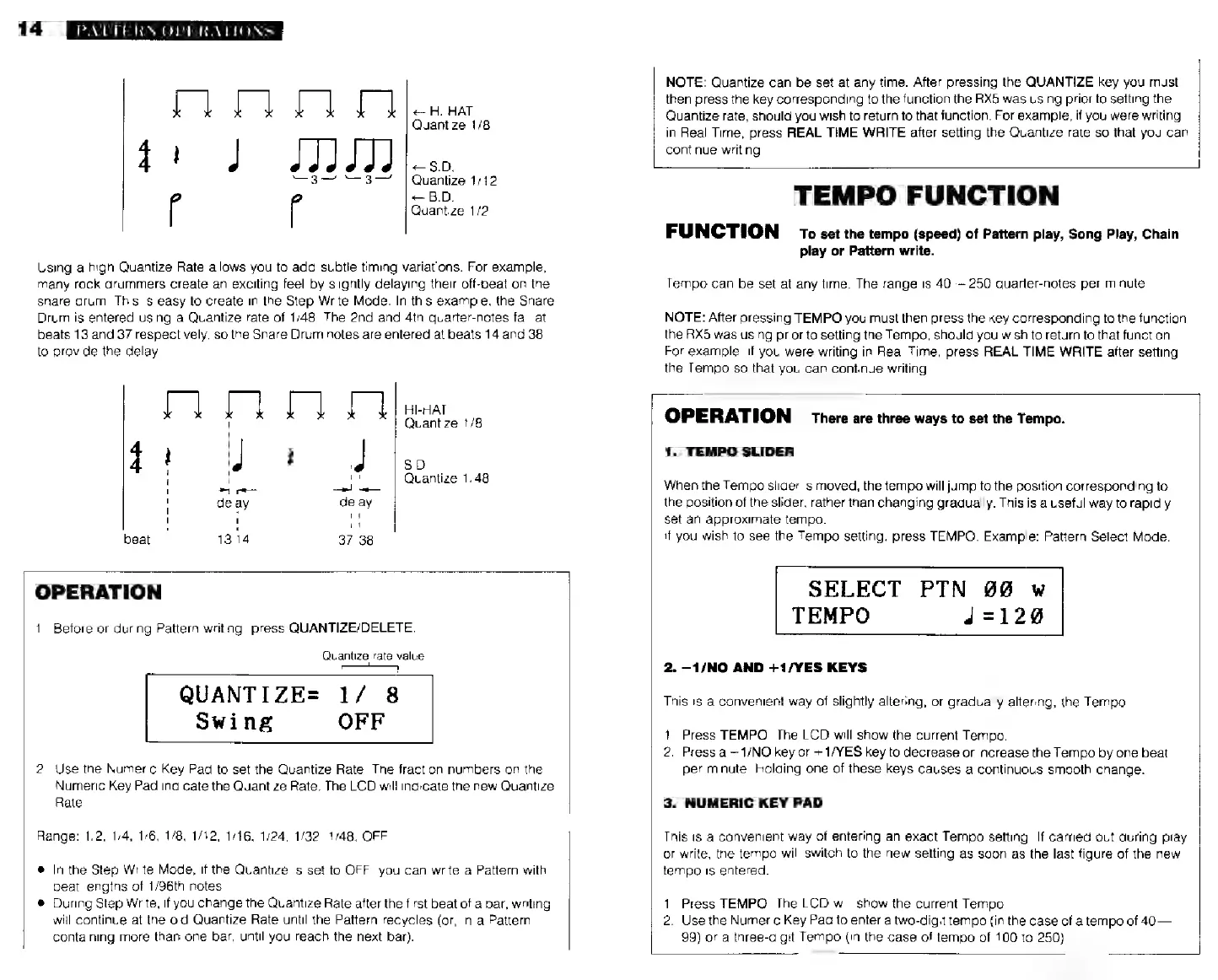
Using
a
high
Quantize
Rate
allows
you
to
add
subtle
timing
variations.
For
example,
many
rock
drummers
create
an
exciting
feel
by
slightly
delaying
their
off-beat
on
the
snare
drum.
This
is
easy
to
create
in
the
Step
Write
Mode.
In
this
example,
the
Snare
Drum
is
entered
using
a
Quantize
rate
of
1/48.
The 2nd and
4th
quarter-notes
fall
at
beats
13
and
37
respectively,
so
the
Snare
Drum
notes
are
entered
at
beats
14
and
38
to
provide
the
delay.
Г]
Г]
Г]
[i
HI-HAT
Quantize
1/8
S.D.
NI
Quantize
1/48
TA
------
а
еее
>.
_
—-
ы
delay delay
!
!!
I
beat
1314
37 38
NOTE:
Quantize
can
be
set
at
any
time.
After
pressing
the
QUANTIZE
key
you
must
then
press
the
key
corresponding
to
the
function
ihe
RX5
was
using
prior
to
setting
the
Quantize
rate,
should
you
wish
to
return
to
that
function.
For
example,
if
you
were
writing
in
Real
Time,
press
REAL
TIME
WRITE
after
setting
the
Quantize
rate
so
that
you
can
continue
writing
TEMPO
FUNCTION
FUNCTION
то
set
the
tempo
(speed)
of
Pattern
play,
Song
Play,
Chain
play
or
Pattern
write.
Tempo
сап
be
set
at
any
time.
The
range
is
40—
250
quarter-notes
per
minute.
NOTE:
After
pressing
TEMPO
you
must
then
press
the
key
corresponding
to
the
function
the
RX5
was
using
prior
to
setting
the
Tempo,
should
you
wish
to
return
to
that
function
For
example,
if
you
were
writing
in
Real
Time,
press
REAL
TIME
WRITE
after
setting
the
Tempo
so
that
you
can
continue
writing.
OPERATION
1.
Before
or
during
Pattern
writing,
press
QUANTIZE/DELETE.
Quantize
rate
value
r
QUANTIZE=
1/
8
Swing
OFF
2.
Use
the
Numeric
Key
Pad
to
set
the
Quantize
Rate.
The
fraction
numbers
on
the
Numeric
Key
Pad
indicate
the
Quantize
Rate.
The
LCD
will
indicate
the
new
Quantize
Rate
Range:
1/2, 1/4,
1/6, 1/8,
1/42, 1/16,
1/24, 1/32,
1/48,
OFF.
e
In
the
Step
Write
Mode,
if
the
Quantize
is
set
to
OFF,
you
can
write
a
Pattern
with
beat
lengths
of
1/96th
notes
*
During
Step
Write,
if
you
change
the
Quantize
Rate
after
the
first
beat
of
a
bar,
writing
will
continue
at
the
old
Quantize
Rate
until
the
Pattern
recycles
(or,
in
a
Pattern
containing
more
than
one
bar,
until
you
reach
the
next
bar).
OPERATION
there
are
three
ways
to
set
the
Tempo.
1.
TEMPO
SLIDER
When
the
Tempo
slider
is
moved,
the
tempo
will
jump
to
the
position
corresponding
to
the
position
of
the
slider,
rather
than
changing
gradually.
This
is
a
useful
way
to
rapidly
set
an
approximate
tempo.
If
you
wish
to
see
the
Tempo
setting,
press
TEMPO.
Example:
Pattern
Select
Mode.
SELECT
РТМ
w
TEMPO
4=128
2.
—1/МО
AND
+1/YES
KEYS
This
is
a
convenient
way
of
slightly
altering,
or
gradually
altering,
the
Tempo.
1.
Press
TEMPO.
The
LCD
will
show
the
current
Tempo.
2.
Press
а
1/NO
key
or
+
1/YES
key
to
decrease
or
increase
the
Tempo
by
one
beat
per
minute.
Holding
one
of
these
keys
causes
a
continuous
smooth
change.
3.
NUMERIC
KEY
PAD
This
is
a
convenient
way
of
entering
an
exact
Tempo
setting.
If
carried
out
during
play
or
write,
the
tempo
will
switch
to
the
new
setting
as
soon
as
the
last
figure
of
the
new
tempo
is
entered.
1.
Press
TEMPO.
The
LCD
will
show
the
current
Tempo
2.
Use
the
Numeric
Key
Pad
to
enter
a
two-digit
tempo
(in
the
case
of
a
tempo
of
40—
99)
or
a
three-digit
Tempo
(in
the
case
of
tempo
of
100
to
250).