EasyManua.ls Logo

Yamaha RX5 - Quantize Function

Yamaha RX5
81 pages
Print Icon
To Next Page IconTo Next Page
To Previous Page IconTo Previous Page
Loading...
12
PATTERN
OPERATIONS
PATTERN/INSTRUMENT
CLEAR
FUNCTION
то
clear
a
selected
Pattern,
or
a
selected
instrument
in
a
Pattern.
You
can
instantly
clear
(erase)
a
whole
Pattern.
This
would
be
done,
for
example,
if
the
RX5's
Pattern
memory
were
full
and
you
wanted
to
write
another
Pattern.
You
can
also
clear
a
selected
instrument
within
a
Pattern.
This
gives
you
an
easy
way
of
re-arranging
a
Pattern
to
make
a
new
one.
Simply
remove
an
instrument
(or
several
instruments)
and
write
new
parts
as
needed.
*
Youcan
also
clear
ail
100
Patterns
simultaneously.
Referto
UTILITY
MODE
JOB
#05
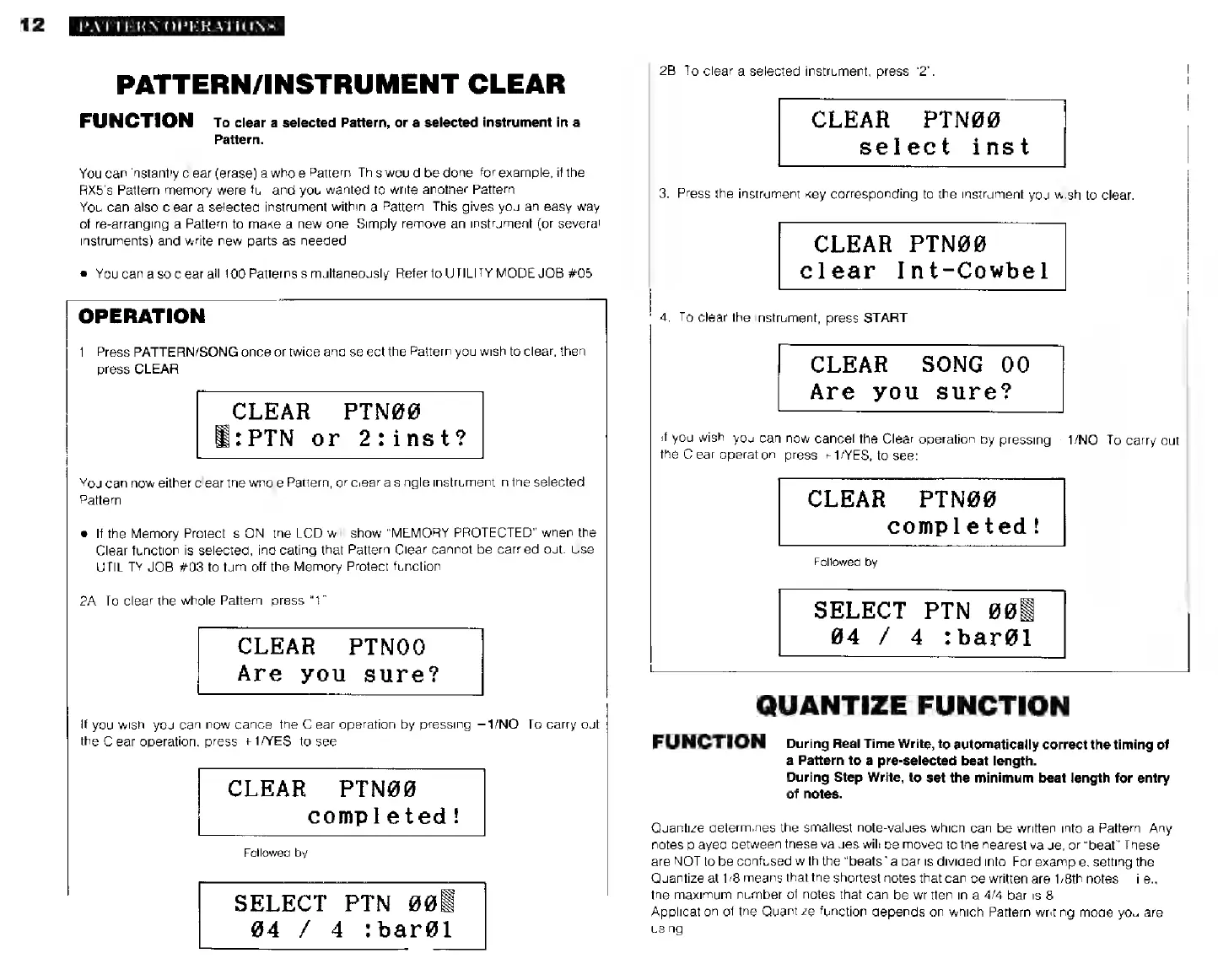
OPERATION
|
|]
1.
Press
PATTERN/SONG
once
or
twice
and
select
the
Pattern
you
wish
to
clear,
then
press
CLEAR,
CLEAR
PTNØØ
:РТМ
or
2:inst?
You
can
now
either
clear
the
whole
Pattern,
or
clear
a
single
instrument
in
the
selected
Pattern
e
If
the
Memory
Protect
is
ON,
the
LCD
will
show
"MEMORY
PROTECTED"
when
the
Clear
function
is
selected,
indicating
that
Pattern
Clear
cannot
be
carried
out.
Use
UTILITY
JOB
#03
to
turn
off
the
Mernory
Protect
function.
2A.
To
clear
the
whole
Pattern,
press
“t”
CLEAR
PTNOO
Áre
you
sure?
If
you
wish,
you
can
now
cancel
the
Clear
operation
by
pressing
1/NO.
To
carry
out
the
Clear
operation,
press
+1/YES,
to
see:
CLEAR
PTN00
completed!
Followed
by
SELECT
PTN
905
04
/
4
:bare1
;
4.
To
clear
Ihe
instrument,
press
START.
!
2В.
To
clear
а
selected
instrument,
press
"2".
CLEAR
PTN00
inst
select
3.
Press
the
instrument
key
corresponding
to
the
instrument
you
wish
to
clear.
CLEAR
PTNO9
clear
Int-Cowbel
CLEAR
SONG
00
Are
you
sure?
if
you
wish,
you
can
now
cancel
the
Clear
operation
by
pressing
—1/NO.
To
carry
out
the
Clear
operation,
press
+
1/YES,
to
see:
CLEAR
РТМӨ@
completed!
Followed
by
SELECT
РТМ
@@
04
/
4
tbar@l
QUANTIZE
FUNCTION
FUNCTION
During
Real
Time
Write,
to
automatically
correct
the
timing
of
a
Pattern
to
a
pre-selected
beat
length.
During
Step
Write,
to
set
the
minimum
beat
length
for
entry
of
notes.
Quantize
determines
the
smallest
note-values
which
can
be
written
into
a
Pattern.
Any
notes
played
between
these
values
will
be
moved
to
the
nearest
value,
or
"beat"
These
are
NOT
to
be
confused
with
the
“beats”
a
bar
is
divided
into.
For
example,
setting
the
Quantize
at
1/8
means
that
the
shortest
notes
that
can
be
written
are
1/8th
notes
i.e.,
the
maximum
number
of
notes
that
can
be
written
in
a
4/4
bar
is
8.
Application
of
the
Quantize
function
depends
on
which
Pattern
writing
mode
you
are
using.