EasyManua.ls Logo

Yamaha RX5 - Delete Function

Yamaha RX5
81 pages
Print Icon
To Next Page IconTo Next Page
To Previous Page IconTo Previous Page
Loading...
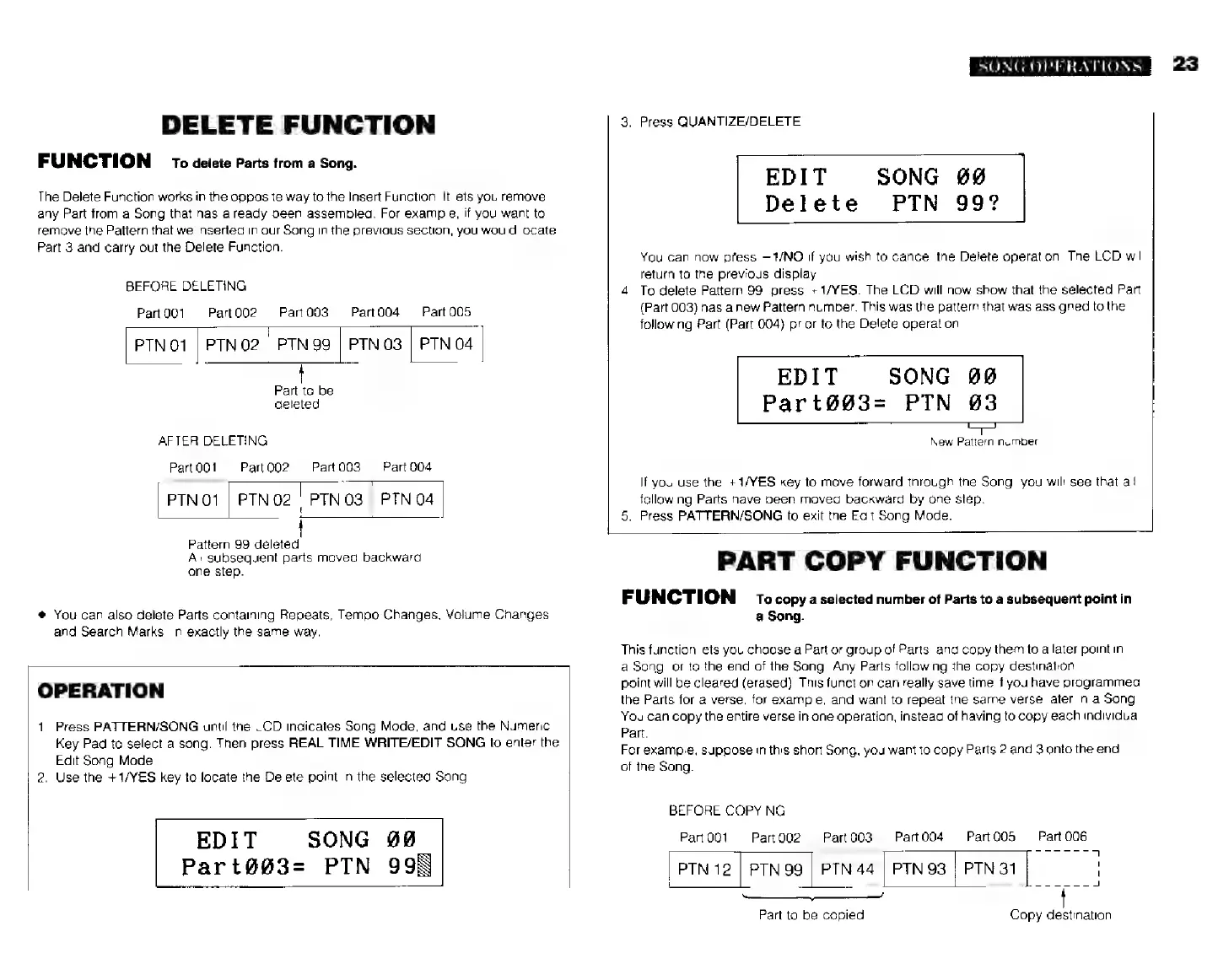
DELETE
FUNCTION
FUNCTION
то
deiete
Parts
trom
a
Song.
The
Delete
Function
works
in
the
opposite
way
to
the
Insert
Function.
It
lets
you
remove
any
Part
from
a
Song
that
has
already
been
assembled.
For
example,
if
you
want
to
remove
the
Pattern
that
we
inserted
in
our
Song
in
the
previous
section,
you
would
locate
Part
3
and
carry
out
the
Delete
Function.
BEFORE
DELETING
Part
001
Part002
Рап003
Part004
Part
005
РТМ01
|
РТМ
02
|
PTN
99
|
РТМ03
|
РТМ
04
Part
to
be
deleted.
AFTER
DELETING
Part
001
Part
002
PTN01
|
PTN02
|
PTN
03
|
PTN
04
|
Рай
003
Рап
004
Pattern
99
deleted.
All
subsequent
parts
moved
backward
one
step.
*
You
can
also
delete
Parts
containing
Repeats,
Tempo
Changes,
Volume
Changes
and
Search
Marks,
in
exactly
the
same
way.
OPERATION
1.
Press
PATTERN/SONG
until
the
LCD
indicates
Song
Mode,
and
use
the
Numeric
Key
Pad
to
select
a
song.
Then
press
REAL
TIME
WRITE/EDIT
SONG
to
enter
the
Edit
Song
Mode.
2.
Use
the
+1/YES
key
to
locate
the
Delete
point
in
the
selected
Song
EDIT
SONG
98
Part@@3=
РТМ
998
SONG
OPERATIONS
3.
Press
QUANTIZE/DELETE
SONG
#0
PTN
99?
EDIT
Delete
You
can
now
press
—1/МО
if
you
wish
to
cancel
the
Delete
operation.
The
LCD
will
return
to
the
previous
display.
4.
To
delete
Pattern
99,
press
+1/YES.
The
LCD
will
now
show
that
the
selected
Part
(Part
003)
has
a
new
Pattern
number.
This
was
the
pattern
that
was
assigned
to
the
following
Part
(Part
004)
prior
to
the
Delete
operation
EDIT
SONG
00
Part6903-
РТМ
63
New
Pattern
number
If
you
use
the
+1/YES
key
to
move
forward
through
the
Song,
you
will
see
that
ай
following
Parts
have
been
moved
backward
by
one
step.
5.
Press
PATTERN/SONG
to
exit
the
Edit
Song
Mode.
PART
COPY
FUNCTION
FUNCTION
то
copy
a
selected
number
of
Parts
to
a
subsequent
point
in
a
Song.
This
function
lets
you
choose
а
Part
or
group
of
Parts,
and
copy
them
to
a
later
point
in
a
Song,
or
to
the
end
of
the
Song.
Any
Parts
following
the
copy
destination
point
will
be
cleared
(erased).
This
function
can
really
save
time
if
you
have
programmed
the
Parts
for
a
verse,
for
example,
and
want
to
repeat
the
same
verse
later
in
a
Song.
You
can
copy
the
entire
verse
in
one
operation,
instead
of
having
to
copy
each
individual
Part.
For
example,
suppose
in
this
short
Song,
you
want
to
copy
Parts
2
and
3
onto
the
end
of
the
Song.
BEFORE
COPYING
Part
001
Part
006
PartQ02
Рай
003
Рай004
Рап005
РТМ
12
|
PTN
99
|
РТМ
44
|
РТМ
93
|
РТМ
31
|
|
iw
ee
Part
to
be
copied.
Copy
destination
23