EasyManua.ls Logo

Yamaha RX5 - Page 28

Yamaha RX5
81 pages
Print Icon
To Next Page IconTo Next Page
To Previous Page IconTo Previous Page
Loading...
24
SONG
OPERATIONS
AFTER
COPYING
Part
001
Part002
Раі
003
Рай
004
Part005
Раг006
Part007
РТМ
12
|
РТМ
99
|
PTN
44
|
PTN
93
|
РТМ
31
|
РТМ
99
|
РТМ
44
l
Los
|
і
V4
New
Parts
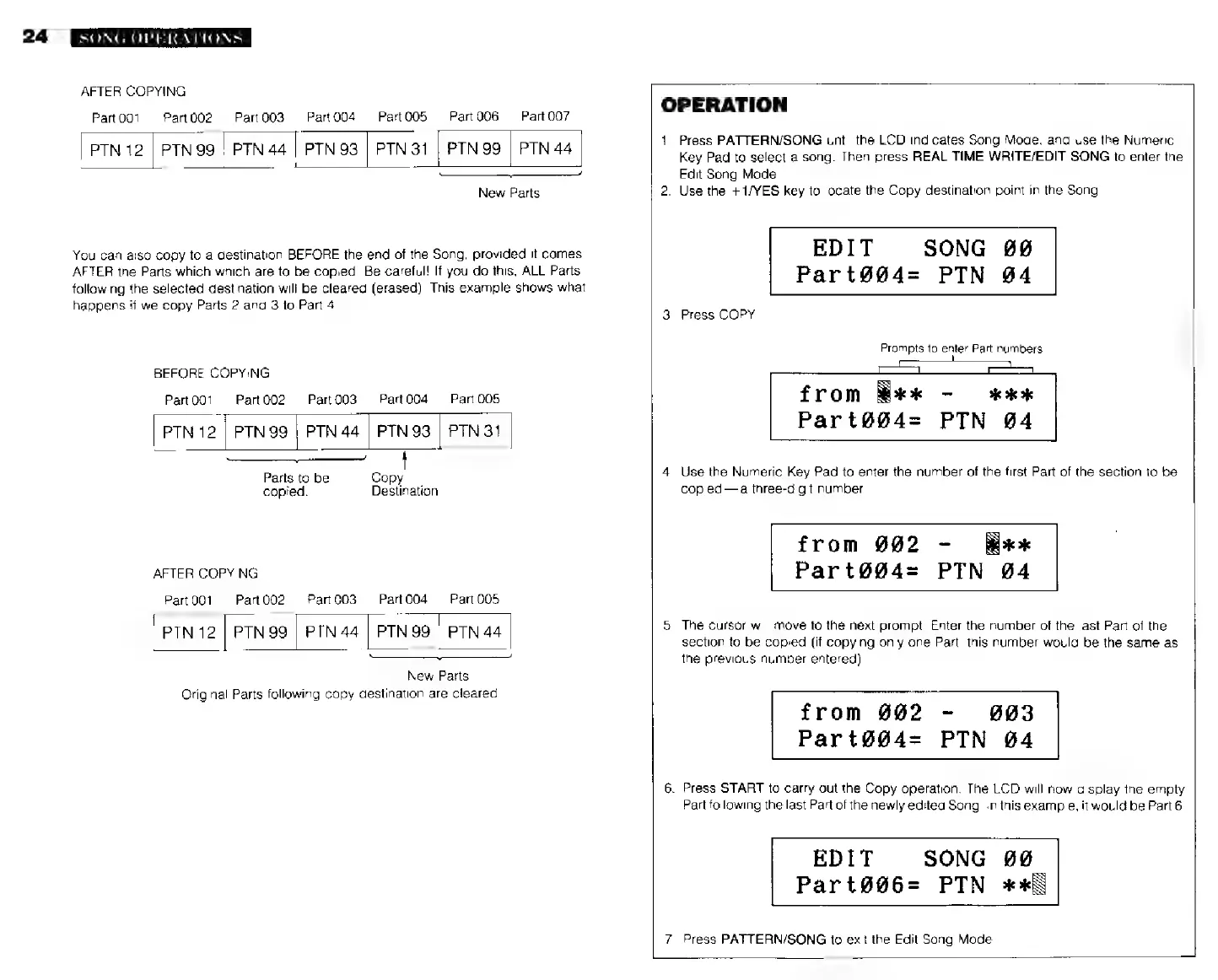
You
can
also
copy
to
a
destination
BEFORE
the
end
of
the
Song,
provided
it
comes
AFTER
the
Parts
which which
are
to
be
copied.
Be
careful!
If
you
do
this,
ALL
Parts
following
the
selected
destination
will
be
cleared
(erased).
This
example
shows
what
happens
її
we
copy
Parts
2
and
3
to
Part
4
BEFORE
COPYING
Рай
001
Part002
PartO03
Рай004
Рап
005
|
PTN
12
|
PTN
99
|
PTN
44
|
PTN
93
|
РТМ31
Parts
to
be
Copy
copied.
Destination
AFTER
COPYING
Part
001
Рап
003
Part004
Part
005
Рап
002
|
PTN
12
|
PTN
99
|
PTN
44
PTN
99
|
PTN
44
|
=
New
Parts
Original
Parts
following
copy
deslination
are
cleared.
OPERATION
1.
Press
PATTERN/SONG
until
the
LCD
indicates
Song
Mode,
and
use
the
Numeric
Key
Pad
to
select
a
song.
Then
press
REAL
TIME
WRITE/EDIT
SONG
to
enter
the
Edit
Song
Mode.
2.
Use
the
+
1/YES
key
to
locate
the
Copy
destination
point
in
the
Song
EDIT
SONG
00
Part@@4=
РТМ
04
3.
Press
COPY.
Prompts
to
enter
Part
numbers
from
Wk
~
жжж
Part@ü004=
РТМ
04
4.
Use
the
Numeric
Key
Pad
to
enter
the
number
of
the
first
Part
of
the
section
to
be
copied—a
three-digit
number.
from
902
-
жж
Part@@4=
PTN
04
5.
The
cursor
will
move
to
the
next
prompt.
Enter
the
number
of
the
last
Part
of
the
section
to
be
copied
(if
copying
only
one
Part,
this
number
would
be
the
same
as
the
previous
number
entered).
from
802
-
993
Part®@@4=
РТМ
04
6.
Press
START
to
carry
out
the
Copy
operation.
The
LCD
will
now
display
the
empty
Part
following
the
last
Part
of
the
newly
edited
Song.
In
this
example,
it
would
be
Part
6
EDIT
SONG
00
Part@@6=
РТМ
жж
7.
Press
PATTERN/SONG
to
exit
the
Edit
Song
Mode