EasyManua.ls Logo

Yamaha RX5 - Real Time Write

Yamaha RX5
81 pages
Print Icon
To Next Page IconTo Next Page
To Previous Page IconTo Previous Page
Loading...
REAL
TIME
WRITE
In
the
Real
Time
Write
mode,
the
Quantize
function
is
used
as
a
timing
correction
device.
If
the
Quantize
is
set
to
OFF,
your
Pattern
will
sound
exactly
as
you
play
it,
with
all
the
timing
subtleties
of
your
original
performance.
(Actually,
when
the
Quantize
is
OFF,
it
is
recording
your
performance
in
increments
of
1/96th
notes,
which
are
short
enough
to
capture
the
finest
nuances
of
timing).
However,
the
Quantize
function
can
be
used
to
make
the
writing
of
perfectly-timed
Patterns
easy
and
rapid.
For
example,
you
could
set
the
Quantize
Rate
at
1/4,
and
write
in
a
simpie
bass
drum
part.
Even
if
you
play
the
notes
off
the
beat,
you'll
hear
them
sound
exactly
on
the
beat
as
soon
as
the
Pattern
recycles.
Performance
`
--inaccurate
timing
B.D.
=
ee
A
®
_ a
~
Playback
—perfect
timing
You
could
then,
without
stopping
Real
Time
writing,
change
the
Quantize
rate
to
1/8
and
record
an
off-beat
Snare
Drum
part.
{аздау
Then
you
could
reset
to
1/16
Quantize
and
add
a
more
complex
Hi-Hat
part,
to
complete
the
following
basic
rhythm
Pattern.
In
this
example
the
first
Hi-Hat
note
is
open,
the
rest
are
closed,
S.D.
га,
A
f
f
|
You
could
even
turn
the
Quantize
OFF
and
add
ad-lib
Tom
or
Latin
percussion
sounds,
if,
for
example,
your
Pattern
were
to
be
used
as
an
intro
or
fill.
*—
Hi
Hat-Quantize
1/16
+
S.D.-Quantize
1/8
=
B.D.—Quantize
1/4
PATTERN
OPERATIONS
STEP
WRITE
In
the
Step
Write
mode,
the
Quantize
function
is
used
to
set
the
minimum
length
of
each
beat.
Although
your
Pattern
may
contain
a
complex
arrangement
of
rhythms,
you
can
save
Pattern
writing
time
by
writing
each
instrument
in
at
the
appropriate
Quantize
Rate,
in
a
similar
fashion
to
the
use
of
Quantize
for
Real
Time
writing.
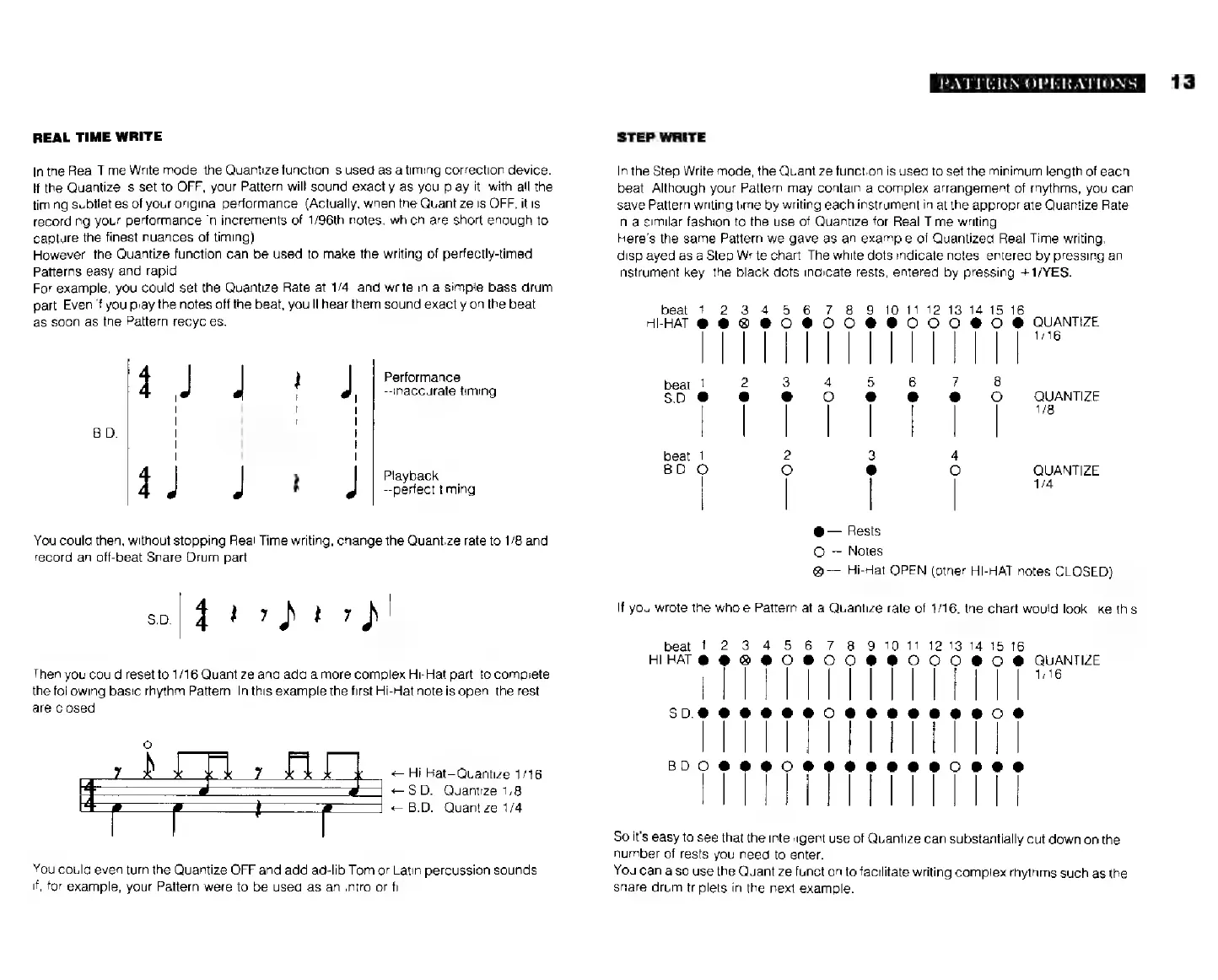
Here's
the
same
Pattern
we
gave
as an
example
of
Quantized
Real
Time
writing,
displayed
as
a
Step
Write
chart.
The
white
dots
indicate
notes,
entered
by
pressing
an
instrument
key;
the
black
dots
indicate
rests,
entered
by
pressing
+1/YES.
beat
1
2
34
5
6
7 8 9
10
11
12
13
14 15
16
TTT
TTT
beat
2
3
4
5
6
7
8
5.0.
e
|
|
|
| :
°
|
QUANTIZE
beat
2
3
4
BD.
о
o e
О
QUANTIZE
|
1/4
@—
Rests
О--
Notes
®
Hi-Hat
OPEN
(other
HI-HAT
notes
CLOSED)
If
you
wrote
the
whole
Pattern
at
a
Quantize
rate
of
1/16,
the
chart
would
look
like
this.
10
11
12 13 14
15
o
6
QUANTIZE
1/16
ШИН
ЕНІН!
ӨНІП
So
it's
easy
to
see
that
the
intelligent
use
of
Quantize
can
substantially
cut
down
on
the
number
of
rests
you
need
to
enter.
You
can
also
use
the
Quantize
function
to
facilitate
writing
complex
rhythms
such
as
the
snare
drum
triplets
in
the
next
example.
13