EasyManua.ls Logo

Yamaha RX5 - Job #05: Initialize Note

Yamaha RX5
81 pages
Print Icon
To Next Page IconTo Next Page
To Previous Page IconTo Previous Page
Loading...
64
MIDI
MODE
OPERATION
1.
Press
MIDI
and
select
Job
#04.
The
LCD
will
show
the
last
function
that
was
selected
in
this
Job.
2.
Press
"1"
to
select
the
“VOICE”
function
(corresponding
to
the
Note
Number
Mode)
or
"2"
to
select
the
"PITCH"
function
(corresponding
to
the
Tunable
Note
Mode).
VOICE
FUNCTION
Notez
Asgn:VOICE
Int-BD
1
B-A
1
Voice
Note
1.
Use
the
DATA
ENTRY
slider
or
the
—1/NO
and
+1/YES
keys
Io
select
the
voice.
2.
Press
ACCENT
2
to
move
the
cursor
to
the
Note
Number
position.
Use
the
DATA
ENTRY
slider
or
the
-1/МО
and
+1/YES
keys
to
set
the
Note
Number.
Range:
C-2
Q8.
You
can
now
use
ACCENT
2
to
move
the
cursor
back
to
the
voice
name,
and
select
another
voice
to
have
its
Note
Number
set.
PITCH
FUNCTION
Note#
Asgn:PITCH
ch@1N=Int-BD
1
[um
МО!
Receive
Channel
Voice
1.
Use
the
DATA
ENTRY
slider
or
the
—1/NO
and
+1/YES
keys
to
select
the
MIDI
Receive
Channel.
Range:
1
16.
2.
Press
ACCENT
2
to
move
the
cursor
to
the
Voice
position.
Use
the
DATA
ENTRY
slider
or
the
—1/NO
and
+1/YES
keys
to
select
a
voice.
You
can
now
use
ACCENT
2
to
move
the
cursor
back
to
the
MIDI
Receive
Channel,
and
select
another
channel
to
which
a
voice
can
be
assigned.
NOTE:
When
you
assign
a
voice
to
a
MIDI
Receive
Channel,
the
channel
MUST
be
turned
ON
(refer
to
Job
#02).
If
it
is
turned
OFF,
you
will
see
the
following
display
when
you
1гу
to
assign
a
voice
in
this
Job.
Example:
MIDI
Receive
Channel
1.
Note#
Asgn:
PITCH
ch
9
1E]
=жжжжжжжжжж
In
this
case,
you
cannot
assign
a
voice.
Use
JOB
#02
to
turn
the
selected
MIDI
Receive
Channel
ON,
then
return
to
this
Job
and
assign
a
voice
to
the
selected
MIDI
Receive
Channel
JOB
#05:
INITIALIZE
NOTE
FUNCTION
то
return
the
MIDI
Note
Numbers
of
all
voices
to
their
default
settings.
This
function
allows
you
to
instantly
return
the
MIDI
Note
numbers
of
all
64
voices
of
the
RX5
to
their
initial
(default)
values.
16
of
the
voices
(and
their
Note
Nembers)
correspond
to
the
voices
of
the
RX11
Digital
Rhythm
Programmer,
so
this
is
a
rapid
method
of
setting
the
RX5
so
that
it
could
control
an
RX11,
or
vice-versa.
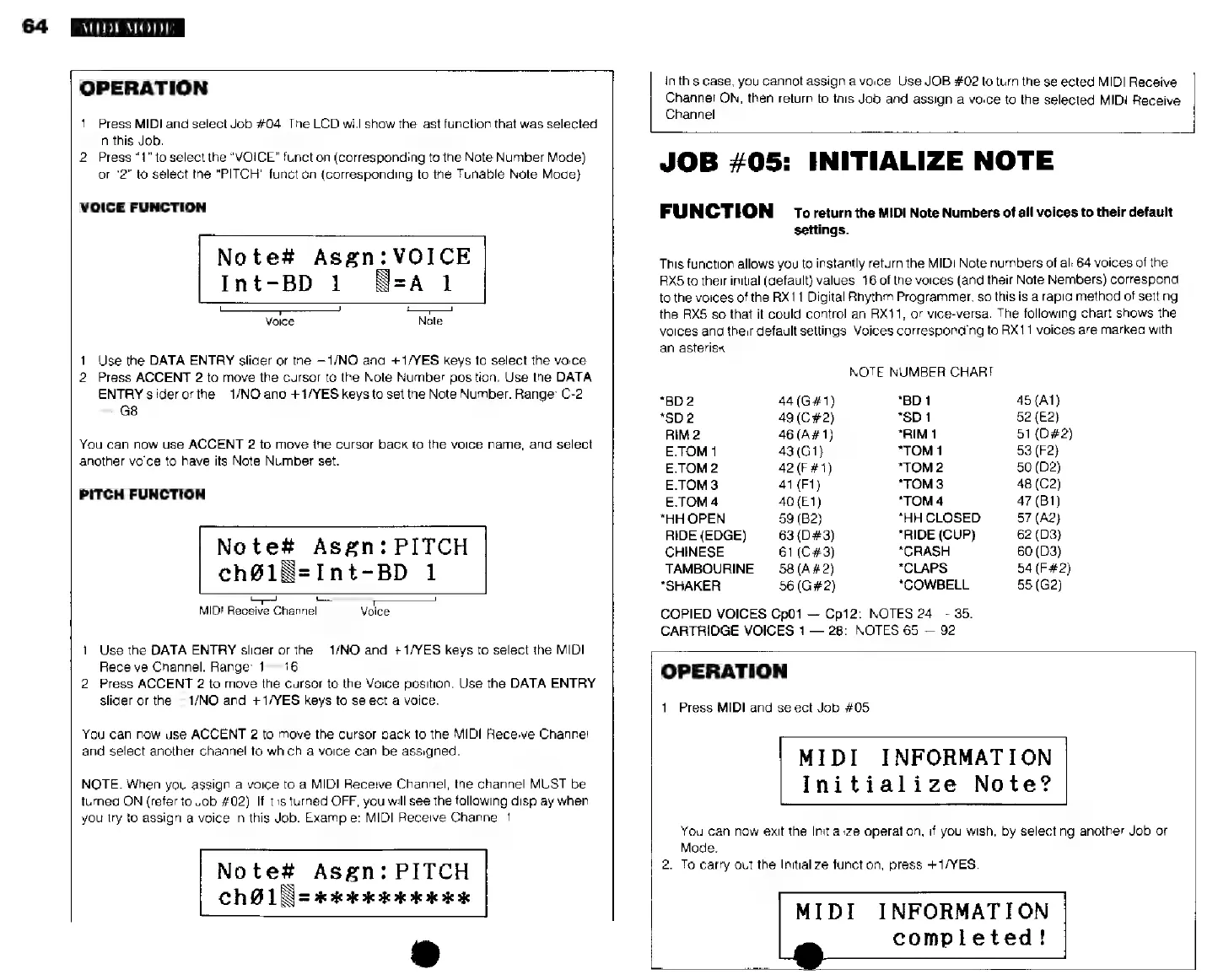
The
following
chart
shows
the
voices
and
their
default
settings.
Voices
corresponding
to
RX11
voices
are
marked
with
an
asterisk.
NOTE
NUMBER
CHART
*BD2
44
(G#1)
"BD
1
45
(A1)
*502
49(С#2)
*SD1
52
(E2)
RIM2
46(A#1)
*RIM1
51(D#2)
E.TOM1
43(G1)
*TOM1
53
(F2)
E.TOM2
42
(F#1)
“ТОМ?
50
(D2)
E.TOM3
41
(Ft)
"TOMS
48
(C2)
E.TOM4
40(Е1)
*TOM4
47
(B1)
*HH
OPEN
59
(B2)
*HH
CLOSED
57
(A2)
RIDE(EDGE)
|
63(D£3)
*RIDE
(CUP)
62
(D3)
CHINESE
61
(C#3)
*CRASH
80
(D3)
TAMBOURINE
58
(A#2)
*CLAPS
54
(F#2)
“SHAKER
56
(G#2)
*COWBELL
55
(G2)
COPIED
VOICES
Cp01
Ср12:
NOTES
24
35.
CARTRIDGE
VOICES
1
28:
NOTES
65
92.
OPERATION
1,
Press
MIDI
and
select
Job
#05.
MIDI
INFORMATION
Initialize
Note?
You
can
now
exit
the
Initialize
operation.
if
you
wish,
by
selecting
another
Job
or
Mode.
2.
To
carry
out
the
Initialize
function,
press
+1/YES.
MIDI
INFORMATION
completed!