EasyManua.ls Logo

Yamaha RX5 - Operation

Yamaha RX5
81 pages
Print Icon
To Next Page IconTo Next Page
To Previous Page IconTo Previous Page
Loading...
THE
INSTRUMENTS
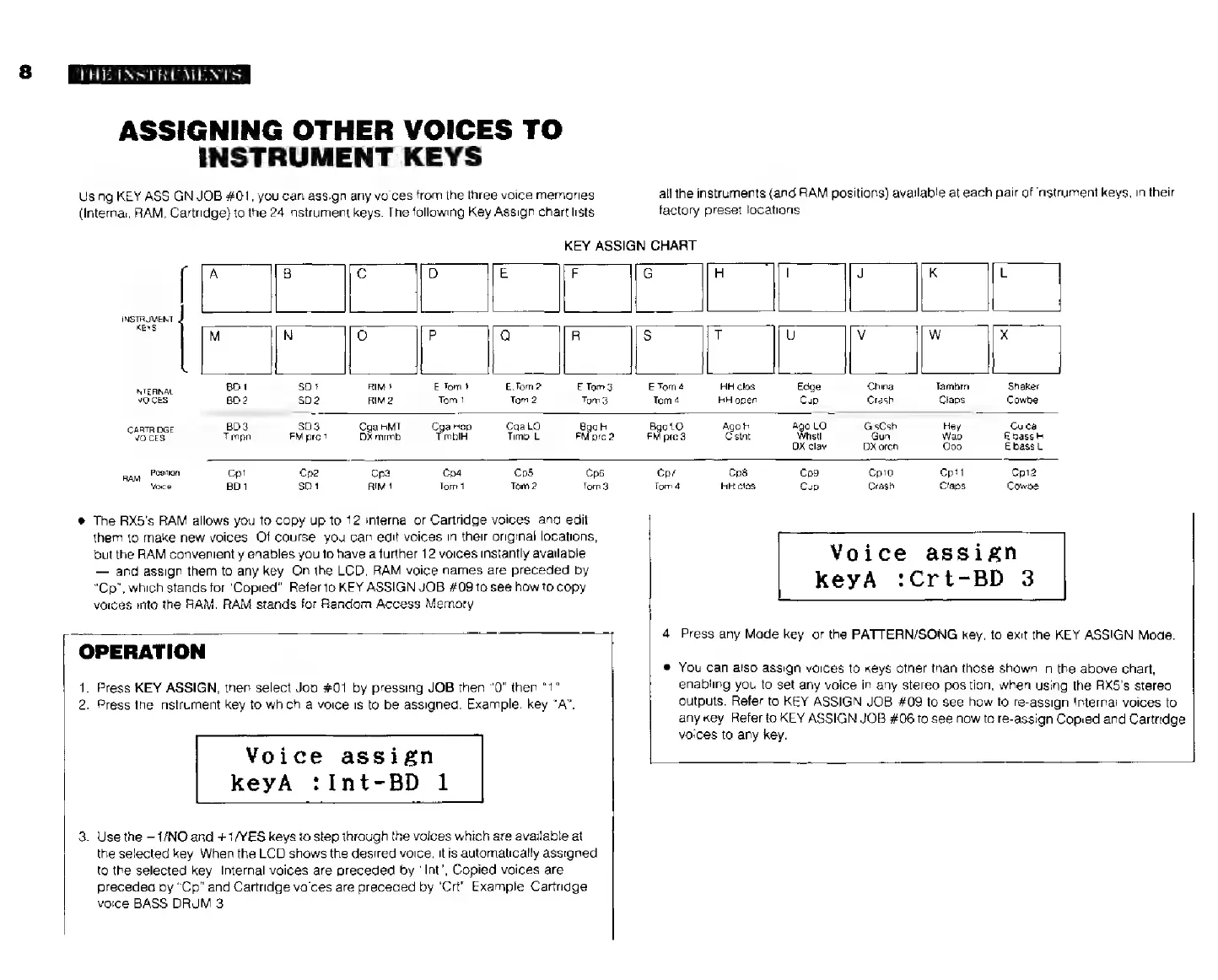
Using
KEY
ASSIGN
JOB
#01,
you
can
assign
any
voices
ASSIGNING
OTHER
VOICES
TO
INSTRUMENT
KEYS
rom
the
three
voice
memories
(Internal,
RAM,
Cartridge)
to
the
24
instrument
keys.
The
following
Key
Assign
chart
lists
all
the
instruments
(and
RAM
positions)
available
at
each
pair
of
instrument
keys,
in
their
factory
preset
locations.
KEY
ASSIGN
CHART
71
71
Te
1
[
A
B
C D
E
i
G
|
J
K
L
INSTRUMENT
KEYS
M
l
о
Р
|
Q
В
|
5
|
|
0
V
|
W
x
|
INTERNAL
BD
1
50
1
RIM
f
E
Tomt
E.Tom
2
E
Tom
3
Е
Тот
4
HH
clos
Edge
China
Tambrn
Shaker
WOICES:
BD
2
502
RIM
2
Tom
1
Tom
2
Tom3
Tom
4
HH
open
Cup
Crash
Claps
Cowbel
CARTRIDGE.
BD3
803
Cga
HMT
Cga
Hep
Cga
LO
Bga
HI
Bgo
LO
Ago
HI
Ago
LO
GisCsh
Hey
Cuica
VOICES:
Timpn
FM
pre
1
DX
mrmb
TimbIH
Timbl
L
FM
prc2
FM
prc
3
Селі
Whstl
Gun
Wao
Е
bass
H
DX
сам
DX
orch
Ооо
E
bass
L
Raw
Position
Ср1
Cp2
Cp3
Cp4
Срв
Cp6
Ср?
Срё
Cp9
Сріо
Cp11
Cp12
Voice:
BD1
SD1
RIM
1
Tom
1
Tom
2
Tom3
Тот
4
HH
cios
Cup
Crash
Claps
Cowbel
*
The
RX5's
RAM
allows
you
to
copy
up
to
12
internal
or
Cartridge
voices,
and
edit
them
to
make
new
voices.
Of
course,
you
сап
edit
voices
in
their
original
locations,
but
the
RAM
conveniently
enables
you
to
have
a
lurther
12
voices
instantly
available
and
assign
them
to
any
key.
On
the
LCD,
RAM
voice
names
are
preceded
by
“Ср”,
which
stands
for
"Copied".
Refer
10
KEY
ASSIGN
JOB
#09
to
see
how
to
copy
voices
into
the
НАМ.
RAM
stands
for
Random
Access
Memory.
|
OPERATION
1.
2.
Press
the
instrument
key
to
which
a
voice
is
to
be
assigned.
Example:
key
“A”.
3.
Use
the
—1/NO
and
+
1/YES
keys
to
step
through
the
voices
which
are
available
at
Press
KEY
ASSIGN,
then
select
Job
#01
by
pressing
JOB
then
"0"
then
"1".
Voice
assign
КеуА
:Int-BD
1
the
selected
кеу.
When
the
LCD
shows
the
desired
voice,
it
is
automatically
assigned
to
the
selected
key.
Internal
voices
are
preceded
by
"Int",
Copied
voices
are
preceded
by
"Ср"
and
Cartridge
vaices
are
preceded
by
"Crt"
Example:
Cartridge
voice
BASS
DRUM
3.
Voice
assign
КеуА
:Crt-BD
3
4.
Press
any
Made
key,
or
the
PATTERN/SONG
key,
to
exit
the
KEY
ASSIGN
Mode.
*
You
can
also
assign
voices
to
keys
other
than
those
shown
in
the
above
chart,
enabling
you
to
set
any
voice
in
any
stereo
position,
when
using
the
RX5's
stereo
outputs.
Refer
to
KEY
ASSIGN
JOB
#09
to
see
how
to
re-assign
Internal
voices
to
any
key.
Refer
to
KEY
ASSIGN
JOB
#06
to
see
how
to
re-assign
Copied
and
Cartridge
voices
to
any
key.