EasyManua.ls Logo

Yamaha RX5 - Page 29

Yamaha RX5
81 pages
Print Icon
To Next Page IconTo Next Page
To Previous Page IconTo Previous Page
Loading...
REPEATS
FUNCTION
то
емег
repeat
commands
іп
а
Song.
Repeats
can
save
a
lot
of
editing
time,
by
making
it
possible
to
repeat
any
Part
or
group
of
Parts
up
to
98
times.
This
is
needed,
for
example,
when
the
sarne
rhythm
plays
through
an
entire
verse.
Repeats
are
entered
in
two
operations.
The
Begin
repeat
command
is
entered
at
the
start
of
the
section
which
is
to
be
repeated.
Then
the
End
Repeat
is
entered
at
the
end
of
the
section
to
be
repeated,
together
with
a
number
indicating
the
number
of
times
that
the
section
is
to
be
repeated.
Remember
that
the
number
of
repeats
should
be
ONE
LESS
than
the
total
number
of
plays
of
the
selected
section.
Each
repeat
command
counts
as
a
Part.
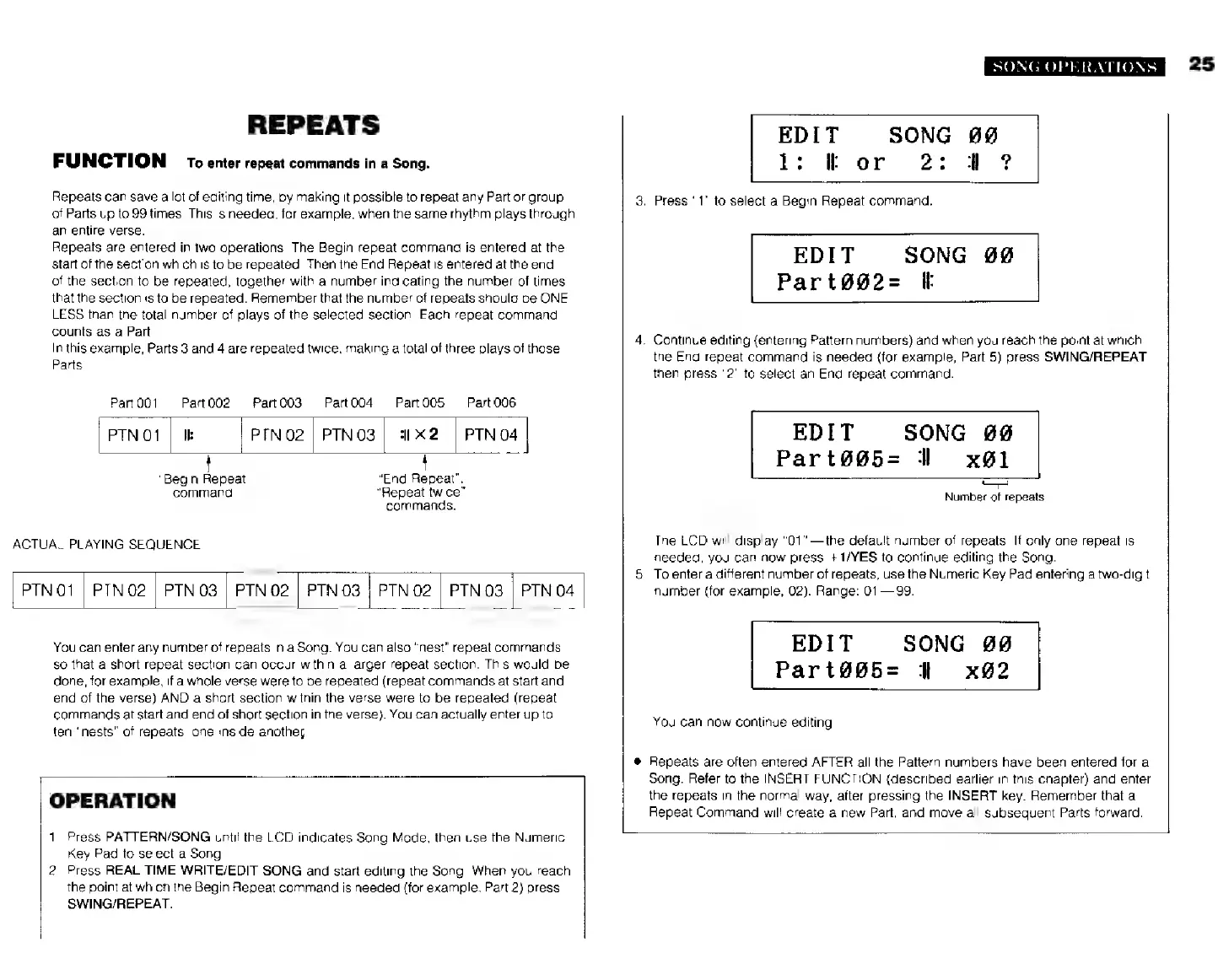
In
this
example,
Parts
3
and
4
are
repeated
twice,
making
a
total
of
three
plays
of
those
Parts.
Рай
001
Рат002
Part003
Part004
Part005
Part006
PTNO1
|
Ik
РТМ02
|
PINO3
|
1х2
|
PTNO4
|
“Begin
Repeat”
“End
Repeat",
command.
“Repeat
twice”
commands.
ACTUAL
PLAYING
SEQUENCE
|
РТМ
01
|
РТМ
02
|
PTN
G3
|
PTN
02
|
PTN
03
|
PTN
02
|
PTN
03
|
PTN
04
You
can
enter
any
number
of
repeats
in
a
Song.
You
can
also
“nest”
repeat
commands,
so
that
a
short
repeat
section
can
occur
within
a
larger
repeat
section.
This
would
be
done,
for
example,
if
a
whole
verse
were
to
be
repeated
(repeat
commands
at
start
and
end
of
the
verse)
AND
a
shart
section
within
the
verse
were
to
be
repeated
(repeat
commands
at
start
and end
of
short
section
in
the
verse).
You
can
actually
enter
up
to
ten
“nests”
of
repeats,
one
inside
another.
OPERATION
1.
Press
PATTERN/SONG
until
the
LCD
indicates
Song
Mode,
then
use
the
Numeric
Key
Pad
to
select
a
Song.
the
point
at
which
the
Begin
Repeat
command
is
needed
(for
example,
Part
2)
press
SWING/REPEAT.
SONG
OPERATIONS
EDIT
1:
H
or
SONG
89
3.
Press
"1"
to
select
a
Begin
Repeat
command.
SONG
90
Раг%йй2-
E
EDIT
4.
Continue
editing
(entering
Pattern
numbers)
and
when
you
reach
the
point
at
which
the
End
repeat
command
is
needed
{for
example,
Part
5)
press
SWING/REPEAT
then
press
"2"
to
select
an
End
repeat
command.
EDIT SONG
й@
Part@@5=
1
x91
Number
of
repeats
The
LCD
will
display
"01"
—the
default
number
of
repeats.
If
only
one
repeat
is
needed,
you
can
now
press
+1/YES
to
continue
editing
the
Song.
5.
Toenter
a
different
number
of
repeats,
use
the
Numeric
Key
Pad
entering
a
two-digit
number
(for
example,
02).
Range:
01—99.
EDIT
SONG
Part#@5=
1
x92
You
can
now
continue
editing
*
Repeats
are
often
entered
AFTER
all
the
Pattern
numbers
have been
entered
for
a
Song.
Refer
to
the
INSERT
FUNCTION
(described
earlier
in
this
chapter)
and
enter
the
repeats
in
the
normal
way,
after
pressing
the
INSERT
key.
Remember
that
a
Repeat
Command
will
create
a
new
Part,
and
move
all
subsequent
Parts
forward.
2.
Press
REAL
TIME
WRITE/EDIT
SONG
and
start
editing
the
Song.
When
you
reach
25