EasyManua.ls Logo

Yamaha RX5 - Page 19

Yamaha RX5
81 pages
Print Icon
To Next Page IconTo Next Page
To Previous Page IconTo Previous Page
Loading...
CLICK
FUNCTION
FUNCTION
то
provide
a
metronome-type
click
during
Pattern
play
or
write.
The
Click
function
gives
you
an
exact
rhythm
guide,
for
writing
a
Pattern
in
Real
Time
or
for
play.
It
is
heard
via
headphones
or
via
a
separate
Click
Output
jack
which
can
be
connected
to
your
mixer
or
amplifier.
The
Click
can
be
set
to
sound
once
every
1/2,
1/4, 1/6, 1/8,
1/12,
1/16,
1/24
or
1/32
note.
The
pitch
of
the
Click
is
higher
on
the
first
beat
of
each
bar.
The
Click
rate
can
be
set
before
or
during
any
Pattern
operations.
NOTE:
After
setting
the
Click
function
you
must
then
press
the
key
corresponding
to
the
function
the
RX5
was
using
prior
to
pressing
CLICK,
should
you
wish
to
return
to
that
function.
For
example,
if
you
were
writing
in
Real
Time,
press
REAL
TIME
WRITE
after
setting
the
Click
function,
so
that
you
can
continue
writing.
OPERATION
1.
Press
CLICK.
The
LCD
will
show
the
current
Click
Rate.
Example:
Pattern
select
Mode.
SELECT
РТМ
00
w
OFF:CLICK=
1/
8E
2.
Use
the
Numeric
Key
Pad
to
set
the
Click
Rate
3.
The
Click
always
functions
during
Real
Time
writing.
To
turn
the
Click
off
or
on
for
Pattern
Play,
press
—1/NO
(OFF)
or
+1/YES
(ON).
Example:
Click
ON;
1/4
note
SELECT
PTN
00
w
ON
:CLICK=
1/
48
4.
The
level
of
the
Click
is
adjusted
using
the
CLICK
VOLUME
slider.
SWING
FUNCTION
FUNCTION
то
automatically
add
a
swing
feei
to
a
Pattern
written
in
Real
Time.
The
Swing
function
offers
a
simple
and
rapid
way
to
write
a
Pattern
that
contains
a
jazz-type
swing
feel.
It
can
ONLY
be
used
with
a
Quantize
rate
of
1/8
or
1/16.
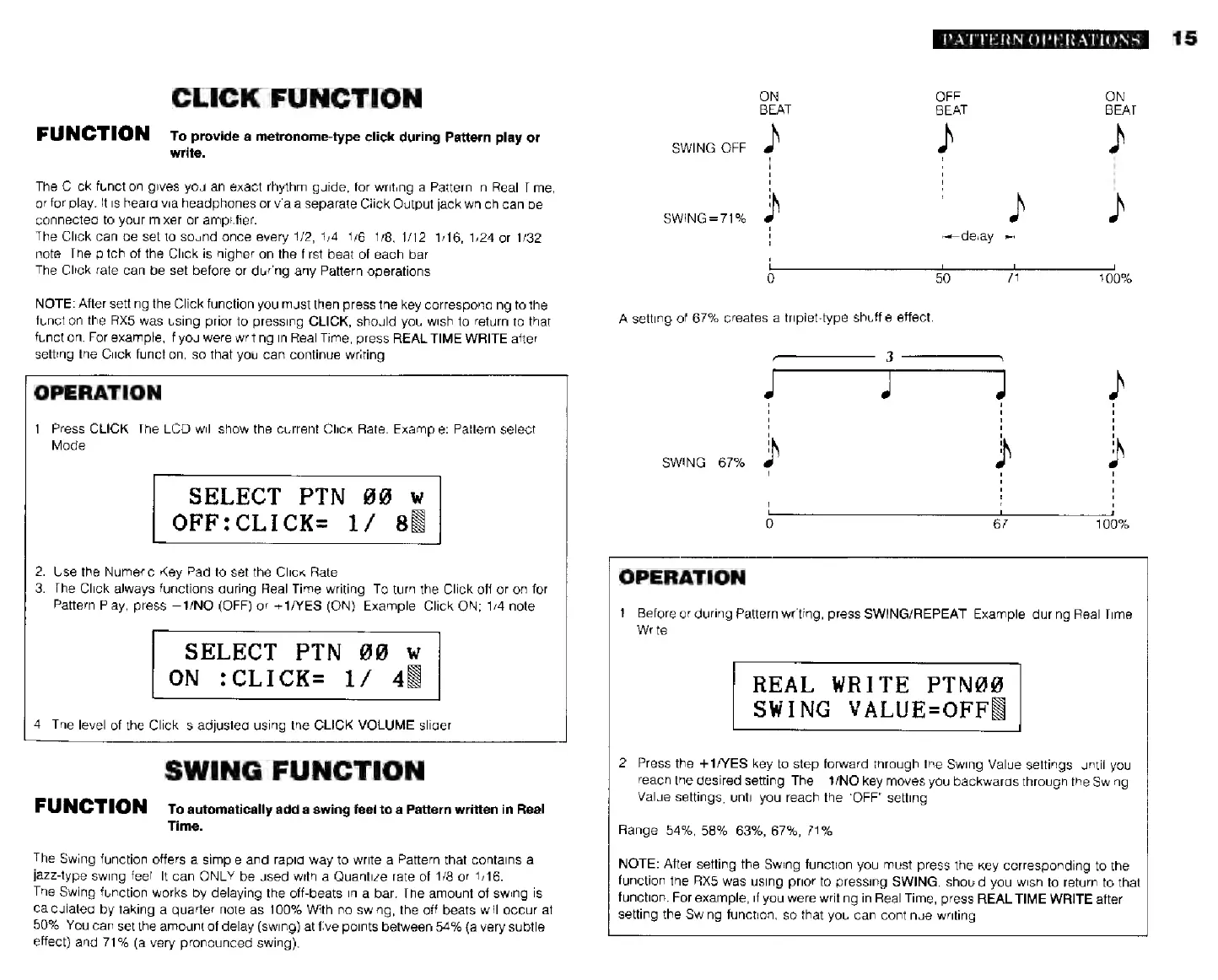
The
Swing
function
works
by
delaying
the
off-beats
in
a
bar.
The
amount
of
swing
is
calculated
by
taking
a
quarter-note
as
10096
With
no
swing,
the
off-beats
will
occur
al
50%.
You
can
set
the
amount
of
delay
(swing)
at
five
points
between
54%
(a
very
subtle
effect)
and
7196
(a
very
pronounced
swing).
PATTERN
OPERATIONS
ON
OFF
ON
BEAT
BEAT
BEAT
SWING:
OFF
2
2
2
|
|
}
SWING=71%
4
І
i
L
0
г]
1
}
SWING=67%
А
ith
ae
a.
T
i
р
'
'
'
0
6?
100%
OPERATION
1.
Before
or
during
Pattern
writing,
press
SWING/REPEAT.
Example:
during
Real
Time
Write.
REAL
WRITE
PTN@S
SWING
VALUE-OFFB
2.
Press
the
+1/YES
key
to
step
forward
through
the
Swing
Value
settings,
until
you
reach
the
desired
setting.
The
1/NO
key
moves
you
backwards
through
the
Swing
Value
settings,
until
you
reach
the
"OFF"
setting.
Range:
54%,
58%,
63%,
6796,
7196.
NOTE:
After
setting
the
Swing
function
you
must
press
the
key
corresponding
to
the
function
the
АХ5
was
using
prior
to
pressing
SWING,
should
you
wish
to
return
to
that
function.
For
example,
if
you
were
writing
in
Real
Time,
press
REAL
TIME
WRITE
after
setting
the
Swing
function,
so
that
you
can
continue
writing.
15