EasyManua.ls Logo

Yamaha RX5 - Page 20

Yamaha RX5
81 pages
Print Icon
To Next Page IconTo Next Page
To Previous Page IconTo Previous Page
Loading...
16
PATTERN
OPERATIONS
PATTERN
COPY/APPEND
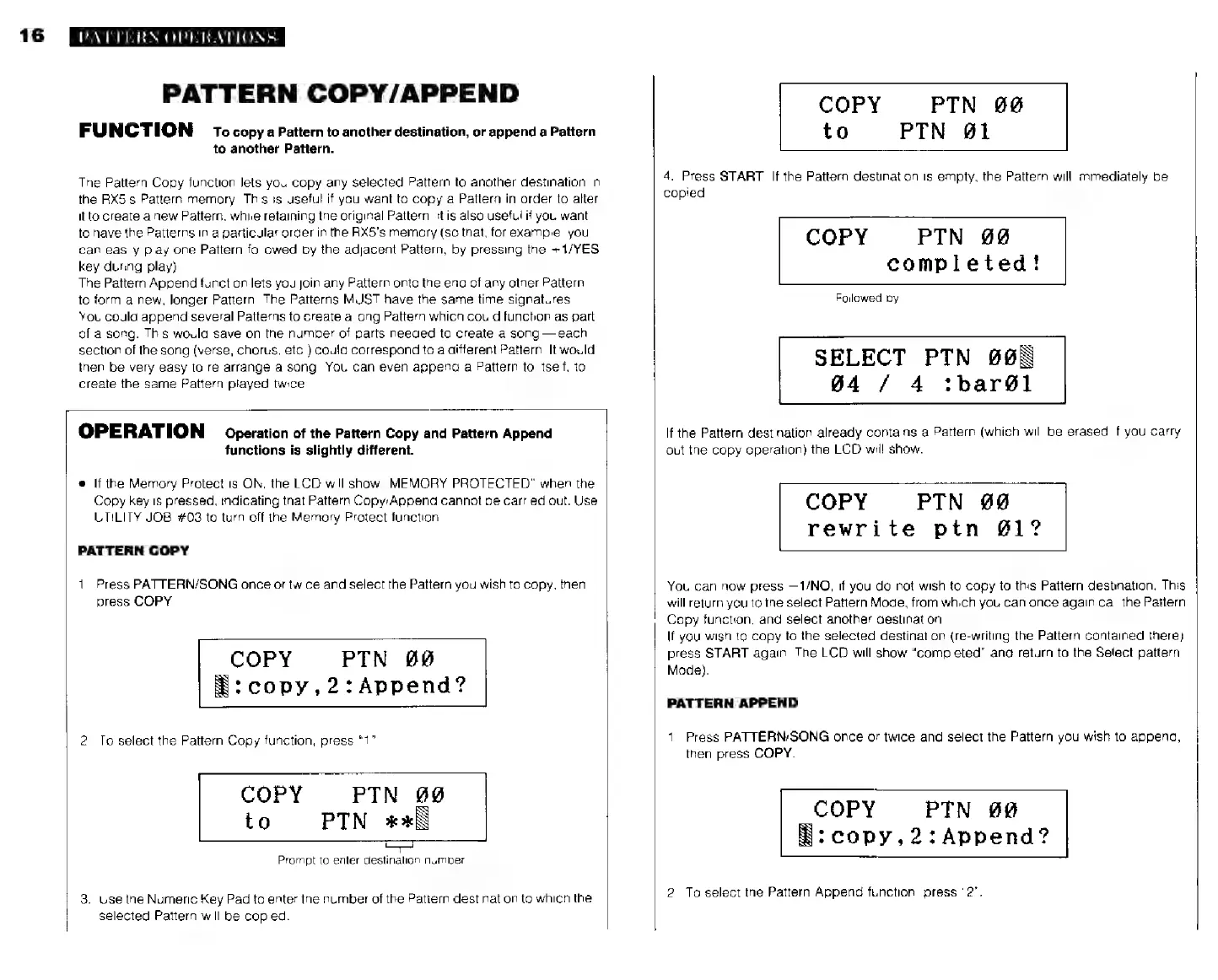
FUNCTION
то
copy
a
Pattern
to
another
destination,
or
append
a
Pattern
to
another
Pattern.
The
Pattern
Copy
function
lets
you
copy
any
selected
Pattern
to
another
destination
in
the
RX5's
Pattern
memory.
This
is
useful
if
you
want
to
copy
a
Pattern
in
order
to
alter
it
to
create
a
new
Pattern,
while
retaining
the
original
Pattern.
It
is
also
useful
if
you
want
to
have
the
Patterns
in
a
particular
order
in
the
RX5's
memory
(so
that,
for
example,
you
can
easily
play
one
Pattern
followed
by
the
adjacent
Pattern,
by
pressing
the
+1/YES
key
during
play).
The
Pattern
Append
function
lets
you
join
any
Pattern
onto
the
end
of
any
other
Pattern,
to
form
a
new,
longer
Pattern.
The
Patterns
MUST
have
the
same
time
signatures.
You
could
append
several
Patterns
to
create
a
long
Pattern
which
could
function
as
part
of
a
song.
This
would
save
on
the
number
of
parts
needed
to
create
a
song
each
section
of
the
song
(verse,
chorus,
etc.)
could
correspond
to
a
different
Pattern.
It
would
then
be
very
easy
to
re-arrange
a
song.
You
can
even
append
a
Pattern
to
itself,
to
create
the
same
Pattern
played
twice
OPERATION
Operation
of
the
Pattern
Copy
and
Pattern
Append
functions
is
slightly
different.
e
If
the
Memory
Protect
is
ON,
the
LCD
will
show
"MEMORY
PROTECTED"
when
the
Copy
key
is
pressed,
indicating
that
Pattern
Copy/Append
cannot
be
carried
out.
Use
UTILITY
JOB
#03
to
turn
off
the
Memory
Protect
function
PATTERN
COPY
1.
Press
PATTERN/SONG
once
or
twice
and
select
the
Pattern
you
wish
to
copy,
then
press
COPY
COPY
РТМ
#0
$:
сору,
2:
Аррепа?
2.
То
select
the
Pattern
Copy
function,
press
“1”
COPY
РТМ
00
to
РТМ
ж
Prompt
to
enter
destination
number
3.
Use
the
Numeric
Key
Pad
to
enter
the
number
of
the
Pattern
destination
to
which
the
selecied
Pattern
will
be
copied.
COPY
PTN
00
to
РТМ
#1
4.
Press
START.
If
the
Pattern
destination
is
empty,
the
Pattern
will
immediately
be
copied
COPY
PTN
@@
completed!
Followed
by
SELECT
РТМ
8698
94
/
4
:Ъагб1
If
the
Pattern
destination
already
contains
a
Pattern
(which
will
be
erased
if
you
carry
out
the
copy
operation)
the
LCD
will
show.
COPY
РТМ
09
rewrite
рїп
01°
You
can
now
press
—1/NO,
if
you
do
not
wish
to
copy
to
this
Pattern
destination.
This
will
return
you
to
the
select
Pattern
Mode,
from
which
you
can
once
again
call
the
Pattern
Copy
function,
and
select
another
destination.
If
you
wish
to
copy
to
the
selected
destination
(re-writing
the
Pattern
contained
there)
press
START
again.
The
LCD
will
show
“completed”
and
return
ta
the
Select
pattern
Mode).
PATTERN
APPEND
1.
Press
PATTERN/SONG
once
or
twice
and
select
the
Pattern
you
wish
to
append,
then
press
COPY.
COPY
РТМ
89
Ñ:
сору,
2
:
Аррепа?
2.
To
select
the
Pattern
Append
function,
press
"2".