EasyManua.ls Logo

Yamaha RX5 - Page 73

Yamaha RX5
81 pages
Print Icon
To Next Page IconTo Next Page
To Previous Page IconTo Previous Page
Loading...
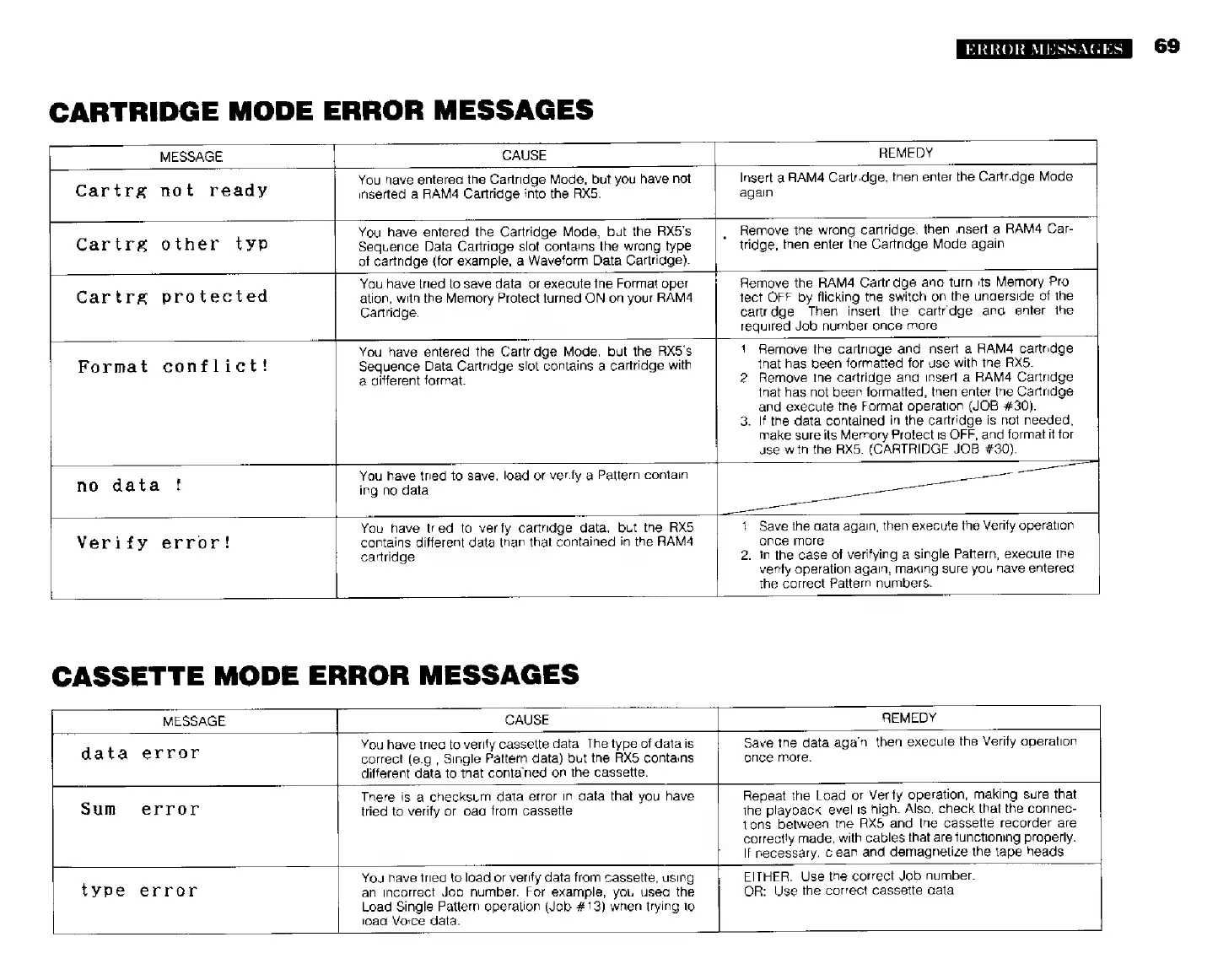
CARTRIDGE
MODE
ERROR
MESSAGES
MESSAGE
CAUSE
Cartrg
not
ready
REMEDY
You
have
entered
the
Cartridge
Mode,
but
you
have
not
inserted
а
RAM4
Cartridge
into
the
RX5.
Cartrg
other
typ
Cartrg
protected
You
have
entered
the
Cartridge
Mode,
but the
RX5's
Sequence
Data
Cartridge
slot
contains
the
wrong
type
of
cartridge
(for
example,
a
Waveform
Data
Cartridge).
Insert
a
RAMA
Cartridge,
then
enter
the
Cartridge
Mode
again.
Remove
the
wrong
cartridge,
then
insert
a
RAM4
Car-
tridge,
then
enter
the
Cartridge
Mode
again.
You
have
tried
to
save
data,
or
execute
the
Format
oper-
ation,
with
the
Memory
Protect
turned
ON
on
your
RAM4
Cartridge.
Remove
the
RAM4
Cartridge
and
turn
its
Memory
Pro-
tect
OFF
by
flicking
the
switch
on
the
underside
of
the
cartridge.
Then
insert
the
cartridge
and
enter
the
required
Job
number
once
more.
Format
conflict!
no
data
!
You
have
entered
the
Cartridge
Mode,
but
the
RX5's
Sequence
Data
Cartridge
slot
contains
a
cartridge
with
a
different
format.
1
2
Remove
the
cartridge
and
insert
a
RAM4
cartridge
that
has
been
formatted
for
use
with
the
RX5.
Remove
the
cartridge
and
insert
a
RAM4
Cartridge
that
has
not
been
formatted,
then
enter
the
Cartridge
and
execute
the
Format
operation
(JOB
#30).
the
data
contained
in
the
cartridge
is
not
needed,
make
sure
its
Memory
Protect
is
OFF,
and
format
it
for
use
with
the
RX5.
(CARTRIDGE
JOB
#30).
You
have
tried
to
save,
load
or
verify
a
Pattern
contain-
ing
no
data.
Verify
error!
You
have
tried
to
verify
cartridge
data,
but
the
RX5
contains
different
data
than
that
contained
in
the
RAM4
cartridge.
.
Save
the
data
again,
then
execute
the
Verify
operation
once
more.
in
the
case
of
verifying
a
single
Pattern,
execute
the
verify
operation
again,
making
sure
you
have
entered
the
correct
Pattern
numbers.
CASSETTE
MODE
ERROR
MESSAGES
MESSAGE
|
CAUSE
REMEDY
data
error
You
have
tried
to
verify
cassette
data.
The
type
of
data
is
correct
(e.g.,
Single
Pattern
data)
but
the
RX5
contains
different
data
to
that
contained
on
the
cassette.
Save
the
data
again,
then
execute
the
Verify
operation
once
more.
ERROR
MESSAGES
There
is
a
checksum
data
error
in
data
that
you
have
tried
to
verify
or
load
from
cassette
Repeat
the
Load
or
Verify
operation,
making
sure
that
ihe
playback
level
is
high.
Also,
check
that
the
connec-
tions
between
the
RX5
and
the
cassette
recorder
are
correctly
made,
with
cables
that
are
functioning
properly.
If
necessary,
clean
and
demagnetize
the
tape
heads.
EITHER:
Use
the
correct
Job
number.
OR:
Use
the
correct
cassette
dala.
Sum
error
You
have
tried
to
load
or
verify
data from
cassette,
using
an
incorrect
Job
number.
For
example,
you
used
the
Load
Single
Pattern
operation
(Job
#13)
when
trying
1o
load
Voice
data.
tvpe
error