EasyManua.ls Logo

Yamaha RX5 - Page 61

Yamaha RX5
81 pages
Print Icon
To Next Page IconTo Next Page
To Previous Page IconTo Previous Page
Loading...
ТАРЕ
SYNC
APPLICATIONS
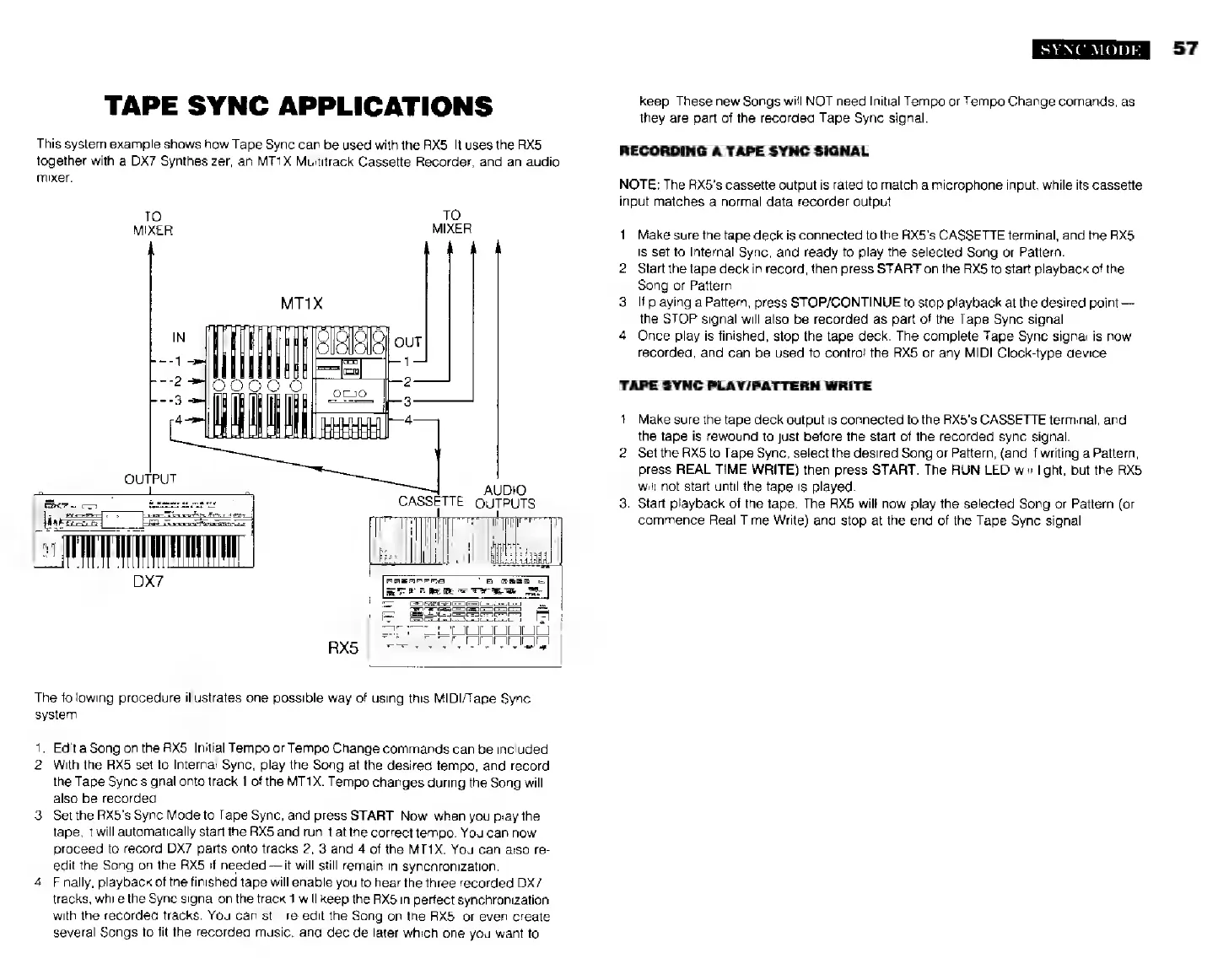
This
systern
example
shows
how
Tape
Sync
can
be
used
with
the
RX5.
It
uses
the
RX5
together
with
а
DX7
Synthesizer,
an
MT1X
Multitrack
Cassette
Recorder,
and
an
audio
mixer.
TO
TO
MIXER
MIXER
AU
CASSETTE
OUTPUTS
ТІ
The
following
procedure
illustrates
one
possible
way
of
using
this
MIDI/Tape
Sync
system.
1.
Edita
Song
on
the
RX5.
Initial
Tempo
or
Tempo
Change
commands
can
be
included.
2.
With
the
RX5
set
to
Internal
Sync,
play
the
Song
at
the
desired
tempo,
and
record
the
Tape
Sync
signal
onto
track
1
of
the
MT1X.
Tempo
changes
during
the
Song
will
also
be
recorded.
3.
Setthe
RX5's
Sync
Mode
to
Tape
Sync,
and
press
START.
Now,
when
you
play
the
tape,
it
will
automatically
start
the
RX5
and
run
it
at
the
correct
tempo.
You
can
now
proceed
to
record
DX7
parts
onto
tracks
2,
3
and
4
of
the
MT1X.
You
can
also
re-
edit
the
Song
on
the
RX5
if
needed
it
will
still
remain
in
synchronization.
4.
Finally,
playback
of
the
finished
tape
will
enable
you
to
hear
the
three
recorded
DX7
tracks,
while
the
Sync
signal
on
the
track
1
will
keep
the
RX5
in
perfect
synchronization
with
the
recorded
tracks.
You
can
still
re-edit
the
Song
on
the
RX5,
or
even
create
several
Songs
to
fit
the
recorded
music,
and
decide
later
which
one
you
want
to
SYNC
MODE
keep.
These
new
Songs
will
NOT
need
Initial
Tempo
or
Tempo
Change
comands,
as
they
are
part
of
the
recorded
Tape
Syne
signal.
RECORDING
A
TAPE
SYNC
SIGNAL
NOTE:
The
RX5's
cassette
output
is
rated
to
match
a
microphone
input,
while
its
cassette
input
matches
a
normal
data
recorder
output.
1
2.
Make
sure
the
tape
deck
is
connected
to
the
RX5's
CASSETTE
terminal,
and
the
АХ5
is
set
to
Internal
Sync,
and
ready
to
play
the
selected
Song
or
Pattern.
Start
the
tape
deck
in
record,
then
press
START
on
the
НХ5
to
start
playback
of
the
Song
or
Pattern.
If
playing
a
Pattern,
press
STOP/CONTINUE
to
stop
playback
at
the
desired
point
the
STOP
signal
will
also
be
recorded
as
part
of
the
Tape
Sync
signal
Once
play
is
finished,
stop
the
tape
deck.
The
complete
Tape
Sync
signal
is
now
recorded,
and
can
be
used
to
contro!
the
RX5
or
any
MIDI
Clock-type
device.
TAPE
SYNC
PLAY/PATTERN
WRITE
1.
2.
Make
sure
the
tape
deck
output
is
connected
to
the
RX5's
CASSETTE
terminal,
and
the
tape
is
rewound
to
just
before
the
start
of
the
recorded
sync
signal.
Set
the
RX5
to
Tape
Sync,
select
the
desired
Song
or
Pattern,
(and
if
writing
a
Pattern,
press
REAL
TIME
WRITE)
then
press
START.
The
RUN
LED
will
light,
but
the
RX5
will
not
start
until
the
tape
is
played.
Start
playback
of
the
tape.
The
RX5
will
now
play
the
selected
Song
or
Pattern
(or
commence
Real
Time
Write)
and
stop
at
the
end
of
the
Tape
Sync
signal.
57