EasyManua.ls Logo

Yamaha RX5 - Page 75

Yamaha RX5
81 pages
Print Icon
To Next Page IconTo Next Page
To Previous Page IconTo Previous Page
Loading...
EDIT
VOICE
BLOCK
DIAGRAM
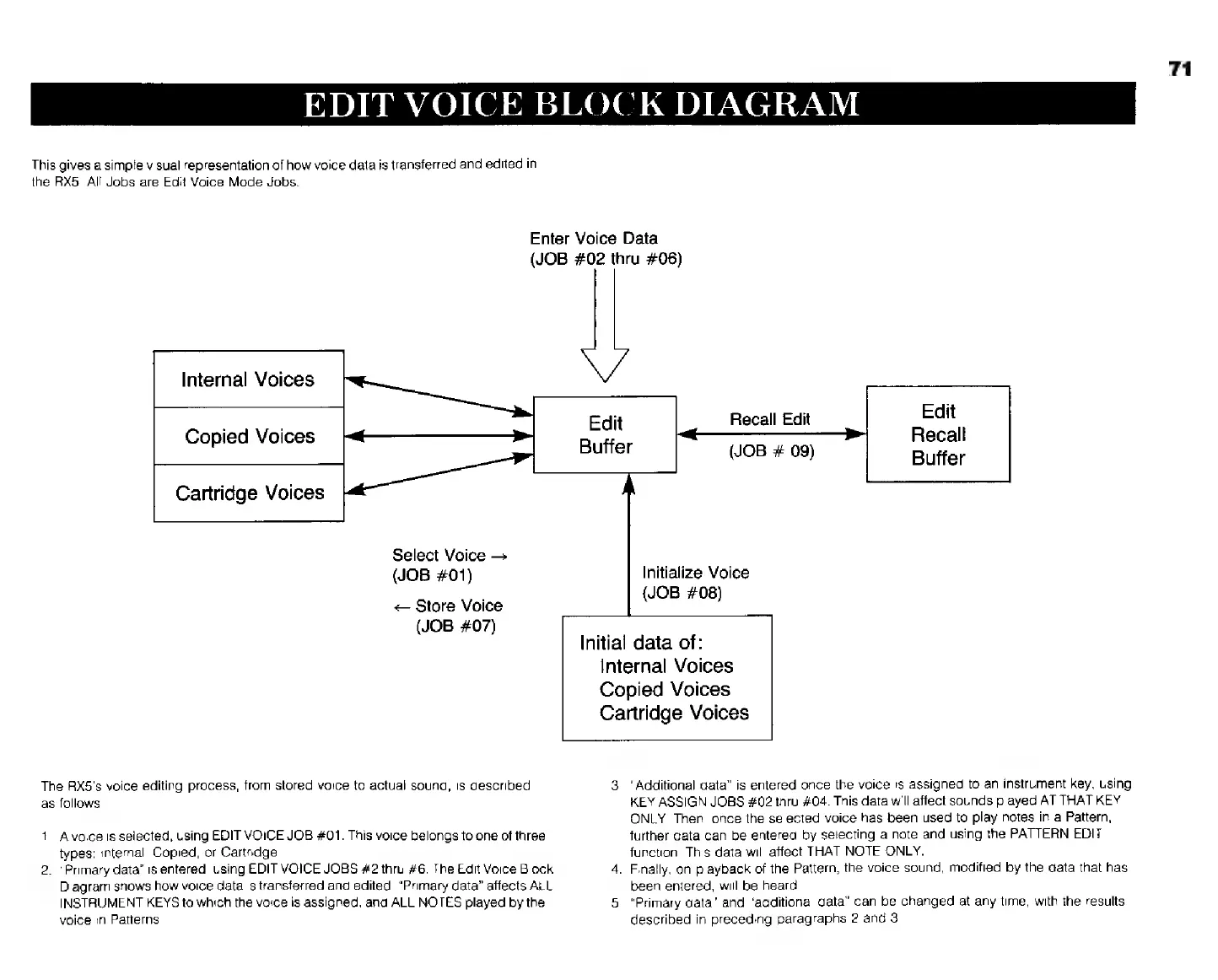
This
gives
a
simple
visual
representation
of
how
voice
data
is
transferred
and
edited
in
the
RX5.
All
Jobs
are
Edit
Voice
Mode
Jobs.
Enter
Voice
Data
(JOB
#02
thru
#06)
Internal
Voices
Copied
Voices
Cartridge
Voices
Select
Voice
Recall
Edit
Edit
Recall
(JOB
#
09)
Buffer
71
(JOB
#01)
Initialize
Voice
=
Store
Voice
(JOB
#08)
(JOB
#07)
Initial
data
of:
Internal
Voices
Copied
Voices
Cartridge
Voices
The
RX5's
voice
editing
process,
from
stored
voice
to
actual
sound,
is
described
3.
"Additional
data”
is
entered
once
the
voice
is
assigned
to
an
instrument
key,
using
as
follows
1.
A
voice
is
selected,
using
EDIT
VOICE
JOB
#01.
This
voice
belongs
to
one
of
three
types:
internal,
Copied,
or
Cartridge.
2.
“Primary
data”
is
entered,
using
EDIT
VOICE
JOBS
#2
thru
#6.
The
Edit
Voice Block
Diagram
shows
how
voice
data
is
transferred
and
edited.
"Primary
data"
affects
ALL
INSTRUMENT
KEYS
to
which
the
vaice
is
assigned,
and
ALL
NOTES
played
by
the
voice
in
Patterns.
KEY
ASSIGN
JOBS
#02
thru
#04.
This
data
will
affect
sounds
played
AT
THAT
KEY
ONLY.
Then,
once
the
selected
voice
has
been
used
to
play
notes
in
a
Pattern,
further
data
can
be
entered
by
selecting
a
note
and
using
the
PATTERN
EDIT
function.
This
data
will
affect
THAT
NOTE
ONLY.
.
Finally,
on
playback
of
the
Pattern,
the
voice
sound,
modified
by
the
data
that
has
been
entered,
will
be
heard.
.
"Primary
data"
and
"additional
data"
can
be
changed
at
any
time,
with
the
results
described
in
preceding
paragraphs
2
and
3.