EasyManua.ls Logo

Yamaha V50 - Voices and Performances; EASE Aeti; Single Play Mode and Maximum; Single Play Mode Display

Yamaha V50
81 pages
Print Icon
To Next Page IconTo Next Page
To Previous Page IconTo Previous Page
Loading...
VOICES
AND
PERFORMANCES
eee
ee
ee
ee
“Voice”
and
“performance”
are
important
words
to
understand
when
learning
about
the
V50.
Please
take
the
time
to
understand
them
thoroughly.
Voices
net
In
the
V50,
the
word
“voice”
is
used
to
mean
“a
certain
sound”.
For
example,
the
V50
contains
a
“piano
voice”,
a
“guitar
voice”,
and
so
on.
Each
voice
has
a
number
and
name,
which.
are
known
as
“voice
numbers”
and
“voice
names”.
Voices
can
be
thought
of
in
the
following
groups.
e
Preset
voices
The
V50
contains
100
voices,
which
are
called
“preset
voices”.
It
is
not
pssible
to
erase
or
rewrite
these
preset
voices.
e
Internal
voices
100
voices
that
you
may
create
can
be
stored
in
the
V50.
These
are
called
“internal
voices”.
It
is
possible
to
modify
a
preset
voice
and
store
it
as
an
internal
voice.
e
Card
voices
100
voices
can
be
stored
in
a
RAM
card,
and
used
in
the
same
way
as
preset
or
internal
voices.
These
voices
are
called
“card
voices”.
ROM
cards
(com-
mercially
available
cards
with
voices
already
written
into
them)
are
also
refered
to
as
card
voices.
Types
of
voice
Types
of
voice
|
Voice
numbers
Number
Preset
voices
POO
~
P99 100
voices
j
Internal
voices
100~199
100
voices
Card
voices
|
coo
~
c99
100
voices
*
Card
voices
can
be
used
only
when
a
card
is
inserted
in
the
card
slot.
Single
play
mode
and
maximum
simultaneous
notes
LS
We
have
learned
that
a
voice
is
“a
certain
sound”.
Playing
with
just
one
sound
is
called
“single
play
mode”.
In
single
play
mode,
you
can
select
any
one
of
the
preset,
internal,
or
card
voices
(if
a
card
is
inserted
in
the
card
slot).
In
single
play
mode,
you
will
be
able
to
play
chords
of
up
to
16
notes.
When
you
press
the
17th
key,
the
note
18
Introducing
the
V50
you
played
first
will
disappear,
and
the
newly
played
note
will
sound.
(This
is
called
“last-note
priority”.)
Another
way
to
describe
an
instrument
that
can
play
a
chord
of
up
to
16
notes
is
to
say
that
the
instrument
has
“16-note
polyphony”,
or
that
the
instrument
is
“16-note
polyphonic”.
Single
play
mode
display
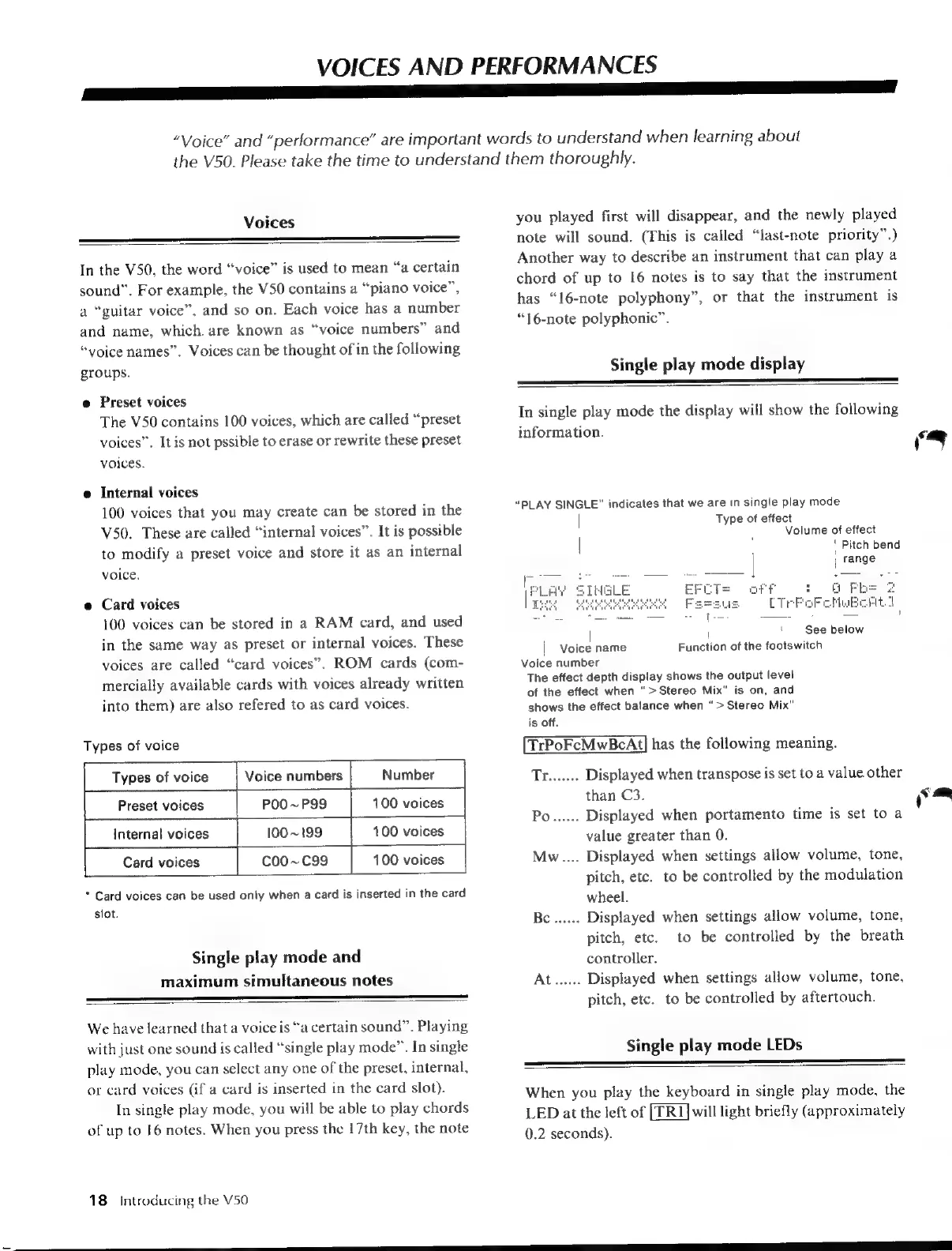
In
single
play
mode
the
display
will
show
the
following
information.
“PLAY
SINGLE”
indicates
that
we
are
in
single
play
mode
|
Type
of
effect
Volume
of
effect
|
:
Pitch
bend
|
|
range
k
"aF
oP
|
s
See
below
|
Voice
name
Function
of
the
footswitch
Voice
number
The
effect
depth
display
shows
the
output
level
of
the
effect
when
“>
Stereo
Mix”
is
on,
and
shows
the
effect
balance
when
“>
Stereo
Mix”
is
off.
TrPoFcMwBcAt|]
has
the
following
meaning.
Tred.
Displayed
when
transpose
is
set
to
a
value
other
than
C3.
Po......
Displayed
when
portamento
time
is
set
to
a
value
greater
than
0.
Mw....
Displayed
when
settings
allow
volume,
tone,
pitch,
etc.
to
be
controlled
by
the
modulation
wheel.
Be
......
Displayed
when
settings
allow
volume,
tone,
pitch,
etc.
to
be
controlled
by
the
breath
controller.
At...
Displayed
when
settings
allow
volume,
tone,
pitch,
etc.
to
be
controlled
by
aftertouch.
Single
play
mode
LEDs
When
you
play
the
keyboard
in
single
play
mode,
the
LED
at
the
left
of
will
light
briefly
(approximately
0.2
seconds).
a
__—
Eee
eee

Table of Contents

Other manuals for Yamaha V50

Related product manuals