EasyManua.ls Logo

Yamaha V50 - VOICE Editie Sausame Nnn Pa; About Quüick:editsat Enn N; Eee Ceccsseeeeeteeeesteeeees; Quick Edit (Release)

Yamaha V50
81 pages
Print Icon
To Next Page IconTo Next Page
To Previous Page IconTo Previous Page
Loading...
VOICE
EDITING
Se
a
a
a
ae
About
quick
edit
Note:
When
you
use
this
quick
edit
function,
the
envelope
generator
AR
and
DIR
of
all
operators
will
be
changed.
“Quick
edit”
is
not
one
of
the
settings
within
a
voice.
Itis
a
function
which
allows
you
to
make
several
settings
at
the
same
time.
For
instance,
it
allows
you
to
adjust
the
envelope
generator
or
the
output
level
of
all
operators
at
once.
It
is
very
useful
when
making
minor
overall
modifications
to
a
voice.
The
indicator
displayed
to
the
right
of
the
“>”
shows
the
relative
change.
Initially,
the
indicator
will
show
that
nothing
has
been
changed,
and
that
the
settings
are
in
their
original
state.
As
you
move
the
data
entry
slider
or
use
the
[=
1][+
1]
buttons,
you
will
see
the
indicator
change
as
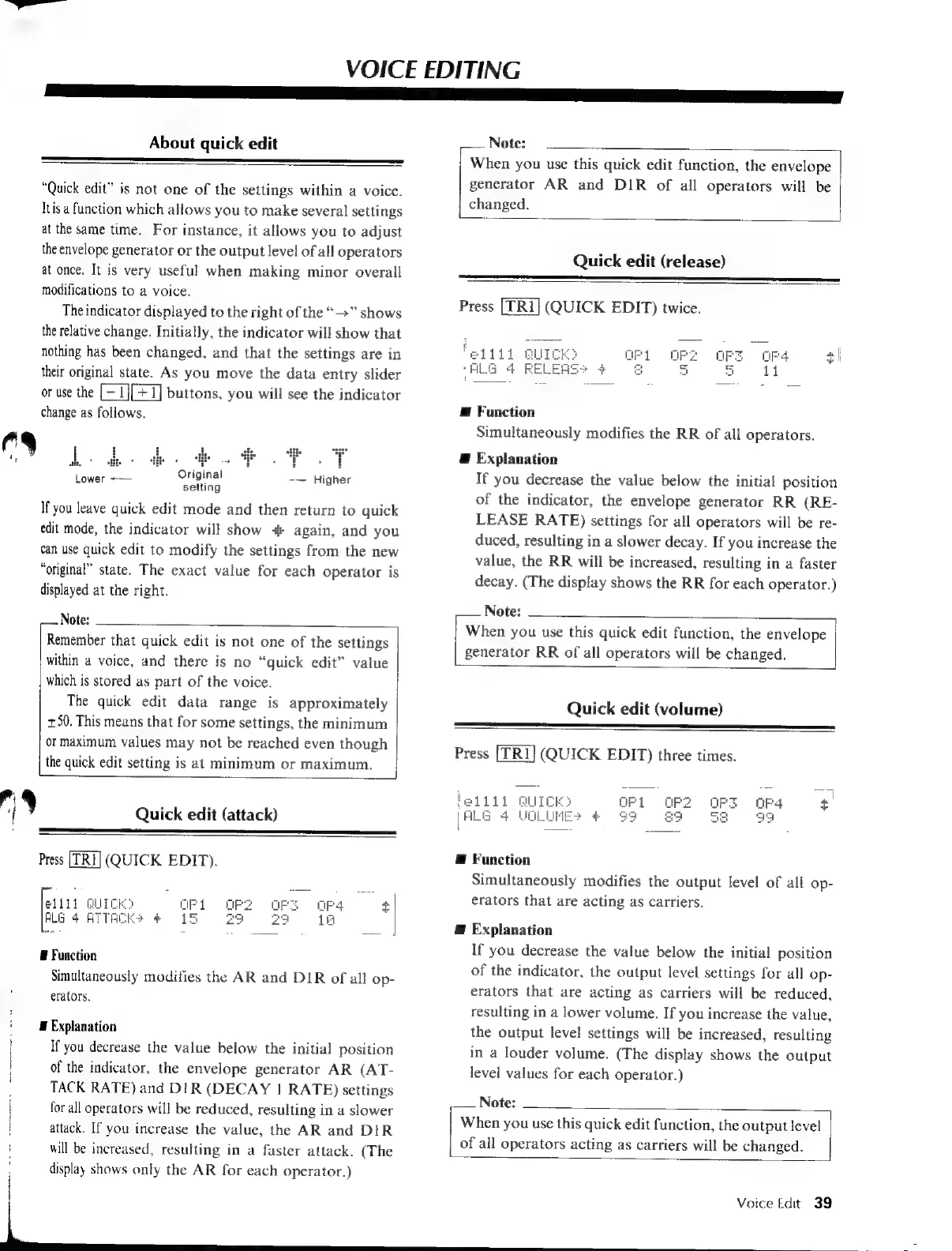
follows.
E
Function
Simultaneously
modifies
the
RR
of
all
operators.
Quick
edit
(release)
Press
(QUICK
EDIT)
twice.
ro.
i
E
Explanation
--—
Higher
If
you
decrease
the
value
below
the
initial
position
>
Original
Lower
~——
;
i
seing
R
of
the
indicator,
the
envelope
generator
RR
(RE-
If
you
leave
quick
edit
mode
and
then
return
to
quick
LEASE
RATE)
settings
for
all
operators
will
be
re-
edit
mode,
the
indicator
will
show
+
again,
and
you
can
use
quick
edit
to
modify
the
settings
from
the
new
“original”
state.
The
exact
value
for
each
operator
is
displayed
at
the
right.
duced,
resulting
in
a
slower
decay.
If
you
increase
the
value,
the
RR
will
be
increased,
resulting
in
a
faster
decay.
(The
display
shows
the
RR
for
each
operator.)
Note:
j
Note:
h
:
em
:
When
you
use
this
quick
edit
function,
the
envelope
Remember
t
at
quick
edit
8
not
e
of
the
setungs
generator
RR
of
all
operators
will
be
changed.
within
a
voice,
and
there
is
no
“quick
edit”
value
which
is
stored
as
part
of
the
voice.
The
quick
edit
data
range
is
approximately
Quick
edit
(volume)
+50.
This
means
that
for
some
settings,
the
minimum
or
maximum
values
may
not
be
reached
even
though
p
5
Press
[TRI]
(QUICK
EDIT)
three
times.
the
quick
edit
setting
is
at
minimum
or
maximum.
Q
)
dik)
ellil
QUICKO
+
A
Quick
edit
(attack)
(ALG
4
VOLUMES
4
3
Press
(QUICK
EDIT).
@
Function
Simultaneously
modifies
the
output
level
of
all
op-
ae
nunc
as
=
sr
aa
o
+
erators
that
are
acting
as
carriers.
BEG
ATI
u
a
P
Æ
Explanation
If
you
decrease
the
value
below
the
initial
position
B
Function
I
:
i
Simultaneously
modifies
the
AR
and
DIR
of
all
op-
of
the
indicator,
the
output
level
settings
for
all
op-
\
erations:
erators
that
are
acting
as
carriers
will
be
reduced,
resulting
in
a
lower
volume.
If
you
increase
the
value,
'
W
Explanation
the
output
level
settings
will
be
increased,
resulting
|
If
you
decrease
the
value
below
the
initial
position
in
a
louder
volume.
(The
display
shows
the
output
|
of
the
indicator,
the
envelope
generator
AR
(AT-
level
values
for
each
operator.)
TACK
RATE)
and
DIR
(DECAY
|
RATE)
settings
for
all
operators
will
be
reduced,
resulting
in
a
slower
attack.
If
you
increase
the
value,
the
AR
and
DIR
will
be
increased,
resulting
in
a
faster
attack.
(The
display
shows
only
the
AR
for
each
operator.)
|
Voice
Edit
39
Note:
When
you
use
this
quick
edit
function,
the
output
level
of
all
operators
acting
as
carriers
will
be
changed.

Table of Contents

Other manuals for Yamaha V50

Related product manuals