EasyManua.ls Logo

Yamaha V50 - Performance Play Mode Display; Performance Play Mode Leds; Switching Instruments On;Off; When to Use Single Play or Performance

Yamaha V50
81 pages
Print Icon
To Next Page IconTo Next Page
To Previous Page IconTo Previous Page
Loading...
Performance
play
mode
display
Nene
eee
eee
ee
ee
eee
ee
ee
eee
SS
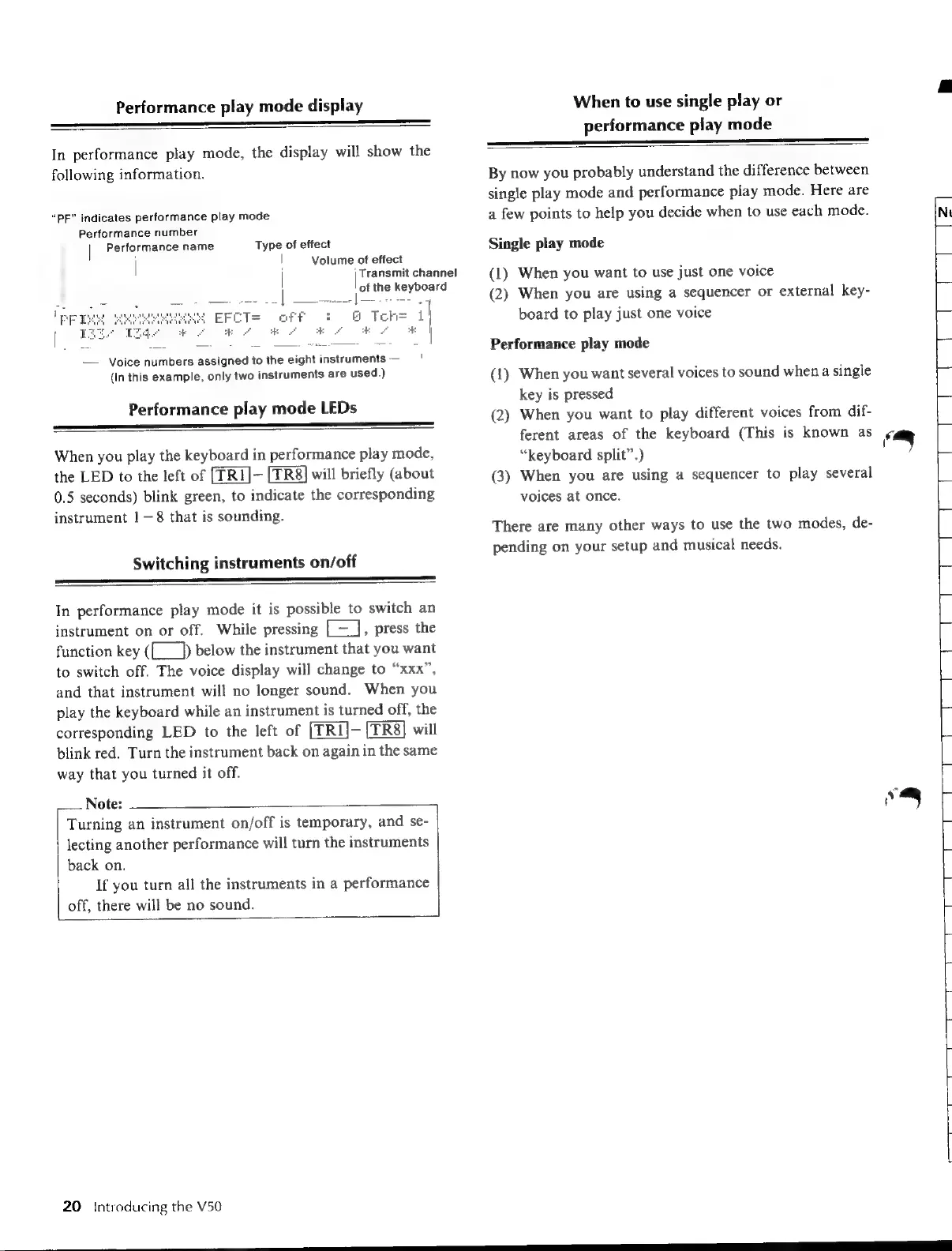
In
performance
play
mode,
the
display
will
show
the
following
information.
“PF”
indicates
performance
play
mode
Performance
number
j
|
Performance
name
Type
of
effect
|
|
Volume
of
effect
|
ie
the
keyboard
EFCT=
off
Toh=
i]
re
ee
|
\—
Voice
numbers
assigned
to
the
eight
instruments
(In
this
example,
only
two
instruments
are
used.)
Performance
play
mode
LEDs
When
you
play
the
keyboard
in
performance
play
mode,
the
LED
to
the
left
of
[TR1]-
will
briefly
(about
0.5
seconds)
blink
green,
to
indicate
the
corresponding
instrument
1—8
that
is
sounding.
Switching
instruments
on/off
In
performance
play
mode
it
is
possible
to
switch
an
instrument
on
or
off.
While
pressing
[=],
press
the
function
key
({___])
below
the
instrument
that
you
want
to
switch
off.
The
voice
display
will
change
to
“xxx”,
and
that
instrument
will
no
longer
sound.
When
you
play
the
keyboard
while
an
instrument
is
turned
off,
the
corresponding
LED
to
the
left
of
[TRI]-
will
blink
red.
Turn
the
instrument
back
on
again
in
the
same
way
that
you
turned
it
off.
Note:
Turning
an
instrument
on/off
is
temporary,
and
se-
lecting
another
performance
will
turn
the
instruments
back
on.
If
you
turn
all
the
instruments
in
a
performance
off,
there
will
be
no
sound.
20
Introducing
the
V50
When
to
use
single
play
or
performance
play
mode
|
|
Transmit
channel
By
now
you
probably
understand
the
difference
between
single
play
mode
and
performance
play
mode.
Here
are
a
few
points
to
help
you
decide
when
to
use
each
mode.
Single
play
mode
(1)
When
you
want
to
use
just
one
voice
(2)
When
you
are
using
a
sequencer
or
external
key-
board
to
play
just
one
voice
Performance
play
mode
(1)
When
you
want
several
voices
to
sound
when
a
single
key
is
pressed
(2)
When
you
want
to
play
different
voices
from
dif-
ferent
areas
of
the
keyboard
(This
is
known
as
“keyboard
split”.)
(3)
When
you
are
using
a
sequencer
to
play
several
voices
at
once.
There
are
many
other
ways
to
use
the
two
modes,
de-
pending
on
your
setup
and
musical
needs.
K.
eee

Table of Contents

Other manuals for Yamaha V50

Related product manuals