EasyManua.ls Logo

Yamaha V50 - Portamento (Mode, Time); Foot Controller (Volume, Pitch, Amplitude)

Yamaha V50
81 pages
Print Icon
To Next Page IconTo Next Page
To Previous Page IconTo Previous Page
Loading...
Portamento
(mode,
time)
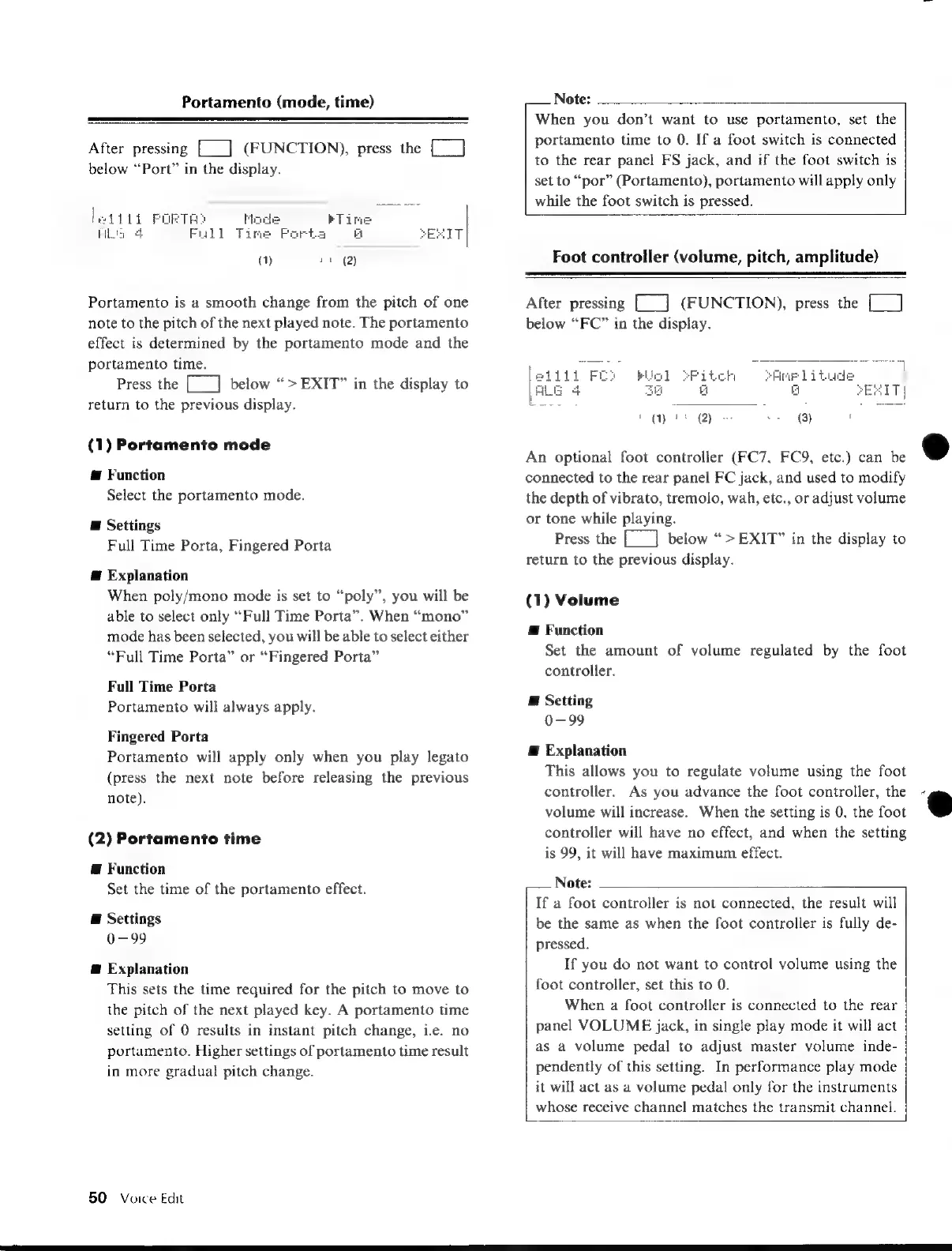
After
pressing
[__]
(FUNCTION),
press
the
[__]
below
“Port”
in
the
display.
li
PORTH?
4
Full
Time
Portamento
is
a
smooth
change
from
the
pitch
of
one
note
to
the
pitch
of
the
next
played
note.
The
portamento
effect
is
determined
by
the
portamento
mode
and
the
portamento
time.
Press
the
[___]
below
“>EXIT”
in
the
display
to
return
to
the
previous
display.
(1)
Portamento
mode
@
Function
Select
the
portamento
mode.
E
Settings
Full
Time
Porta,
Fingered
Porta
@
Explanation
When
poly/mono
mode
is
set
to
“poly”,
you
will
be
able
to
select
only
“Full
Time
Porta”.
When
“mono”
mode
has
been
selected,
you
will
be
able
to
select
either
“Full
Time
Porta”
or
“Fingered
Porta”
Full
Time
Porta
Portamento
will
always
apply.
Fingered
Porta
Portamento
will
apply
only
when
you
play
legato
(press
the
next note
before
releasing
the
previous
note).
(2)
Portamento
time
@
Function
Set
the
time
of
the
portamento
effect.
E
Settings
0-99
@
Explanation
This
sets
the
time
required
for
the
pitch
to
move
to
the
pitch
of
the
next
played
key.
A
portamento
time
setting
of
0
results
in
instant
pitch
change,
i.e.
no
portamento.
Higher
settings
of
portamento
time
result
in
more
gradual
pitch
change.
50
Voice
Edit
Note:
When
you
don’t
want
to
use
portamento,
set
the
portamento
time
to
0.
If
a
foot
switch
is
connected
to
the
rear
panel
FS
jack,
and
if
the
foot
switch
is
set
to
“por”
(Portamento),
portamento
will
apply
only
while
the
foot
switch
is
pressed.
Foot
controller
(volume,
pitch,
amplitude)
After
pressing
[__]
(FUNCTION),
press
the
[_]
below
“FC”
in
the
display.
rAmelituge
a
SP
itch
G
(Wirt
2)
$
(3)
í
An
optional
foot
controller
(FC7,
FC9,
etc.)
can
be
connected
to
the
rear
panel
FC
jack,
and
used
to
modify
the
depth
of
vibrato,
tremolo,
wah,
etc.,
or
adjust
volume
or
tone
while
playing.
Press
the
[___]
below
“>EXIT”
in
the
display
to
return
to
the
previous
display.
(1)
Volume
Æ
Function
Set
the
amount
of
volume
regulated
by
the
foot
controller.
E
Setting
0-99
Æ
Explanation
This
allows
you
to
regulate
volume
using
the
foot
controller.
As
you
advance
the
foot
controller,
the
volume
will
increase.
When
the
setting
is
0,
the
foot
controller
will
have
no
effect,
and
when
the
setting
is
99,
it
will
have
maximum
effect.
Note:
If
a
foot
controller
is
not
connected,
the
result
will
be
the
same
as
when
the
foot
controller
is
fully
de-
pressed.
If
you
do
not
want
to
control
volume
using
the
foot
controller,
set
this
to
0.
When
a
foot
controller
is
connected
to
the
rear
panel
VOLUME
jack,
in
single
play
mode
it
will
act
as
a
volume
pedal
to
adjust
master
volume
inde-
pendently
of
this
setting.
In
performance
play
mode
it
will
act
as
a
volume
pedal
only
for
the
instruments
whose
receive
channel
matches
the
transmit
channel.

Table of Contents

Other manuals for Yamaha V50

Related product manuals