EasyManua.ls Logo

Yamaha V50 - Connections and Setup

Yamaha V50
81 pages
Print Icon
To Next Page IconTo Next Page
To Previous Page IconTo Previous Page
Loading...
CONNECTIONS
apy
a
a
a
ee
To
produce
sound,
you
must
connect
the
V50
to
an
external
amp/speaker
system
or
use
a
pair
of
headphones.
This
section
shows
some
typical
setups.
(The
ā€œampsā€
in
the
diagram
refer
to
a
keyboard
amp
that
has
a
speaker
built
in.)
Note:
so
can
damage
the
amp.
Be
sure
to
turn
the
power
of
both
units
off
before
connecting
the
V50
to
the
amp.
Failing
to
do
Using
a
single
amp
Connecting
other
equipment
via
MIDI
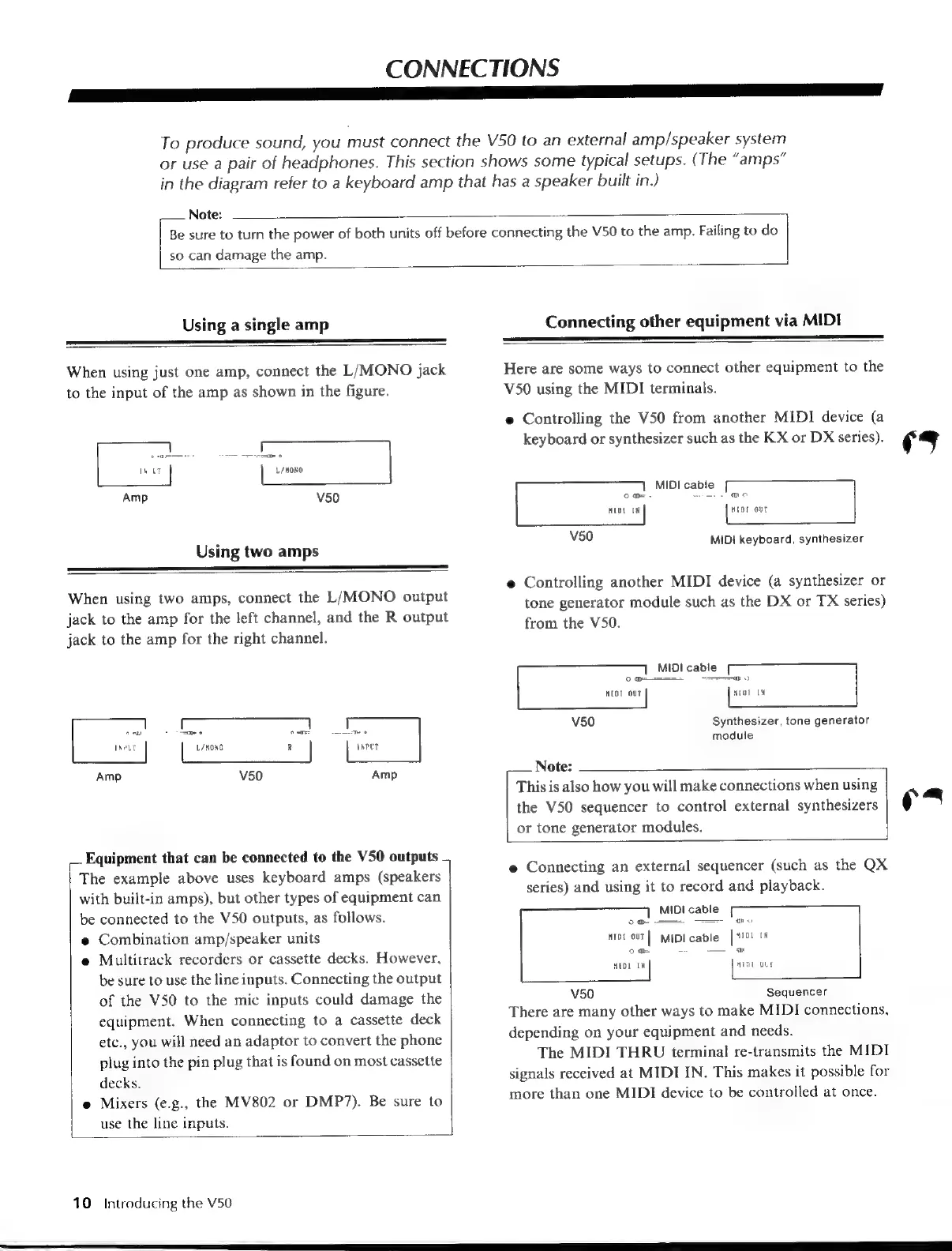
When
using
just
one
amp,
connect
the
L/MONO
jack
to
the
input
of
the
amp
as
shown
in
the
figure.
oa
oO
o
INPLT
L/MONO
Amp
V50
Using
two
amps
When
using
two
amps,
connect
the
L/MONO
output
jack
to
the
amp
for
the
left
channel,
and
the
R
output
jack
to
the
amp
for the
right
channel.
_.
Equipment
that
can
be
connected
to
the
V50
outputs
The
example
above
uses
keyboard
amps
(speakers
with
built-in
amps),
but
other
types
of
equipment
can
be
connected
to
the
V50
outputs,
as
follows.
e
Combination
amp/speaker
units
e
Multitrack
recorders
or
cassette
decks.
However,
be
sure
to
use
the
line
inputs.
Connecting
the
output
of
the
V50
to
the
mic
inputs
could
damage
the
equipment.
When
connecting
to
a
cassette
deck
etc.,
you
will
need
an
adaptor
to
convert
the
phone
plug
into
the
pin
plug
that
is
found
on
most
cassette
decks.
e
Mixers
(e.g.,
the
MV802
or
DMP7).
Be
sure
to
use
the
line
inputs.
10
introducing
the
V50
Here
are
some
ways
to
connect
other
equipment
to
the
V50
using
the
MIDI
terminals.
e
Controlling
the
V50
from
another
MIDI
device
(a
keyboard
or
synthesizer
such
as
the
KX
or
DX
series).
Vow
|
MIDI
cable
o
w=
AA
OO
MIDI
IN
MIDI
OUT
v50
MIDI
keyboard,
synthesizer
e
Controlling
another
MIDI
device
(a
synthesizer
or
tone
generator
module
such
as
the
DX
or
TX
series)
from
the
V50.
MIDI
cable
Ga
et
o
MIDI
OUT
MIDI
1N
v50
Synthesizer,
tone
generator
module
Note:
This
is
also
how
you
will
make
connections
when
using
s
the
V50
sequencer
to
control
external
synthesizers
()
s
or
tone
generator
modules.
e
Connecting
an
external
sequencer
(such
as
the
QX
series)
and
using
it
to
record
and
playback.
MIDI
cable
o
me
-=
m
HID
our
|
MIDI
cable
[sia
Ww
Oo
M
=
——
w
MIDI
OLT
v50
Sequencer
There
are
many
other
ways
to
make
MIDI
connections,
depending
on
your
equipment
and
needs.
The
MIDI
THRU
terminal
re-transmits
the
MIDI
signals
received
at
MIDI
IN.
This
makes
it
possible
for
more
than
one
MIDI
device
to
be
controlled
at
once.
Se
eee
ANN
a
ee
a
a
e

Table of Contents

Other manuals for Yamaha V50

Related product manuals