EasyManua.ls Logo

Yamaha V50 - Output Level; Keyboard Scaling (Rate); Keyboard Scaling (Level)

Yamaha V50
81 pages
Print Icon
To Next Page IconTo Next Page
To Previous Page IconTo Previous Page
Loading...
Output
level
Press
(OUT
LEVEL)
|
l
elili
OUT
LEVEL:
ALG
4
E
Function
Set the
output
level
for
each
operator.
E
Settings
0—99
E
Explanation
At
a
setting
of
0
there
will
be
no
output,
and
a
setting
of
99
is
maximum.
The
output
level
of
an
operator
that
is
acting
as
a
carrier
will
determine
the
volume.
The
output
level
of
an
operator
that
is
acting
as
a
modulator
will
de-
termine
the
tone
of
the
operators
below
it.
If
you
do
not
need
to
use
an
operator,
you
can
set
its
output
level
to
0.
Note:
If
you
set
the
output
level
of
all
carrier
operators
to
0,
there
will
be
no
sound.
Keyboard
scaling
(rate)
Press
(SCALING)
Keyboard
rate
scaling
adjusts
the
rate
of
change
of
the
envelope
generator
for
each
operator
across
the
key-
board.
E
Function
Set
how
the
envelope
generator
rates
are
adjusted
across
the
keyboard.
@
Settings
0-3
@
Explanation
A
setting
of
0
has
almost
no
rate
scaling
effect,
and
a
setting
of
3
has
maximum
scaling
effect.
The
fol-
lowing
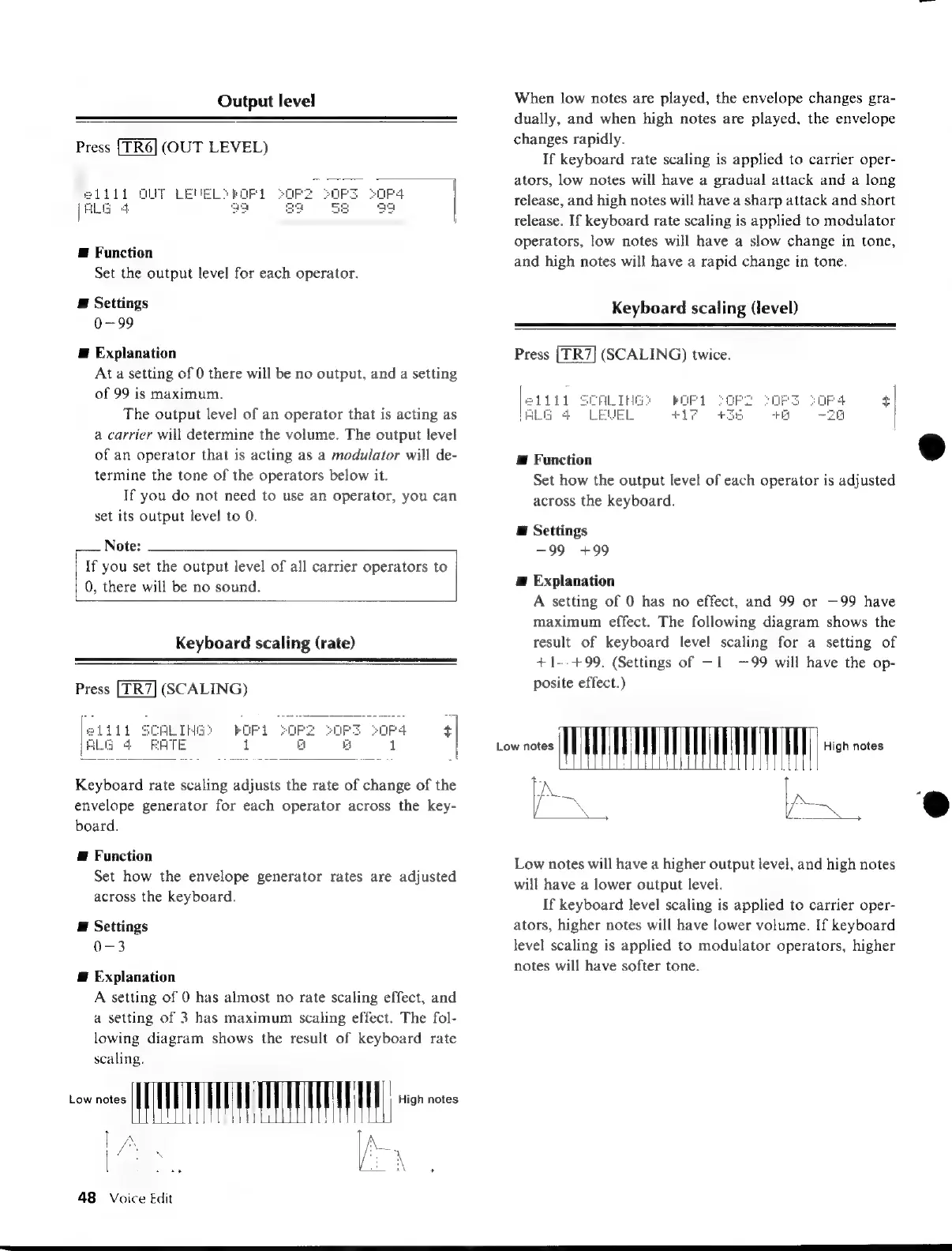
diagram
shows
the
result
of
keyboard
rate
scaling.
oe
EAT
TATE
AE
ee
as
48
Voice
Edit
sono
MIWA
When
low
notes
are
played,
the
envelope
changes
gra-
dually,
and
when
high
notes
are
played,
the
envelope
changes
rapidly.
If
keyboard
rate
scaling
is
applied
to
carrier
oper-
ators,
low
notes
will
have
a
gradual
attack
and
a
long
release,
and
high
notes
will
have
a
sharp
attack
and
short
release.
If
keyboard
rate
scaling
is
applied
to
modulator
operators,
low
notes
will
have
a
slow
change
in
tone,
and
high
notes
will
have
a
rapid
change
in
tone.
Keyboard
scaling
(level)
Press
(SCALING)
twice.
ALIHG?
MOFI
WEL
+17
Æ
Function
Set
how
the
output
level
of
each
operator
is
adjusted
across
the
keyboard.
E
Settings
—99
+99
Æ
Explanation
A
setting
of
0
has
no
effect,
and
99
or
—99
have
maximum
effect.
The
following
diagram
shows
the
result
of
keyboard
level
scaling
for
a
setting
of
+1--+99.
(Settings
of
—1
—99
will
have
the
op-
posite
effect.)
High
notes
Low
notes
will
have
a
higher
output
level,
and
high
notes
will
have
a
lower
output
level.
If
keyboard
level
scaling
is
applied
to
carrier
oper-
ators,
higher
notes
will
have
lower
volume.
If
keyboard
level
scaling
is
applied
to
modulator
operators,
higher
notes
will
have
softer
tone.

Table of Contents

Other manuals for Yamaha V50

Related product manuals