EasyManua.ls Logo

Yamaha V50 - Performance Effect Select; Effect: On;Off O Ranae Na Auctest. Dor Ieeveanede; Effect Select, Effect Balance; Eeeeeeeees

Yamaha V50
81 pages
Print Icon
To Next Page IconTo Next Page
To Previous Page IconTo Previous Page
Loading...
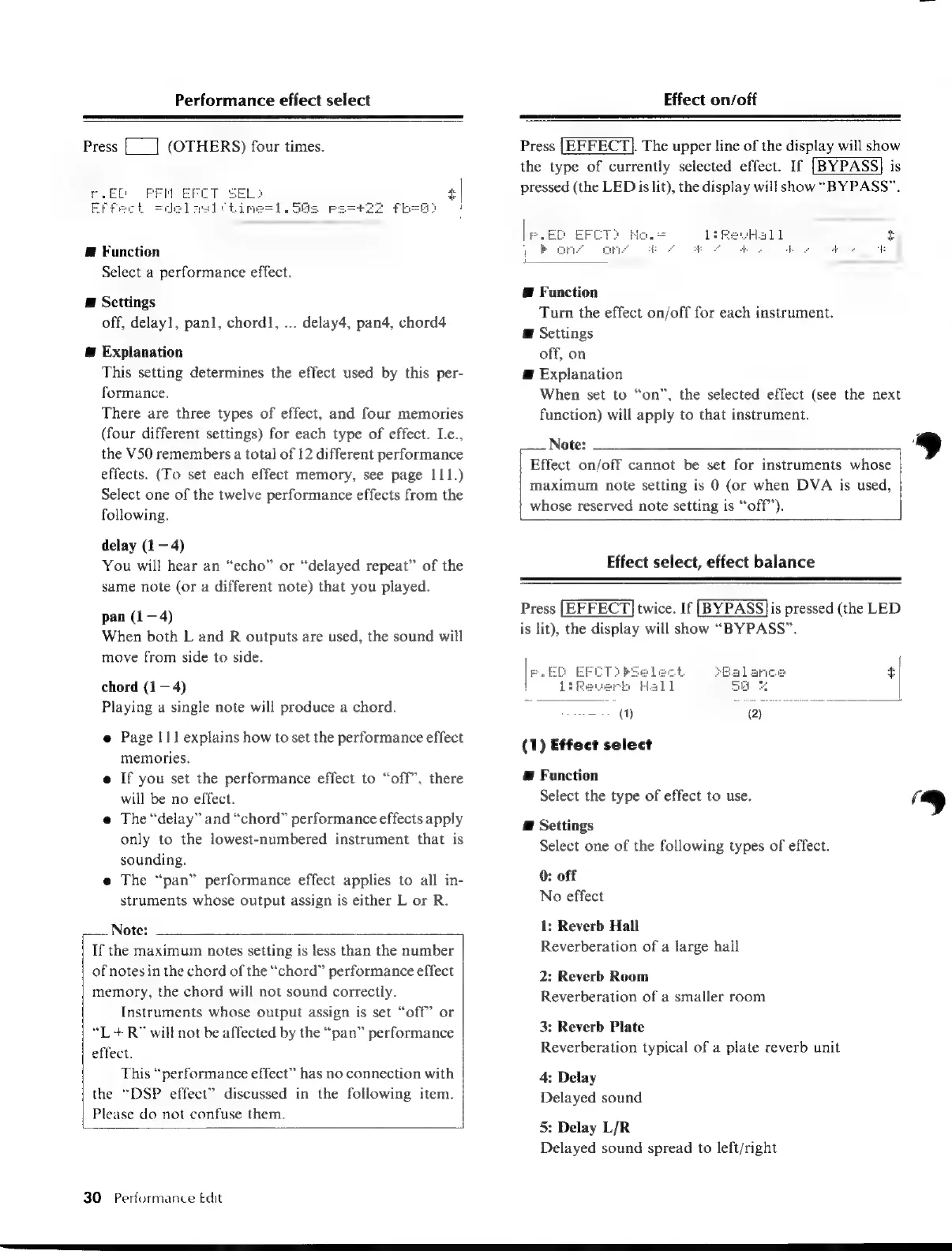
Performance
effect
select
Effect
on/off
Press
[___]
(OTHERS)
four
times.
SS
Fb!
@
Function
Select
a
performance
effect.
E
Scttings
off,
delayl,
panl,
chord,
...
delay4,
pan4,
chord4
@
Explanation
This
setting
determines
the
effect
used
by
this
per-
formance.
There
are
three
types
of
effect,
and
four
memories
(four
different
settings)
for
each
type
of
effect.
I.e.,
the
V50
remembers
a
total
of
t2
different
performance
effects.
(To
set
each
effect
memory,
see
page
111.)
Select
one
of
the
twelve
performance
effects
from
the
following.
delay
(1
4)
You
will
hear
an
“echo”
or
“delayed
repeat”
of
the
same
note
(or
a
different
note)
that
you
played.
pan
(1—4)
When
both
L
and
R
outputs
are
used,
the
sound
will
move
from
side
to
side.
chord
(1
4)
Playing
a
single
note
will
produce
a
chord.
e
Page
|
11
explains
how
to
set
the
performance
effect
memories.
e
If
you
set
the
performance
effect
to
“off”,
there
will
be
no
effect.
e
The
“delay”
and
“chord”
performance
effects
apply
only
to
the
lowest-numbered
instrument
that
is
sounding.
e
The
“pan”
performance
effect
applies
to
all
in-
struments
whose
output
assign
is
either
L
or
R.
Note:
If
the
maximum
notes
setting
is
less
than
the
number
of
notes
in
the
chord
of
the
“chord”
performance
effect
memory,
the
chord
will
not
sound
correctly.
Instruments
whose
output
assign
is
set
“off”
or
“L
+R”
will
not
be
affected
by
the
“pan”
performance
effect.
This
“performance
effect”
has
no
connection
with
the
“DSP
effect”
discussed
in
the
following
item.
Please
do
not
confuse
them.
30
Performance
Edit
Press
[|EFFECT}.
The
upper
line
of
the
display
will
show
the
type
of
currently
selected
effect.
If
[BYPASS]
is
pressed
(the
LED
is
lit),
the
display
will
show
“BYPASS”.
E
Function
Turn
the
effect
on/off
for
each
instrument.
E
Settings
off,
on
Æ
Explanation
When
set
to
“on”,
the
selected
effect
(see
the
next
function)
will
apply
to
that
instrument.
Note:
»
Effect
on/off
cannot
be
set
for
instruments
whose
maximum
note
setting
is
0
(or
when
DVA
is
used,
whose
reserved
note
setting
is
“off”).
Effect
select,
effect
balance
Press
[EFFECT]
twice.
If
|BYPASS}is
pressed
(the
LED
is
lit),
the
display
will
show
“BYPASS”.
+]
(1)
Effect
select
@
Function
Select
the
type
of
effect
to
use.
a
]
@
Settings
Select
one
of
the
following
types
of
effect.
0:
off
No
effect
1:
Reverb
Hall
Reverberation
of
a
large
hall
2:
Reverb
Room
Reverberation
of
a
smaller
room
3:
Reverb
Plate
Reverberation
typical
of
a
plate
reverb
unit
4:
Delay
Delayed
sound
5:
Delay
L/R
Delayed
sound
spread
to
left/nght

Table of Contents

Other manuals for Yamaha V50

Related product manuals