EasyManua.ls Logo

Yamaha V50 - Modulation, Controllers, and Effects

Yamaha V50
81 pages
Print Icon
To Next Page IconTo Next Page
To Previous Page IconTo Previous Page
Loading...
(2)
Feedback
E
Function
Set
the
feedback
level.
A
Settings
0-7
E
Explanation
Feedback
is
a
function
that
allows
the
output
of
operator
4
to
modulate
operator
4
itself.
Raising
the
feedback
level
has
an
effect
similar
to
connecting
two
operators
as
carrier
and
modulator,
and
will
increase
the
brightness
of
the
sound.
This
is
especially
useful
when
making
voices
such
as
brass
or
strings,
or
noise
effects.
If
feedback
is
set
to
0,
the
operator
will
function
in
the
same
way
as
the
other
operators
4
without
feedback.
LCA
Note:
Feedback
will
have
no
effect
unless
the
output
level
of
operator
4
is
raised.
LFO
(wave,
speed,
delay,
key
sync,
PMD,
AMD)
Press
(LFO).
lellli
LFO
PWAME
#
FHD
HAME
|
ALG
4
trian
iZ
St
a)
|
2}
H3)
(4)
UEJL
AG)
|
The
LFO
causes
repeating
change
in
tone,
volume,
or
pitch,
Repeating
change
in
tone
(wah):
The
tone
will
al-
ternately
become
brighter
and
softer.
Repeating
change
in
volume
(tremolo):
The
volume
ni
®
will
alternately
become
louder
and
softer.
Repeating
change
in
pitch
(vibrato):
The
pitch
will
alternately
become
higher
and
lower.
(1)
Wave
@
Function
Select
a
waveform
or
“shape”
for
the
repeating
change.
E
Settings
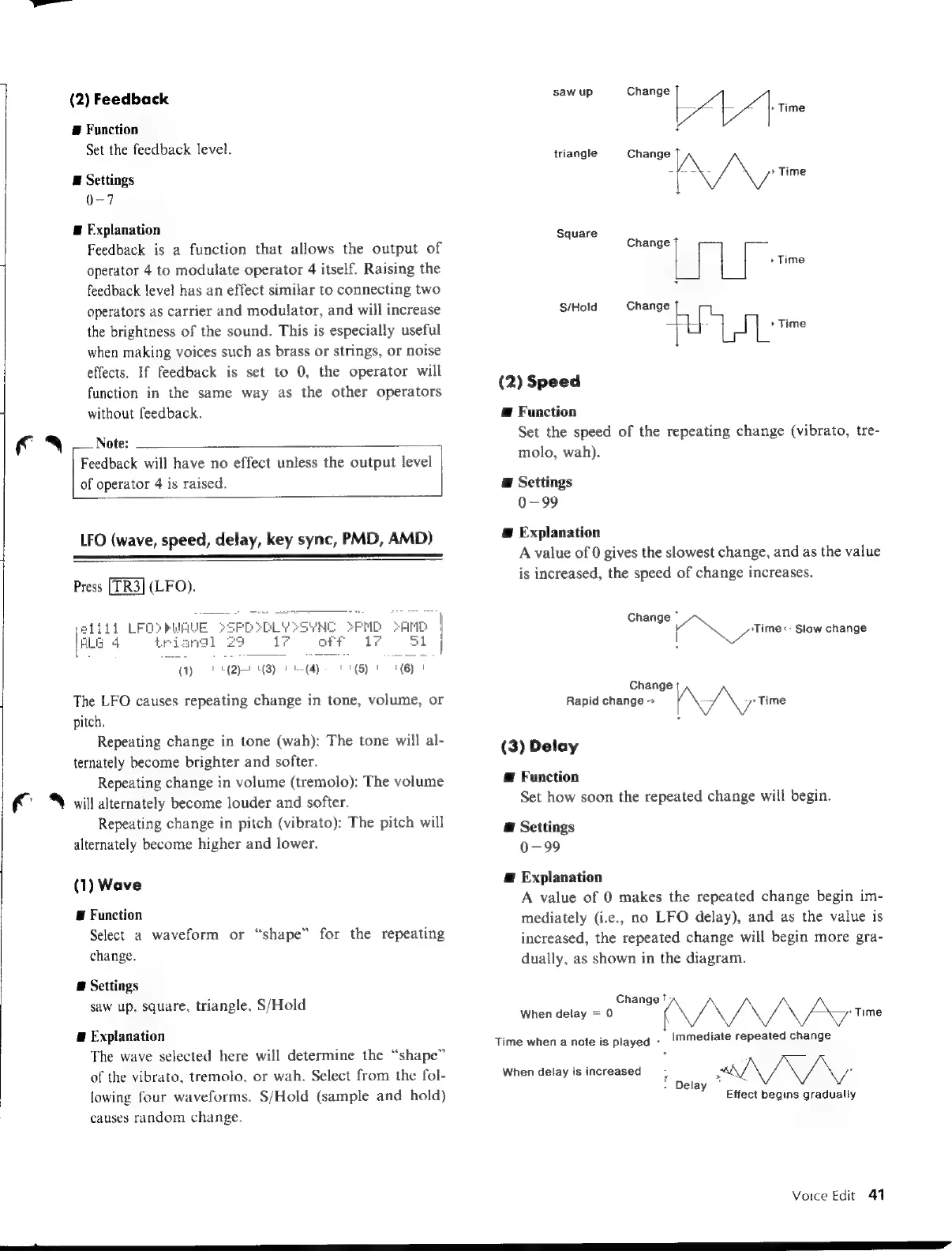
saw
up,
square,
triangle,
S/Hold
a
Explanation
The
wave
selected
here
will
determine
the
“shape”
of
the
vibrato,
tremolo,
or
wah.
Select
from
the
fol-
lowing
four
waveforms.
S/Hold
(sample
and
hold)
causes
random
change.
saw
up
Change
|
obo
rme
triangle
Change
A/A
Time
Square
S/Hold
Change
1
$9
A:
es
(2)
Speed
Æ
Function
Set
the
speed
of
the
repeating
change
(vibrato,
tre-
molo,
wah).
E
Settings
0-99
E
Explanation
A
value
of
0
gives
the
slowest
change,
and
as
the
value
is
increased,
the
speed
of
change
increases.
Change
`
N
Aimee
Slow
change
Change
Rapid
change
~
[N/N
prtime
(3)
Delay
@
Function
Set
how
soon
the
repeated
change
will
begin.
@
Settings
0-99
Æ
Explanation
A
value
of
0
makes
the
repeated
change
begin
im-
mediately
(i.e.,
no
LFO
delay),
and
as
the
value
is
increased,
the
repeated
change
will
begin
more
gra-
dually,
as
shown
in
the
diagram.
Change
';
When
delay
=
0
(
—\—
Time
Time
when
a
note
is
played
>
Immediate
repeated
change
When
delay
is
increased
f
belay
*
>
AV.
Y
Effect
begins
gradually
Voice
Edit
41

Table of Contents

Other manuals for Yamaha V50

Related product manuals