EasyManua.ls Logo

Yamaha V50 - Page 13

Yamaha V50
81 pages
Print Icon
To Next Page IconTo Next Page
To Previous Page IconTo Previous Page
Loading...
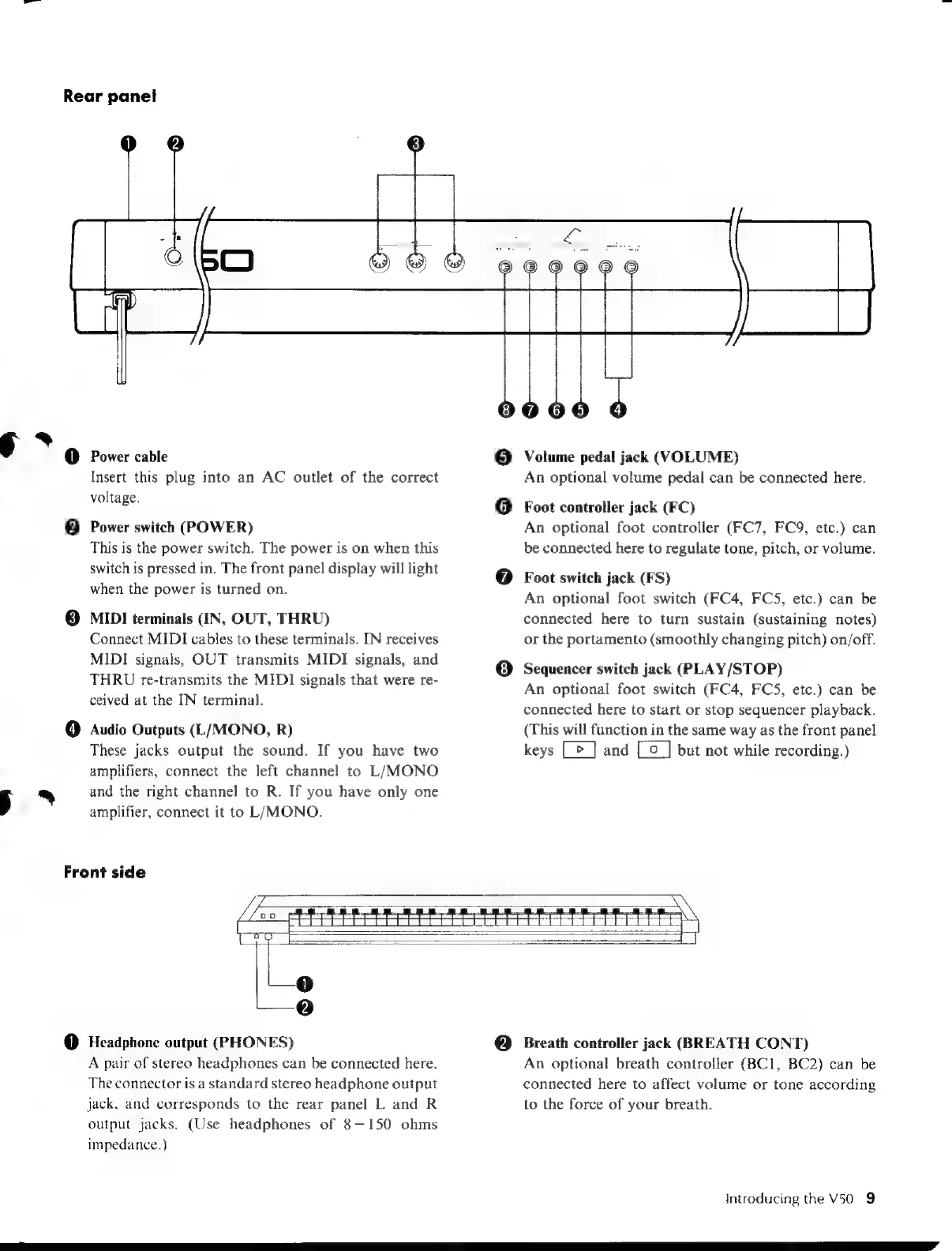
Rear
panel
§
*
@
Power
cable
5
*
@
Insert
this
plug
into
an
AC
outlet
of
the
correct
voltage.
Power
switch
(POWER)
This
is
the
power
switch.
The
power
is
on
when
this
switch
is
pressed
in.
The
front
panel
display
will
light
when
the
power
is
turned
on.
MIDI
terminals
(IN,
OUT,
THRU)
Connect
MIDI
cables
to
these
terminals.
IN
receives
MIDI
signals,
OUT
transmits
MIDI
signals,
and
THRU
re-transmits
the
MIDI
signals
that
were
re-
ceived
at
the
IN
terminal.
Audio
Outputs
(L/MONO,
R)
These
jacks
output
the
sound.
If
you
have
two
amplifiers,
connect
the
left
channel
to
L/MONO
and
the
right
channel
to
R.
If
you
have
only
one
amplifier,
connect
it
to
L/MONO.
Front
side
©
(6)
Volume
pedal
jack
(VOLUME)
An
optional
volume
pedal
can
be
connected
here.
Foot
controller
jack
(FC)
An
optional
foot
controller
(FC7,
FC9,
etc.)
can
be
connected
here
to
regulate
tone,
pitch,
or
volume.
Foot
switch
jack
(FS)
An
optional
foot
switch
(FC4,
FCS,
etc.)
can
be
connected
here
to
turn
sustain
(sustaining
notes)
or
the
portamento
(smoothly
changing
pitch)
on/off.
Sequencer
switch
jack
(PLAY/STOP)
An
optional
foot
switch
(FC4,
FCS,
etc.)
can
be
connected
here
to
start
or
stop
sequencer
playback.
(This
will
function
in
the
same
way
as
the
front
panel
keys
[>
]
and
[co
_]
but
not
while
recording.)
Headphone
output
(PHONES)
A
pair
of
stereo
headphones
can
be
connected
here.
The
connector
is
a
standard
stereo
headphone
output
jack,
and
corresponds
to
the
rear
panel
L
and
R
output
jacks.
(Use
headphones
of
8-150
ohms
impedance.)
Breath
controller
jack
(BREATH
CONT)
An
optional
breath
controller
(BC1,
BC2)
can
be
connected
here
to
affect
volume
or
tone
according
to
the
force
of
your
breath.
Introducing
the
V50
9

Table of Contents

Other manuals for Yamaha V50

Related product manuals