EasyManua.ls Logo

Yamaha V50 - Page 12

Yamaha V50
81 pages
Print Icon
To Next Page IconTo Next Page
To Previous Page IconTo Previous Page
Loading...
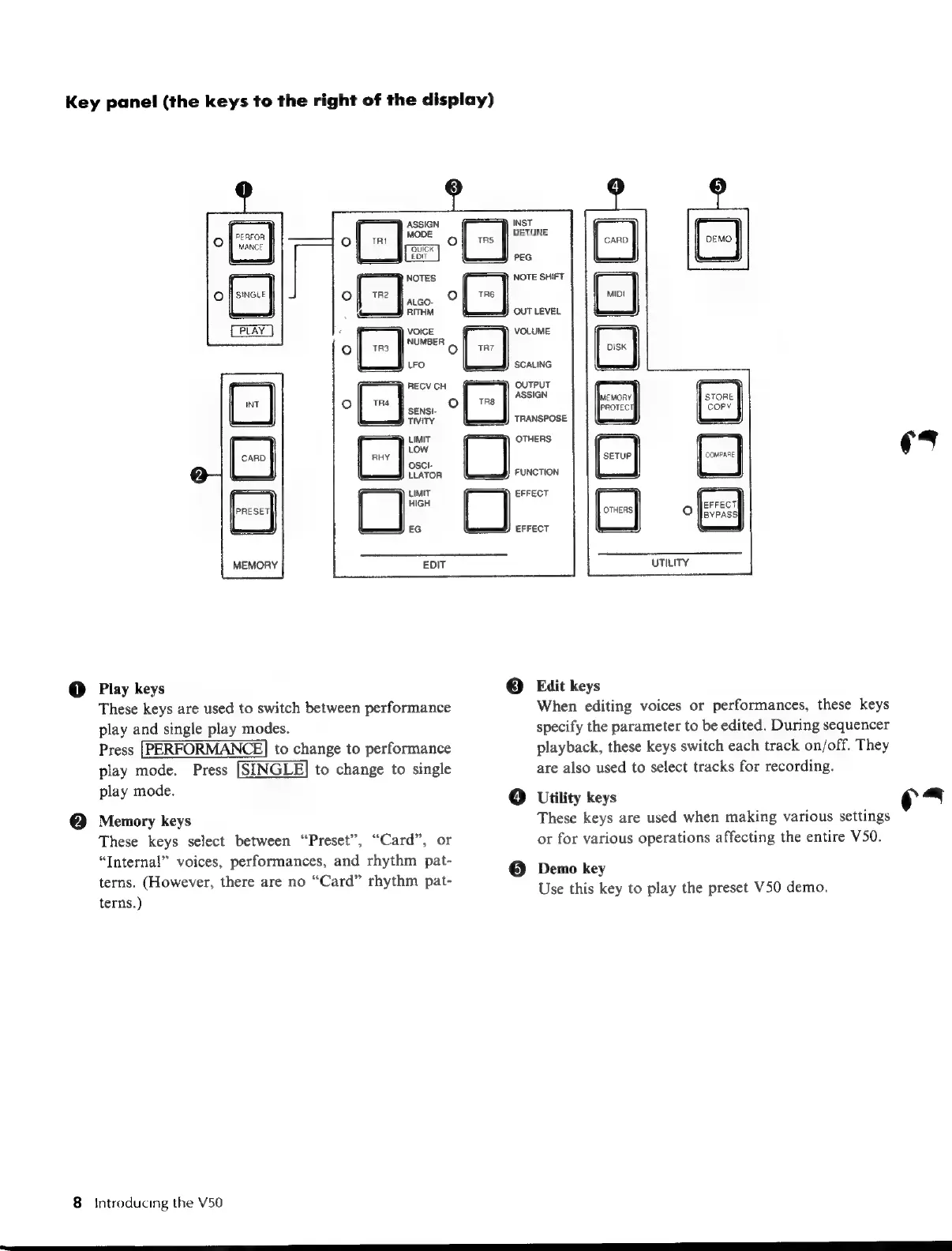
Key
panel
(the
keys
to
the
right
of
the
display)
VOICE
Ni
TR3
UMBER
LFO
@
Play
keys
These
keys
are
used
to
switch
between
performance
play
and
single
play
modes.
Press
[PERFORMANCE]
to
change
to
performance
play
mode.
Press
[SINGLE]
to
change
to
single
play
mode.
Memory
keys
These
keys
select
between
“Preset”,
“Card”,
or
“Internal”
voices,
performances,
and
rhythm
pat-
terns.
(However,
there
are
no
“Card”
rhythm
pat-
terns.)
8
Introducing
the
V50
ASSIGN
)
MODE
o
TRS
EDIT
NOTES
f
TR2
|
TRE
O
ALGO-
o
|
:
RITHM
\
INST
DETUNE
PEG
NOTE
SHIFT
OUT
ASSI
SCALING
OUTPUT
FUNCTION
EFFECT
EFFECT
LEVEL
IGN
UTILITY
©
Edit
keys
When
editing
voices
or
performances,
these
keys
specify
the
parameter
to
be
edited.
During
sequencer
playback,
these
keys
switch
each
track
on/off.
They
are
also
used
to
select
tracks
for
recording.
Utility
keys
These
keys
are
used
when
making
various
settings
or
for
various
operations
affecting
the
entire
V50.
Demo
key
Use
this
key
to
play
the
preset
V50
demo.
es
(Yam

Table of Contents

Other manuals for Yamaha V50

Related product manuals