EasyManua.ls Logo

Yamaha V50 - Page 11

Yamaha V50
81 pages
Print Icon
To Next Page IconTo Next Page
To Previous Page IconTo Previous Page
Loading...
p>
4
©
Data
entry
slider
(DATA
ENTRY/TEMPO)
This
slider
is
used
when
setting
various
data
to
enter
larger
or
smaller
numbers
or
turn
settings
off
or
on.
While
the
rhythm
machine
or
sequencer
is
playing,
this
slider
regulates
the
tempo.
Card
slot
(CARD)
This
is
the
slot
in
which
to
insert
a
RAM
or
ROM
card.
Cards
can
be
used
to
save
voice,
performance,
or
rhythm
data.
Turn
the
power
off
before
inserting
or
removing
a
card.
Key
panel
(the
keys
below
the
display)
T
(8)
Display
This
displays
the
names
of
selected
voices
or
per-
formances,
data
values,
on/off
settings,
etc.
C3
key
mark
Each
key
of
the
keyboard
has
a
name
consisting
of
an
alphabetical
character
A~G
and
a
number
—2
8
indicating
the
octave.
(For
example
G-1,
C#1,
E4,
GS,
A6,
etc.)
This
mark
indicates
the
po-
sition
of
C3.
INST_ON/OFF
ee
Ae
E
=
A
SYSTEM.
a
A
OP
SELECT
OPERATOR.
ON/OFF
2
RECORD
aw
TOP
STOP
SEQUENCER
PLAY
@
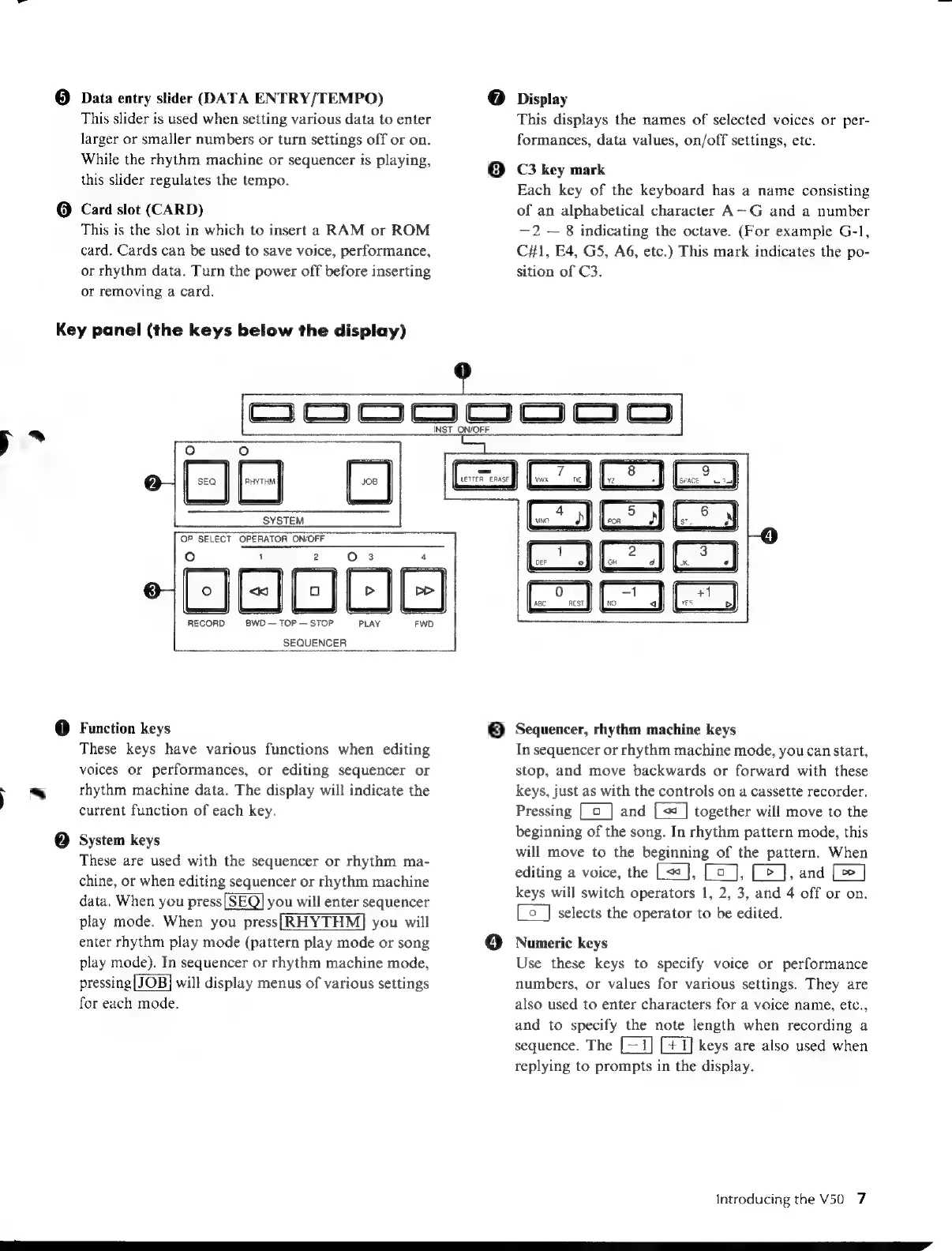
Function
keys
These
keys
have
various
functions
when
editing
voices
or
performances,
or
editing
sequencer
or
rhythm
machine
data.
The
display
will
indicate
the
current
function
of
each
key.
System
keys
These
are
used with
the
sequencer
or
rhythm
ma-
chine,
or
when
editing
sequencer
or
rhythm
machine
data.
When
you
press
you
will
enter
sequencer
play
mode.
When
you
press[|RHYTHM]
you
will
enter
rhythm
play
mode
(pattern
play
mode
or
song
play
mode).
In
sequencer
or
rhythm
machine
mode,
pressing[JOB]
will
display
menus
of
various
settings
for
each
mode.
8
es
Sequencer,
rhythm
machine
keys
In
sequencer
or
rhythm
machine
mode,
you
can
start,
stop,
and
move
backwards
or
forward
with
these
keys,
just
as
with
the
controls
on
a
cassette
recorder.
Pressing
[
o
|
and
together
will
move
to
the
beginning
of
the
song.
In
rhythm
pattern
mode,
this
will
move
to
the
beginning
of
the
pattern.
When
editing
a
voice,
the
[<<],
[co
J],
Ce],
and
[œ]
keys
will
switch
operators
1,
2,
3,
and
4
off
or
on.
Le
_]
selects
the
operator
to
be
edited.
Numeric
keys
Use
these
keys
to
specify
voice
or
performance
numbers,
or
values
for
various
settings.
They
are
also
used
to
enter
characters
for
a
voice
name,
etc.,
and
to
specify
the
note
length
when
recording
a
sequence.
The
keys
are
also
used
when
replying
to
prompts
in
the
display.
Introducing
the
V50
7

Table of Contents

Other manuals for Yamaha V50

Related product manuals