EasyManua.ls Logo

Yamaha V50 - EFFECTS; DSP Effect Types and Selection

Yamaha V50
81 pages
Print Icon
To Next Page IconTo Next Page
To Previous Page IconTo Previous Page
Loading...
EFFECTS
SCI
a
MM
=
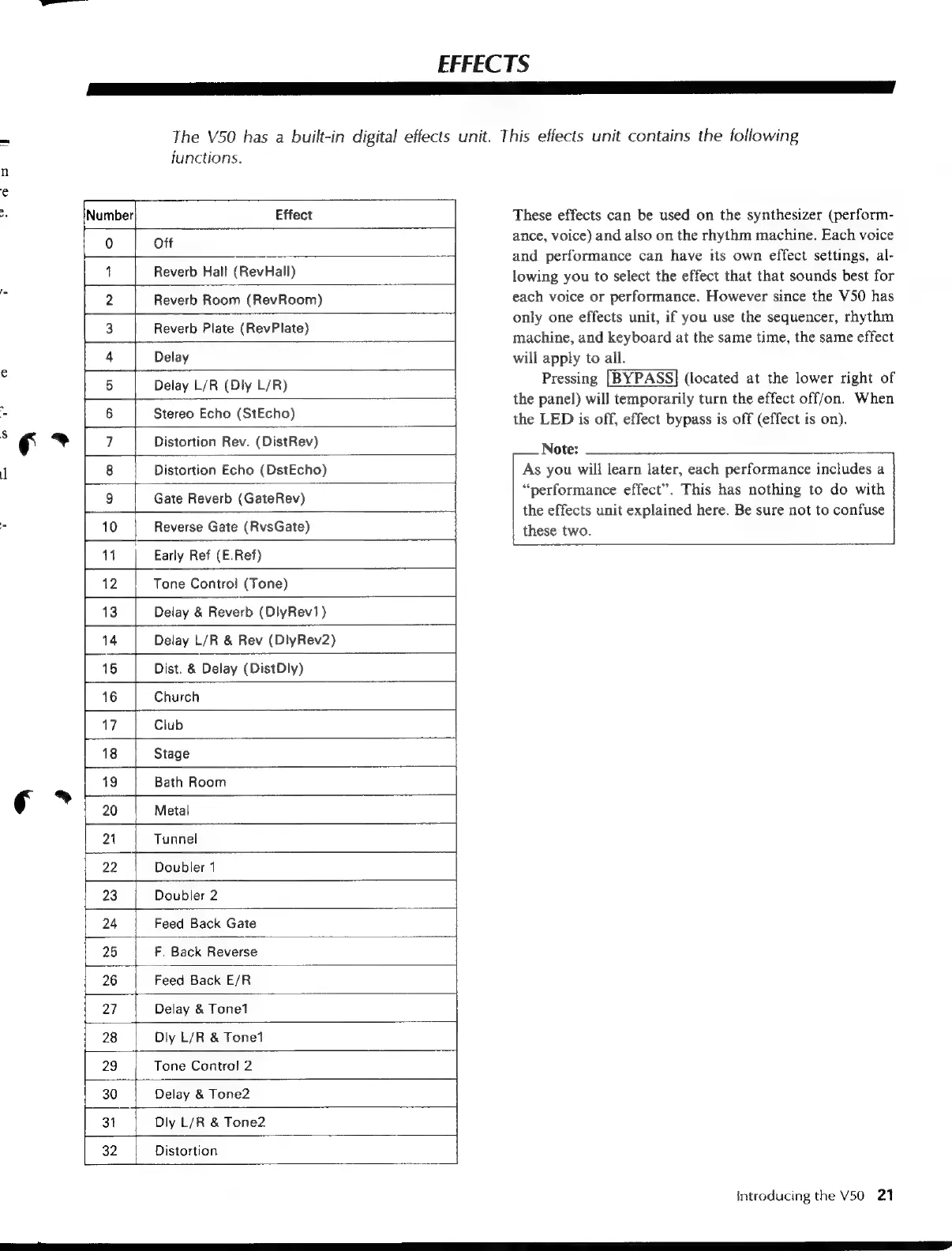
The
V50
has
a
built-in
digital
effects
unit.
This
effects
unit
contains
the
following
functions.
n
e
a
Number
Effect
These
effects
can
be
used
on
the
synthesizer
(perform-
0
Ott
ance,
voice)
and
also
on
the
rhythm
machine.
Each
voice
and
performance
can
have
its
own
effect
settings,
al-
1
Reverb
Hall
(RevHall)
lowing
you
to
select
the
effect
that
that
sounds
best
for
:
2
Reverb
Room
(RevRoom)
each
voice
or
performance.
However
since
the
V50
has
only
one
effects
unit,
if
you
use
the
sequencer,
rhythm
3
R b
Plate
(RevPlat
2
:
evere:
late:
(Revklate)
machine,
and
keyboard
at
the
same
time,
the
same
effect
4
Delay
|
will
apply
to
all.
e
5
Delay
L/R
(Diy
L/R)
|
Pressing
[BYPASS]
(located
at
the
lower
right
of
,
the
panel)
will
temporarily
turn
the
effect
off/on.
When
7
6
Stereo
Echo
(StEcho)
the
LED
is
off,
effect
bypass
is
off
(effect
is
on).
3
fF
ag
7
Distortion
Rev.
(DistRev)
Note:
1
8
Distortion
Echo
(DstEcho)
As
you
will
learn
later,
each
performance
includes
a
9
Gate
Reverb
(GateRev)
“performance
effect”.
This
has
nothing
to
do
with
the
effects
unit
explained
here.
Be
sure
not
to
confuse
3
10
Reverse
Gate
(RvsGate)
these
two.
11
Early
Ref
(E.Ref)
Tone
Control
(Tone)
Delay
&
Reverb
(DlyRev1)
Delay
L/R
&
Rev
(DlyRev2)
Dist.
&
Delay
(DistDly)
Church
17
Club
18
Stage
19
Bath
Room
e>
20
Metal
21
Tunnel
22
Doubler
1
23
Doubler
2
24
Feed
Back
Gate
25
F.
Back
Reverse
26
Feed
Back
E/R
27
Delay
&
Tone1
28
Dly
L/R
&
Tone1
29
|
Tone
Control
2
30
Delay
&
Tone2
31
Diy
L/R
&
Tone2
32
Distortion
Introducing
the
V50
21

Table of Contents