INSTALLATION INSTRUCTIONS AND FIRST-TIME SET-UP
Axio Observer Fitting the microscope stages ZEISS
12/2016 431004-7244-001 47
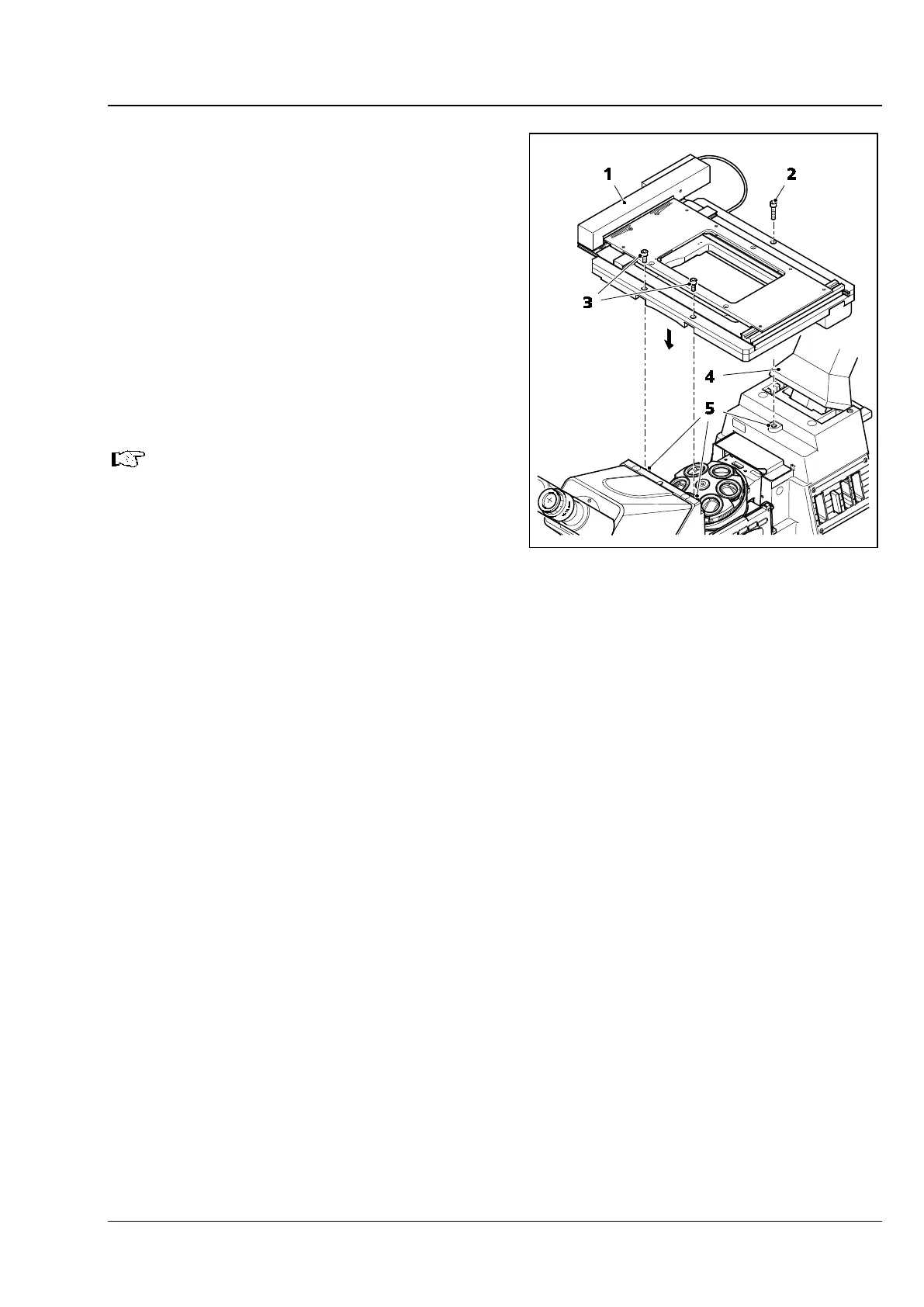
4.9.3 Fitting the scanning stage 130x100
STEP
Scanning stage 130x100 STEP rests directly on
three contact points which have drilled screw holes
for fastening.
• To improve access during stage assembly, the
carrier for transmitted-light illumination
(Fig. 26/4) (if fitted) can be tilted backwards.
• Place the scanning stage 130x100 STEP
(Fig. 26/1) on the three contact points
(Fig. 26/5) of the stand and fix it in position
using three Allen screws (two at the front
(Fig. 26/3), one at the rear (Fig. 26/2)).
All stands and stages are supplied with
appropriate spacer disks.
If using flat mounting frames which are
flush to the stage (e.g. 451344) and
160x110 stage pinhole apertures (e.g.
451345-
9902) do not use spacer disks
(in case of mechanical and scanning
stages)!
Fig. 26 Fitting the scanning stage 130x100









 To Next Page