GETTING TO KNOW YOUR TV
VERTICAL CONTROL PANEL
The following description applies to models havinga verti-
cal control paneL
lk,.J !,.=J
.-T-L
VOI..UME I
VOLUME I
MENU I_ ,_
SELECTI-- ,_
ENTERI-,- -_
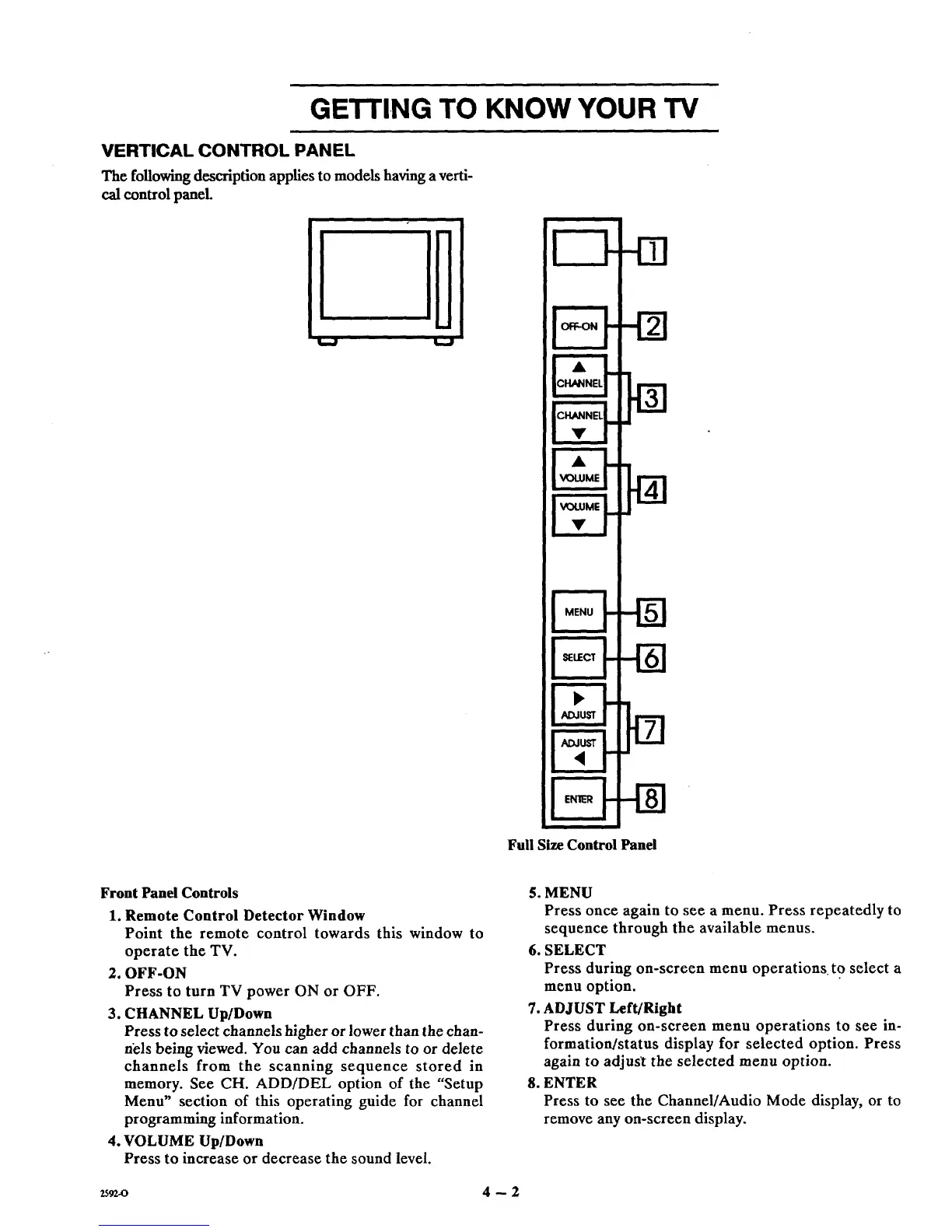
Full Size Control Panel
Front Panel Controls
1. Remote Control Detector Window
Point the remote control towards this window to
operate the TV.
2. OFF-ON
Press to turn TV power ON or OFF.
3. CHANNEL Up/Down
Press to select channels higher or lower than the chan-
nels being viewed. You can add channels to or delete
channels from the scanning sequence stored in
memory. See CH. ADD/DEL option of the "Setup
Menu" section of this operating guide for channel
programming information.
4. VOLUME Up/Down
Press to increase or decrease the sound level.
5. MENU
Press once again to see a menu. Press repeatedly to
sequence through the available menus.
6. SELECT
Press during on-screen menu operations to select a
menu option.
7. ADJUST Left/Right
Press during on-screen menu operations to see in-
formation/status display for selected option. Press
again to adjus_t the selected menu option.
8. ENTER
Press to see the Channel/Audio Mode display, or to
remove any on-screen display.
2592-0 4 -- 2



 To Next Page