P- NNI=CTIONS FOR YOUR TV
STEP 1. MAKE BASIC CONNECTION TO TV
There are four basic hook ups to your TV; outdoor antenna
(or master antenna) with or without VCR, and cable-TV
system with or without VCR. Select the hook up that best
fits your needs. See the following diagrams.
Your connection is made to the ANTENNA/CABLE jack
on the back of the TV. This jack accepts 75-ohm cable ter-
minated in an F-type male connector. You may want to do
the hook-up yourself, or call a TV service technician, or a
cable company.
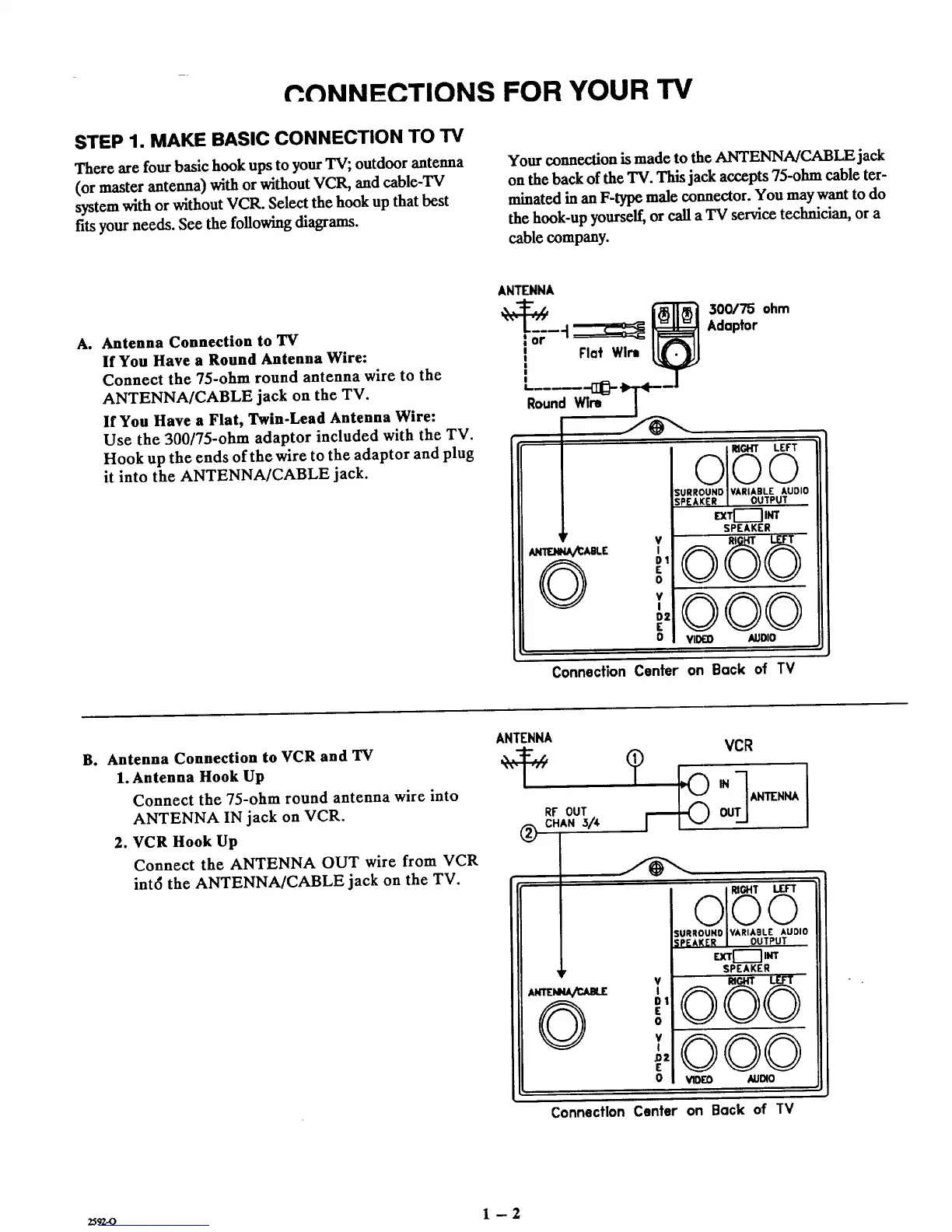
A. Antenna Connection to TV
If You Have a Round Antenna Wire:
Connect the 75-ohm round antenna wire to the
ANTENNA/CABLE jack on the TV.
If You Have a Flat, Twin-Lead Antenna Wire:
Use the 300/75-ohm adaptor included with the TV.
Hook up the ends of the wire to the adaptor and plug
it into the ANTENNA/CABLE jack.
ANTENNA
i Flat Wirt
!
I
I
RoundWlm
300/75 ohm
Adaptor
qr V
°'
E
0
¥
!
D2
E
C
RIGHT LEFT
©©©
SURROUND VARIABLE AUDIO
SPEAKER OUTPUT
IEXTI--_IINT
SPEAKER
000
VID£_O AUDIO
Connection Center on Back of TV
B. Antenna Connection to VCR and TV
1. Antenna Hook Up
Connect the 75-ohm round antenna wire into
ANTENNA IN jack on VCR.
2. VCR Hook Up
Connect the ANTENNA OUT wire from VCR
int6 the ANTENNA/CABLE jack on the TV.
ANTENNA
RF OUT
c.A._/,
v
I
DZ
E
o
o1 6
IURROUNO IVARIAILE AUDIO
SPEAKER I OUTPUT
EXT[--_'J INT
SPEAKER
©©©
V_EO AUDqO
Connection Center on Back of IV
25920 1 - 2



 To Next Page