REMOTE CONTROL MBR3420
INTRODUCTION
The multi-brand remote control supplied with your new
Zenith TV allows you to operate most models of infra-red
(IR) remote-controlled TVs, VCRs, and cable-TV
decoders, even if they are all different brands. In this way, it
takes the place of the several remote controls previously
needed.
Your multi-brandremote hasalready been programmedto
operate yournew Zenith TV, a Zenith manufacturedcable-
TV decoder and a Zenith VHS VCR. It mustbe
programmedto operate other brandsof equipment.
The followinginstructionsare for operation ofZenith
equipment.The instructions for using this remotewith
non-Zenithequipment are in the section entitled "Program-
ming the RemoteControl".
CHOOSING OPERATING MODE
To use the remote to operate your TV, a cable-TV decoder
or a VCR, you must first choose the mode of operation of
the remote control. To select the TV, CABLE or VCR
mode of operation, press MODE repeatedly until the cor-
responding indicator lights.
Some controls on the remote, like PLAY and VOLUME,
will always operate the VCR or the TV. Whether other keys
operate the "IV or the VCR depends on which mode of
operation the remote control is in. For example, OFF-ON
will turn the VCR on and off while the remote control is in
the VCR mode. It will turn the TV on or off while the
remote control is in TV mode.
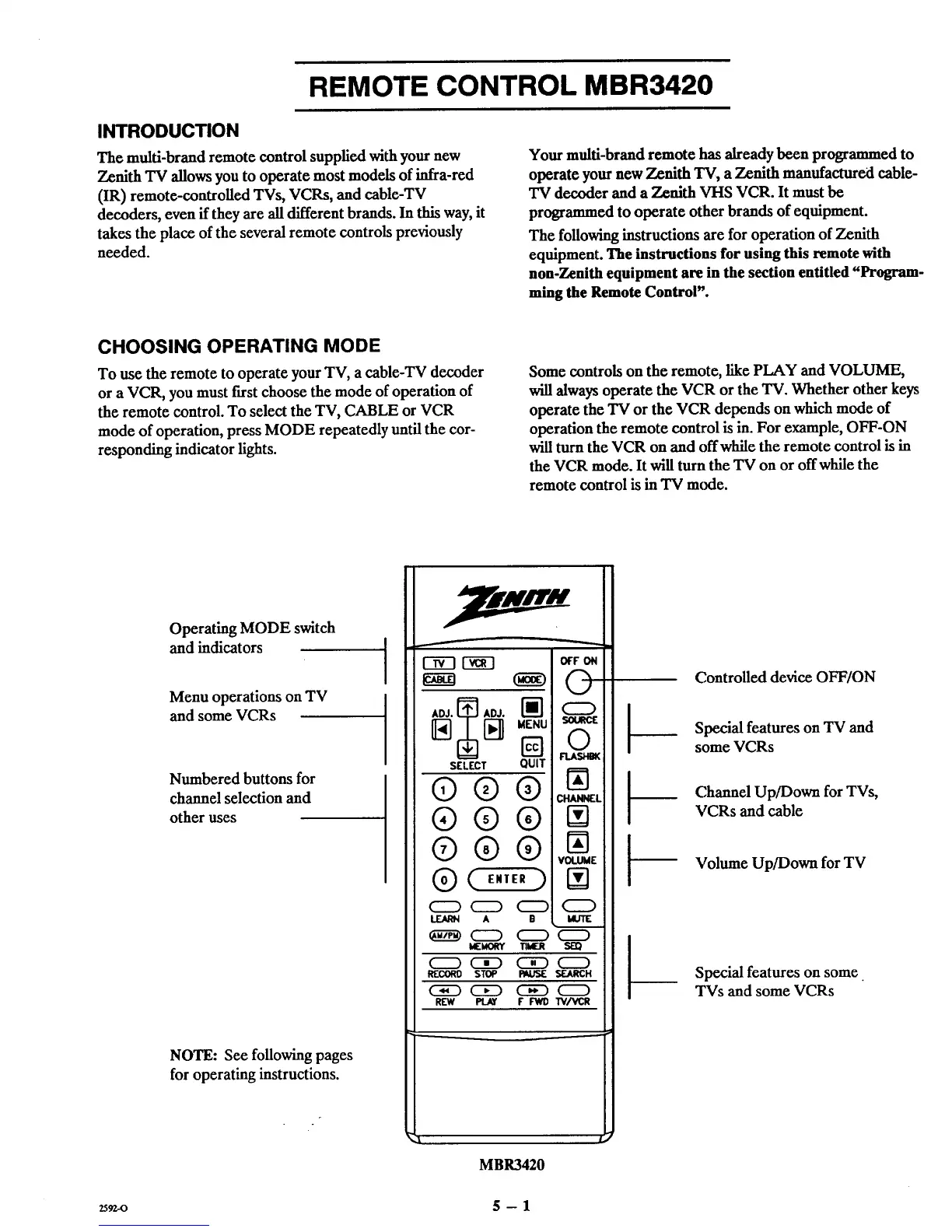
Operating MODE switch
and indicators
Menu operations on TV
and some VCRs
Numbered buttons for
channel selection and
other uses
NOTE: See following pages
for operating instructions.
f
C5E3 _--q
SELECT QUIT
Q®®
®®®
®®®
® ( E,,E,)
C:D C:D C:D
LEARN A B
_ C:D C:D
MEMORY
C:D Ci) CED
R[OORO STOP P_USE
REW PLAY F'FWD
OFF ON
©
©
FLASI.EIK
VOLUME
Q
SEARCH
W/VCR
t-
t-
Controlled device OFF/ON
Special features on TV and
some VCRs
Channel Up/Down for TVs,
VCRs and cable
Volume Up/Down for TV
Special features on some
TVs and some VCRs
MBR3420
2592.o 5 -- 1



 To Next Page