CONNECTIONS FOR YOUR TV
CONNECTION CENTER ON BACK OF TV
The connection center on the rear of your TV allows you to
connect three viewing sources to your TV, and an external
stereo sound amplifier, if desired. You can choose from a
variety of audiotvideo components for your viewingffisten-
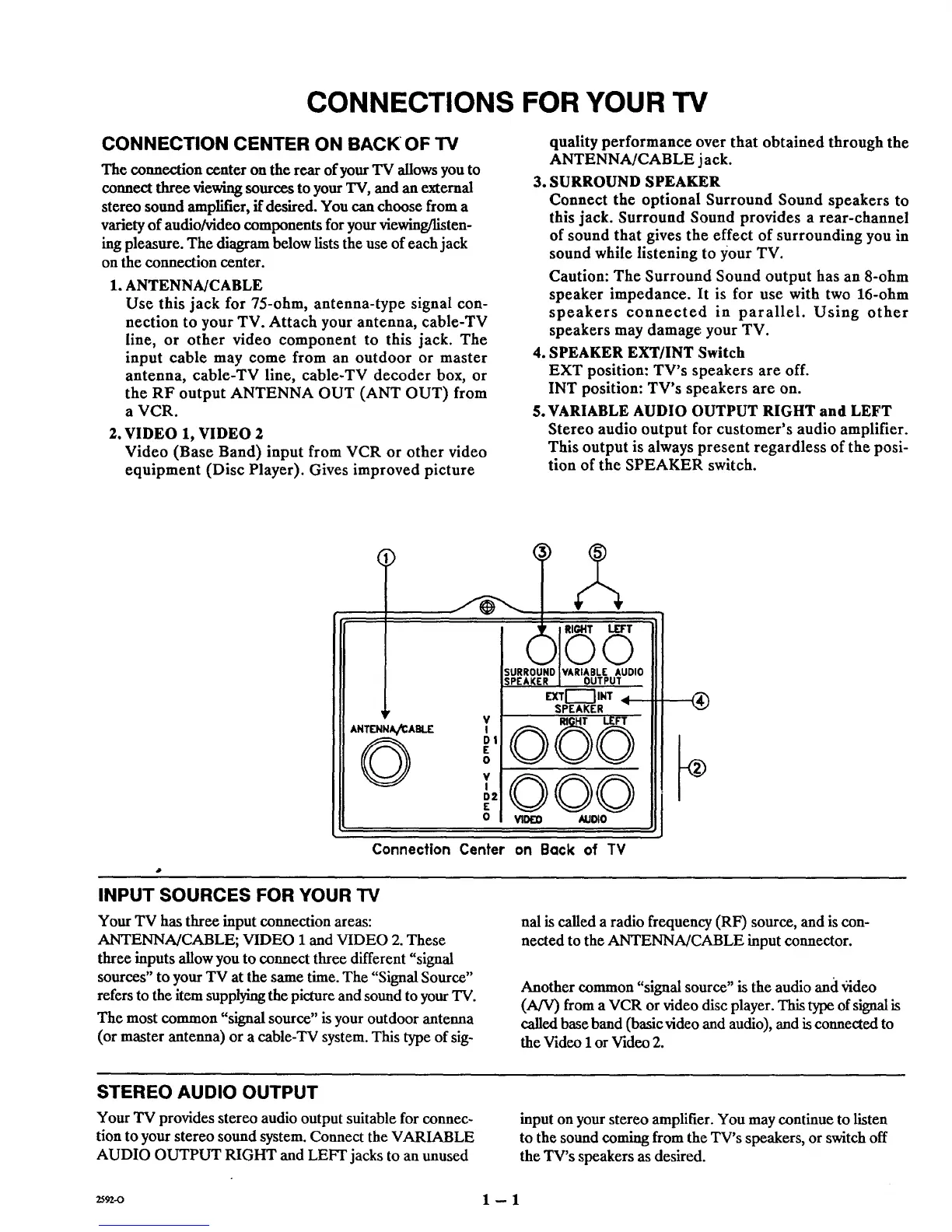
hag pleasure. The diagram below lists the use of each jack
on the connection center.
1. ANTENNA/CABLE
Use this jack for 75-ohm, antenna-type signal con-
nection to your TV. Attach your antenna, cable-TV
line, or other video component to this jack. The
input cable may come from an outdoor or master
antenna, cable-TV line, cable-TV decoder box, or
the RF output ANTENNA OUT (ANT OUT) from
a VCR.
2. VIDEO 1, VIDEO 2
Video (Base Band) input from VCR or other video
equipment (Disc Player). Gives improved picture
quality performance over that obtained through the
ANTENNA/CABLE jack.
3. SURROUND SPEAKER
Connect the optional Surround Sound speakers to
this jack. Surround Sound provides a rear-channel
of sound that gives the effect of surrounding you in
sound while listening to your TV.
Caution: The Surround Sound output has an 8-ohm
speaker impedance. It is for use with two 16-ohm
speakers connected in parallel. Using other
speakers may damage your TV.
4. SPEAKER EXT/INT Switch
EXT position: TV's speakers are off.
INT position: TV's speakers are on.
5. VARIABLE AUDIO OUTPUT RIGHT and LEFT
Stereo audio output for customer's audio amplifier.
This output is always present regardless of the posi-
tion of the SPEAKER switch.
¶r
AN_N_ABLIE
©
RIGHT L.ET'T
©©
SURROUND ' VARIABLE AUDIO
SPEAKER OUTPUT
= LrXT[---'] INT.,
SPEAKER
v ©©
'©
DI
E
o
v,000
D2
E
0 riled AUDIO
®
Connection Center on Back of TV
INPUT SOURCES FOR YOUR TV
Your TV has three input connection areas:
ANTENNA/CABLE; VIDEO 1 and VIDEO 2. These
three inputs allow you to connect three different "signal
sources" to your TV at the same time. The "Signal Source"
refers to the item supplying the picture and sound to your TV.
The most common "signal source" is your outdoor antenna
(or master antenna) or a cable-TV system. This type of sig-
hal is called a radio frequency (RF) source, and is con-
nected to the ANTENNA/CABLE input connector.
Another common "signal source" is the audio and "bideo
(A/V) from a VCR or video disc player. This type of signal is
called base band (basic video and audio), and is connected to
the Video 1 or Video 2.
STEREO AUDIO OUTPUT
Your TV provides stereo audio output suitable for connec-
tion to your stereo sound system. Connect the VARIABLE
AUDIO OUTPUT RIGHT and LEFT jacks to an unused
input on your stereo amplifier. You may continue to listen
to the sound coming from the TV's speakers, or switch off
the TV's speakers as desired.
2592-o 1 -- 1



 To Next Page