SOURCE MENU
TO SELECT A SOURCE
You select the source you want by selecting the SOURCE
Menu. It shows the possible sources available for your view-
ing selection.
To Access the SOURCE Menu Directly
1. Press SOURCE on the remote control to bring up
the SOURCE Menu.
2. Press SOURCE repeatedly until the source you
want is highlighted.
3. Press ENTER to return to normal viewing.
To Access the SOURCE Menu Indirectly
1. Press MENU until the SOURCE Menu is displayed.
2. Press SELECT Up/Down until the desired source is
highlighted.
3. Press ENTER to return to normal viewing.
SOURCE IDENTIFICATION
The Channel/Audio Mode display is used to determine the
input source currently being viewed. To see the Chan-
nel/Audio Mode display, press ENTER. If an antenna or
cable-TV source is being viewed, the Channel/Audio Mode
display is shown in the Channel Number/Time format. If a
VIDEO 1 or VIDEO 2 source is being viewed, the Chan-
nel/Audio Mode display shows VIDEO 1 or VIDEO 2.
NOTE: The sources are identified by color in both the dis-
plays and on the connection center on the back of the TV.
The color for the Channel/Audio Mode display will match
the color of the source you are watching.
'SOURCE MENU
ANT/CABLE
VIDEO 1
VIDEO 2
SOURCE EQUIPMENT CONNECTIONS
The actual source selected for viewing on your TV depends
on how the TV is connected to external equipment.
Selecting ANT/CABLE from the SOURCE Menu: Routes
the ANTENNA/CABLE source to the TV for viewing. You
see program material from the signal source that is con-
nected to the ANTENNA/CABLE jack. Usually the anten-
na is connected to the ANTENNA/CABLE jack. In cable
applications, the output from a cable-TV decoder is con-
nected to this jack. For VCR application, the ANT OUT
from the VCR is connected to this jack.
Selecting VIDEO 1 or 2 from SOURCE Menu: Routes the
video source output (such as a VCR or a Video Disc
player) to the TV for viewing. These video sources must be
connected to corresponding \qDEO 1 or VIDEO 2 jacks.
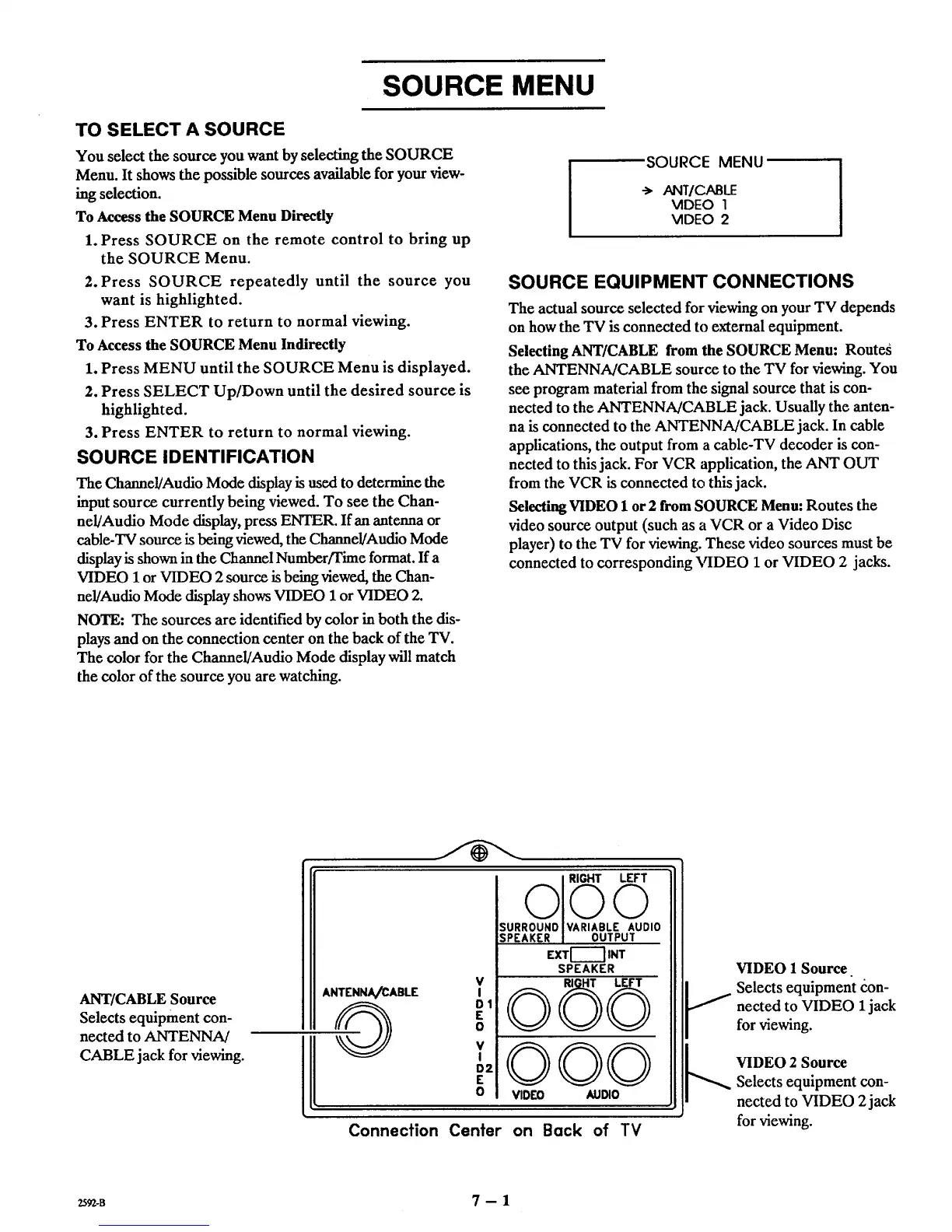
ANT/CABLE Source
Selects equipment con-
nected to ANTENNA/
CABLE jack for viewing.
V
ANTENNA/CABLE I
__0 °'
£
o
V
I
D2
E
o
SURROUNOIYARIABLE AUDIO
SPEAKER I OUTPUT
EXTI-_'_ INT
SPEAKER
©©©
QOO
VIDED AUDIO
Connection Center on Back of TV
VIDEO 1 Source
_i elects equipment _:on-
nected to VIDEO 1jack
for viewing.
_._ VIDEO 2 SourceSelects equipment con-
nected to VIDEO 2jack
for viewing.
ZS92-B 7 - 1



 To Next Page