MAINTENANCE AND TROUBLESHOOTING
VCR MODE CHART 2. OUTPUT TO TV FROM AUDIO/VIDEO JACKS ON VCR
START
HERE
VCR POWER
IS OFF
)
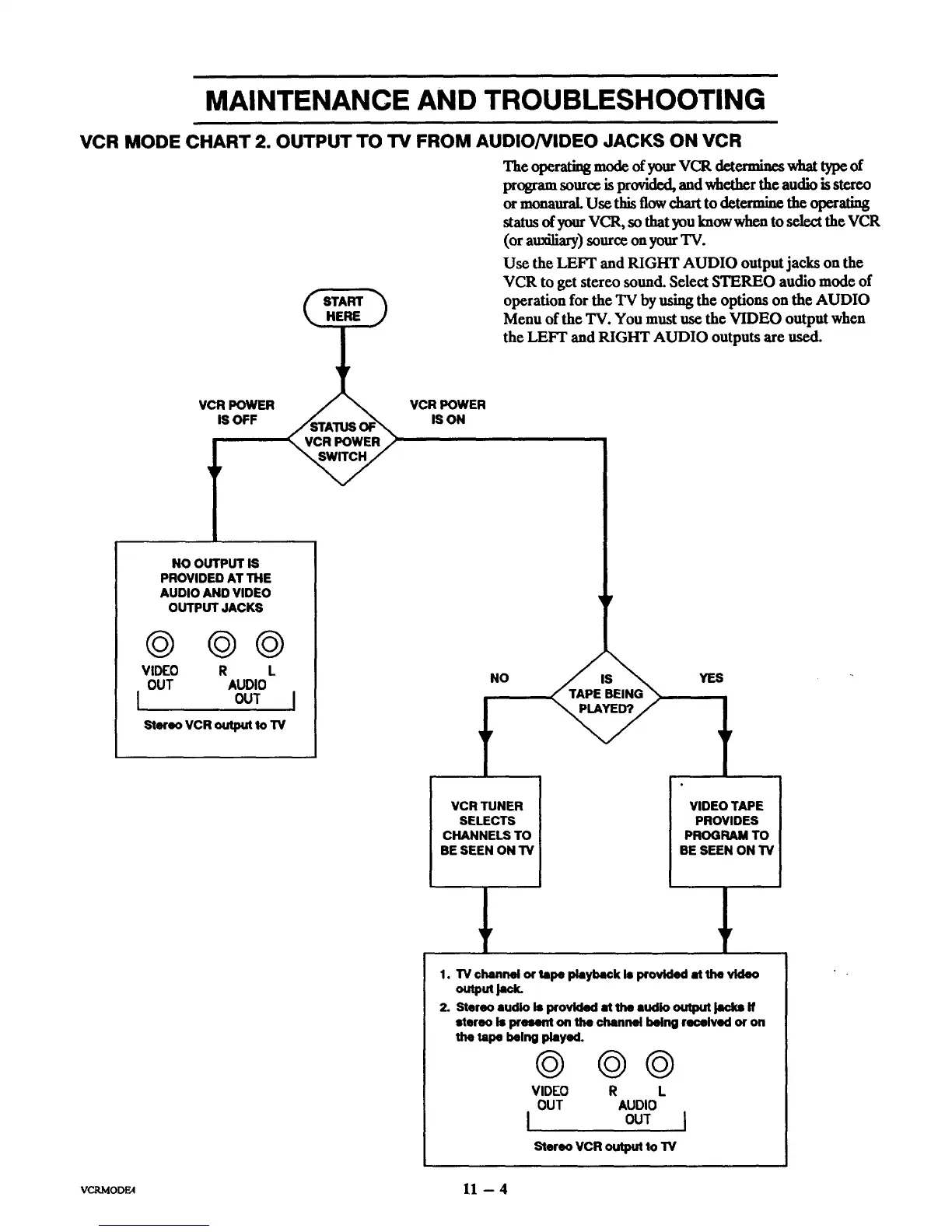
The operating mode of your VCR determiacswhat ty_ of
program sourc_ is provided, andwhe_r the audio is stereo
ormonaural. Use this flow chart to det_ue the operating
status of your VCR, so that you know when to select the VCR
(orau_l_'y) source on yourTV.
Usc the LEFT and RIGHT AUDIO output jacks on the
VCR to get stereo sound. Select STEREO audio mode of
operation for the TV by ushlg the options on the AUDIO
Menu of the TV. You must use the VIDEO output when
the LEFT and RIGHT AUDIO outputs are used.
VCR POWER
IS ON
NO OUTPUT IS
PROVIDED AT THE
AUDIO AND VIDEO
OUTPUT JACKS
@@@
VIDEO R L
OUT AUDIO
[ OUT
Stereo VCR output to TV
NO YES
VCRTUNER
SELECTS
CHANNELS TO
BE SEEN ON'FV
VIDEOTAPE
PROVIDES
PROGRAM TO
BE SEEN ON TV
_Y _V
1. TV channel or tape playback Is provided at the video
outputI=_
2. Stereo audio is provided at the audio output Jacks if
stereo is present on the channel being received or on
the tape being played.
©
VIDEO
OUT
I,
@@
R L
AUDIO
OUT I
Stereo VCR output to TV
VCRMODE4 U -- 4



 To Next Page