REMOTE CONTROL MBR3420
PREPARATION FOR USE
Batteries are provided with this remote, but you must install
them before using the remote.
INSTALLING BATTERIES
When the effective operating range of your remote becomes
noticeably shorter, replace the batteries with two (2) high
quality, alkaline, size AAA batteries. Do the following:
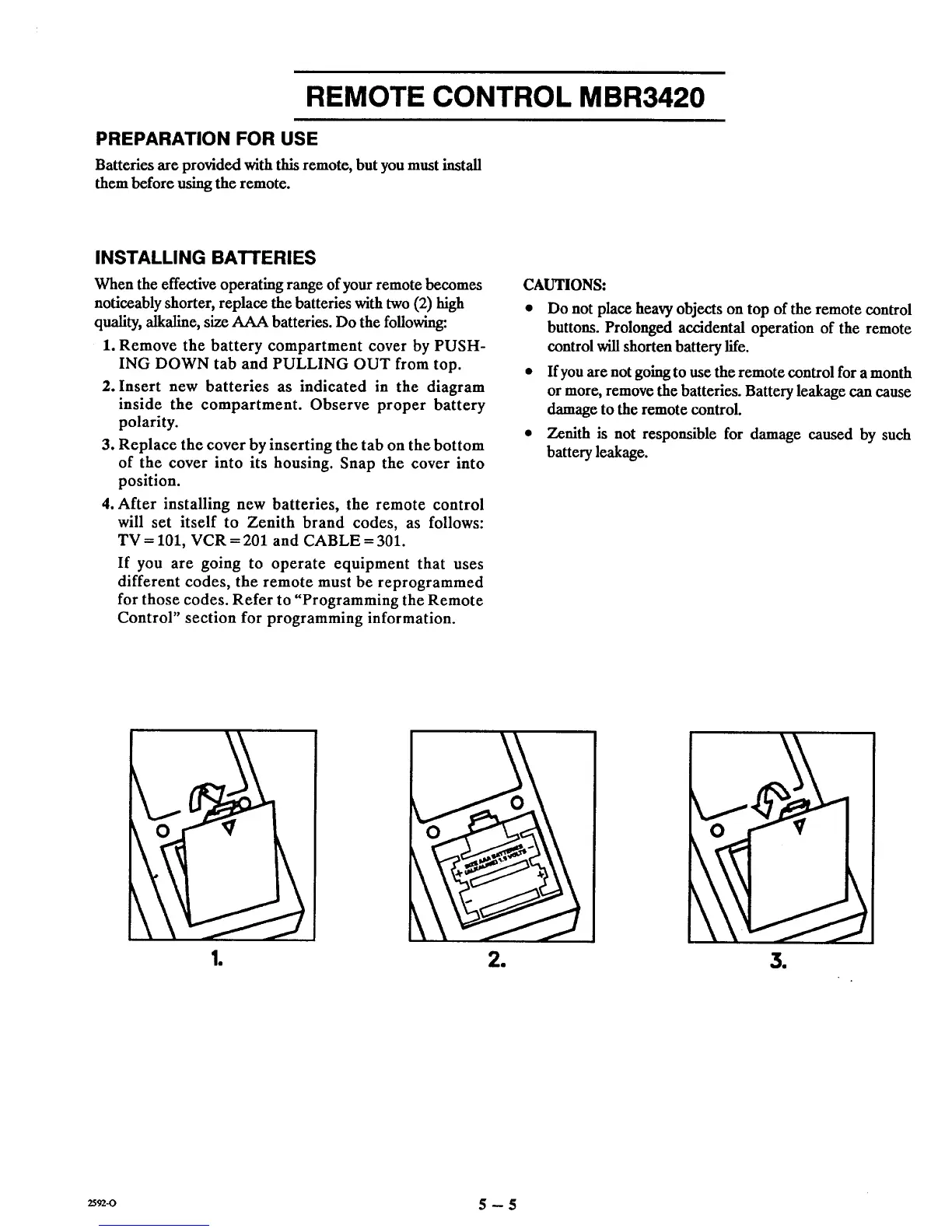
1. Remove the battery compartment cover by PUSH-
ING DOWN tab and PULLING OUT from top.
2. Insert new batteries as indicated in the diagram
inside the compartment. Observe proper battery
polarity.
3. Replace the cover by inserting the tab on the bottom
of the cover into its housing. Snap the cover into
position.
4. After installing new batteries, the remote control
will set itself to Zenith brand codes, as follows:
TV = 101, VCR = 201 and CABLE = 301.
If you are going to operate equipment that uses
different codes, the remote must be reprogrammed
for those codes. Refer to "Programming the Remote
Control" section for programming information.
CAUTIONS:
• Do not place heavy objects on top of the remote control
buttons. Prolonged accidental operation of the remote
control will shorten battery life.
• Ifyou are not going to use the remote control for a month
or more, remove the batteries. Battery leakage can cause
damage to the remote control.
• Zenith is not responsible for damage caused by such
battery leakage.
Re
e
1
_-o 5 -- 5



 To Next Page