SETUP MENU
CH. LABELS
This option allows you to show a channel "name" each time
the channel display appears on the TV. In other words,
each time the cable-TV channel HBO is tuned, "HBO" can
appear in the channel display. Therefore, you always know
what channel you are watching.
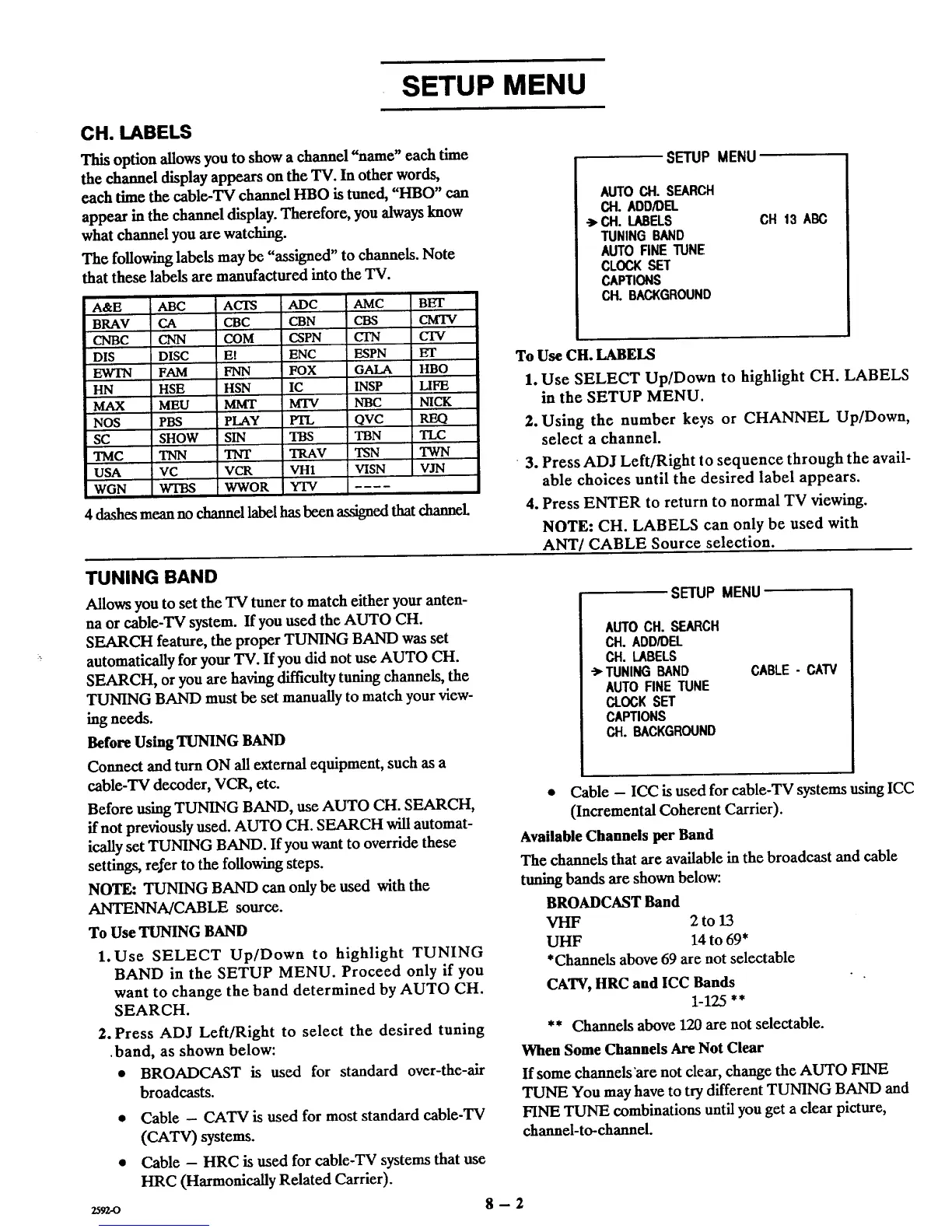
The following labels may be "assigned" to channels. Note
that these labels are manufactured into the TV.
A&E ABC
BRAV CA
CNBC CNN
DIS DISC
EWTN FAM
HN HSE
MAX MEU
NOS PBS
SC SHOW
TMC TNN
USA VC
WGN WTBS
ACTS ADC AMC BET
CBC CBN CBS CMTV
COM CSPN CIN CTV
Et ENC ESPN ET
FNN FOX GALA HBO
HSN IC INSP LIFE
MMT MTV NBC NICK
PLAY _ OVC
SIN TBS TBN TLC
TNT TRAV TSN TWN
VCR VH1 V[SN VJN
WWOR YTV
4 dashes mean no channel label hasbeen assigned thatchannel
SETUP MENU
AUTO CH. SEARCH
CH. ADD/DEL
->.CH. LABELS
TUNING BAND
AUTO RNE TUNE
CLOCK SET
CAPTIONS
CH. BACKGROUND
CH 13 ABC
To Use CH. LABELS
1. Use SELECT Up/Down to highlight CH. LABELS
in the SETUP MENU.
2. Using the number keys or CHANNEL Up/Down,
select a channel.
"3. Press ADJ Left/Right to sequence through the avail-
able choices until the desired label appears.
4. Press ENTER to return to normal TV viewing.
NOTE: CH. LABELS can only be used with
ANT/CABLE Source selection.
TUNING BAND
Allows you to set the TV tuner to match either your anten-
na or cable-TV system. If you used the AUTO CH.
SEARCH feature, the proper TUNING BAND was set
automatically for your TV. If you did not use AUTO CH.
SEARCH, or you are having difficulty tuning channels, the
TUNING BAND must be set manually to match your view-
ing needs.
Before Using TUNING BAND
Connect and turn ON all external equipment, such as a
eable-TV decoder, VCR, etc.
Before using TUNING BAND, use AUTO CH. SEARCH,
if not previously used. AUTO CH. SEARCH will automat-
ieally set TUNING BAND. If you want to override these
settings, refer to the following steps.
NOTE: TUNING BAND can only be used with the
ANTENNA/CABLE source.
To Use TUNING BAND
1. Use SELECT Up/Down to highlight TUNING
BAND in the SETUP MENU. Proceed only if you
want to change the band determined by AUTO CH.
SEARCH.
2. Press ADJ Left/Right to select the desired tuning
•band, as shown below:
• BROADCAST is used for standard over-the-air
broadcasts.
• Cable - CATV is used for most standard cable-TV
(CATV) systems.
• Cable - HRC is used for cable-TV systems that use
HRC (Harmonically Related Carrier).
SETUP MENU
AUTOCH. SEARCH
CH. ADD/DEL
CH. LABELS
"> TUNING BAND
AUTO FINE TUNE
CLOCK SET
CAPTIONS
CH. BACKGROUND
CABLE - CAW
• Cable - ICC is used for cable-TV systems using ICC
(Incremental Coherent Carrier).
Available Channels per Band
The channels that are available in the broadcast and cable
tuning bands are shown below:
BROADCAST Band
VHF 2 to 13
UHF 14 to 69*
*Channels above 69 are not selectable
CATV, HRC and ICC Bands
1-125 **
** Channels above 120are not selectable.
When Some Channels Are Not Clear
If some channels "arenot clear, change the AUTO FINE
TUNE You may have to try different TUNING BAND and
FINE TUNE combinations until you get a clear picture,
channel-to-channel.
2592-0 8-2



 To Next Page