CONNECTIONS FOR YOUR TV
STEP 2. MAKE VCR CONNECTIONS TO TV
STEREO VCR
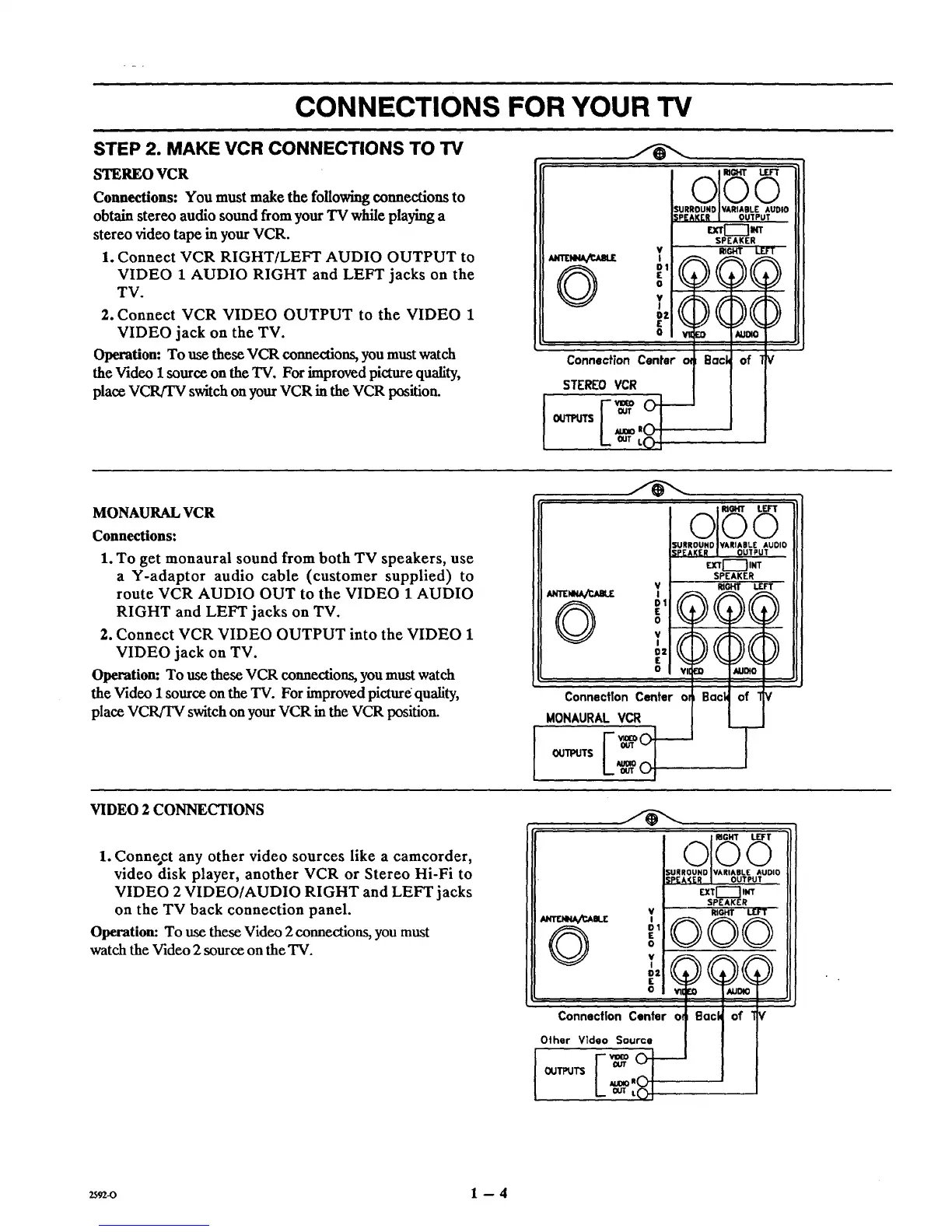
Connections: You must make the following connections to
obtain stereo audio sound from your "IVwhile playing a
stereo video tape in your VCR.
1. Connect VCR RIGHT/LEFT AUDIO OUTPUT to
VIDEO 1 AUDIO RIGHT and LEFT jacks on the
TV.
2. Connect VCR VIDEO OUTPUT to the VIDEO 1
VIDEO jack on the TV.
Operation: To use these VCR connections, you must watch
the Video 1 source on the TV. For improved picture quality,
place VCR/TV switch on your VCR in the VCR position.
©
Connection Center €_
STEREOVCR
[u[ VA_IA.'EOUT,UT..O,O
1 RIGHT LEFT
;()()()
o vii [o t_Jl_o
Sack of t €
-40.m
OUT
o!.m_ffs
. OUT L_
MONAURAL VCR
Connections:
1. To get monaural sound from both TV speakers, use
a Y-adaptor audio cable (customer supplied) to
route VCR AUDIO OUT to the VIDEO 1 AUDIO
RIGHT and LEFT jacks on TV.
2. Connect VCR VIDEO OUTPUT into the VIDEO 1
VIDEO jack on TV.
Operation: To use these VCR connections, you must watch
the Video 1 source on the TV. For improved picture quality,
place VCR/TV switch on your VCR in the VCR position.
VIDEO 2 CONNECTIONS
1. Connect any other video sources like a camcorder,
video disk player, another VCR or Stereo Hi-Fi to
VIDEO 2 VIDEO/AUDIO RIGHT and LEFT jacks
on the TV back connection panel.
Operation: To use these Video 2 connections, you must
watch the Video 2 source on the TV.
©
ol G
$URROUND IVARIAILE AUDIO
SPEAKER I OUTPUT
QII"_-'_ INT
SPEAKER
V RIGHT L£FT
I
o
OE . AUDIO
ConnectionCentero=
MONAURALVCR
i E:.oOl-
SURROUND IVARIABLE AUDIO
SPEAKER I OUTPUT
EXTr'-'--'IlNT
SPEAKER
V RIGHT LEFT
,,,(,)()( )
0 'Illl _1 AU°_
Connection Center otl Back of ]
Other Vldeo Source
2592-0 1 -- 4



 To Next Page