Option Installation
68 025-9227S
appropriate channels. If the characters are “N0”, your Model 4010 did not recognize any
ANI board and will not communicate with it. Make sure the ANI board is properly
installed, reset the Model 4010 by cycling power, and try again. If the display still
indicates “N0” or the wrong number of ANI decoders, contact Zetron.
Configuration
For ANIs to be buffered and displayed by the Model 4010, the ANI REVIEW function
must be assigned to a console key (usually on the system key panel) using CPSW. Other
useful functions to program are ANI SOURCE and ANI SELECT. Refer to ANI Decode/
Display on page 97 for complete details.
Jumper and Switch Settings
5/6 Tone Decoder Jumpers
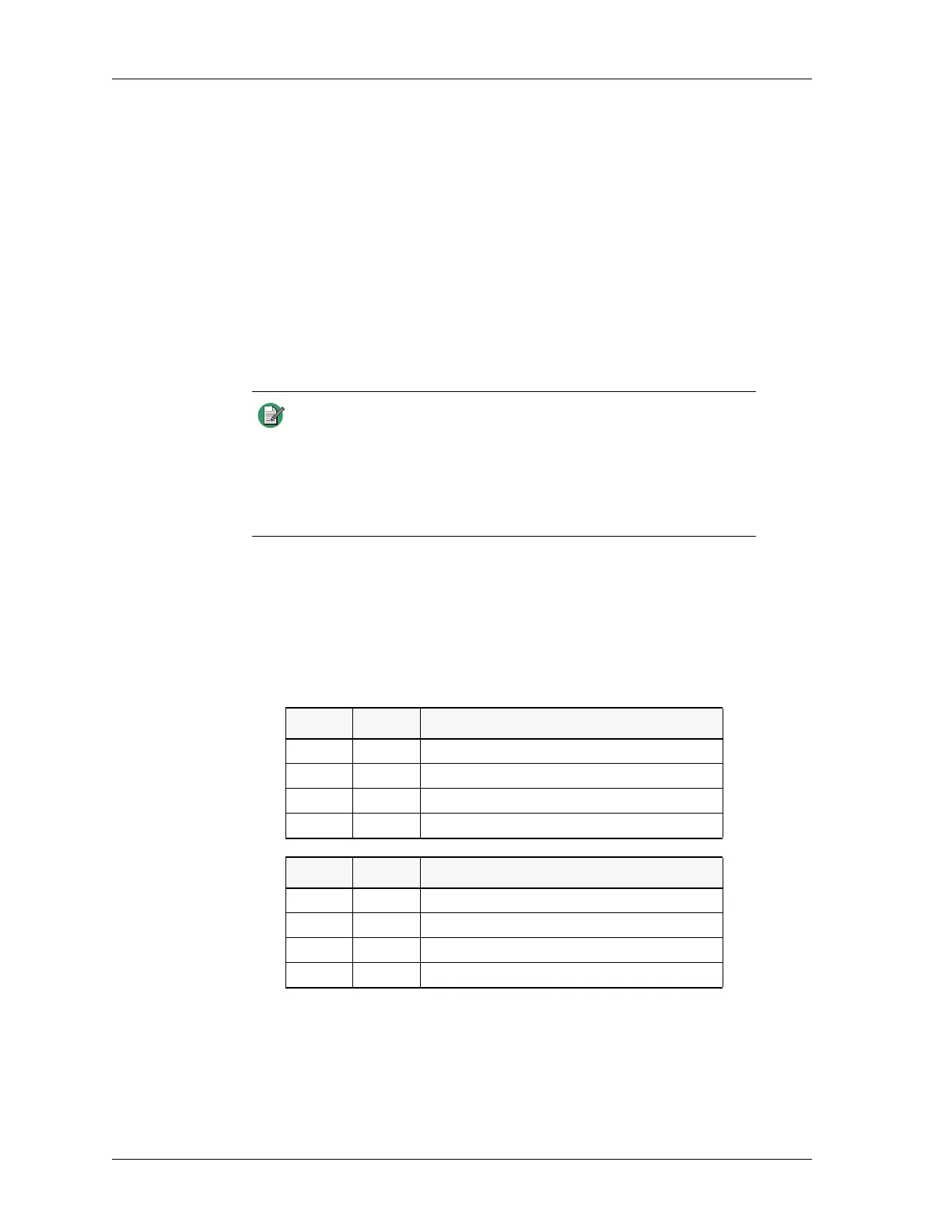
The jumpers JP1 and JP2 are used for 5/6 tone decoding only. The standard setting is both
jumpers in position B.
FSK Tone Decoder Jumper and Switch
JP3 shorts out the incoming audio stream, disabling the ANI decode. This would normally
be left open.
The SW1 4-position bitswitch is not used.
Note The Model 4010 is able to decode only the unit identification in a
PTT-ID. ANIs that are configured with fleet or group designation
separated by a dash from the unit ID cannot be displayed on the
4010 LCD. Therefore, end users who have multiple fleet/group IDs
need to insure that the Unit IDs assigned in one fleet/group are not
duplicated in another or there may be confusion as to the source of
the call.
JP1 JP2 ZVEI Formats (950-9707)
B B ZVEI where repeat digit = 2600 Hz
B A DZVEI where repeat digit = 2400 Hz
A B ZVEI-2 where repeat digit = 970 Hz
A A Ignore ANIs
JP1 JP2 CCIR Formats (950-9708)
B B CCIR/EEA
B A Ignore ANIs
A B Ignore ANIs
A A Ignore ANIs


 To Next Page