59
Model 4010 Auxiliary I/O Card
The sequence will continue for as many I/O boards as are installed.
Connector Pinout
The location of the auxiliary signals depends on which channel slot the Auxiliary I/O
Board is installed in. The location will vary between output connectors as well as which
half of the connector is used as shown in the following tables. First select the channel slot
the Auxiliary I/O board will be installed in and that will show which connector and which
half is used for the signals. The upper half or lower half then shows the appropriate pinout.
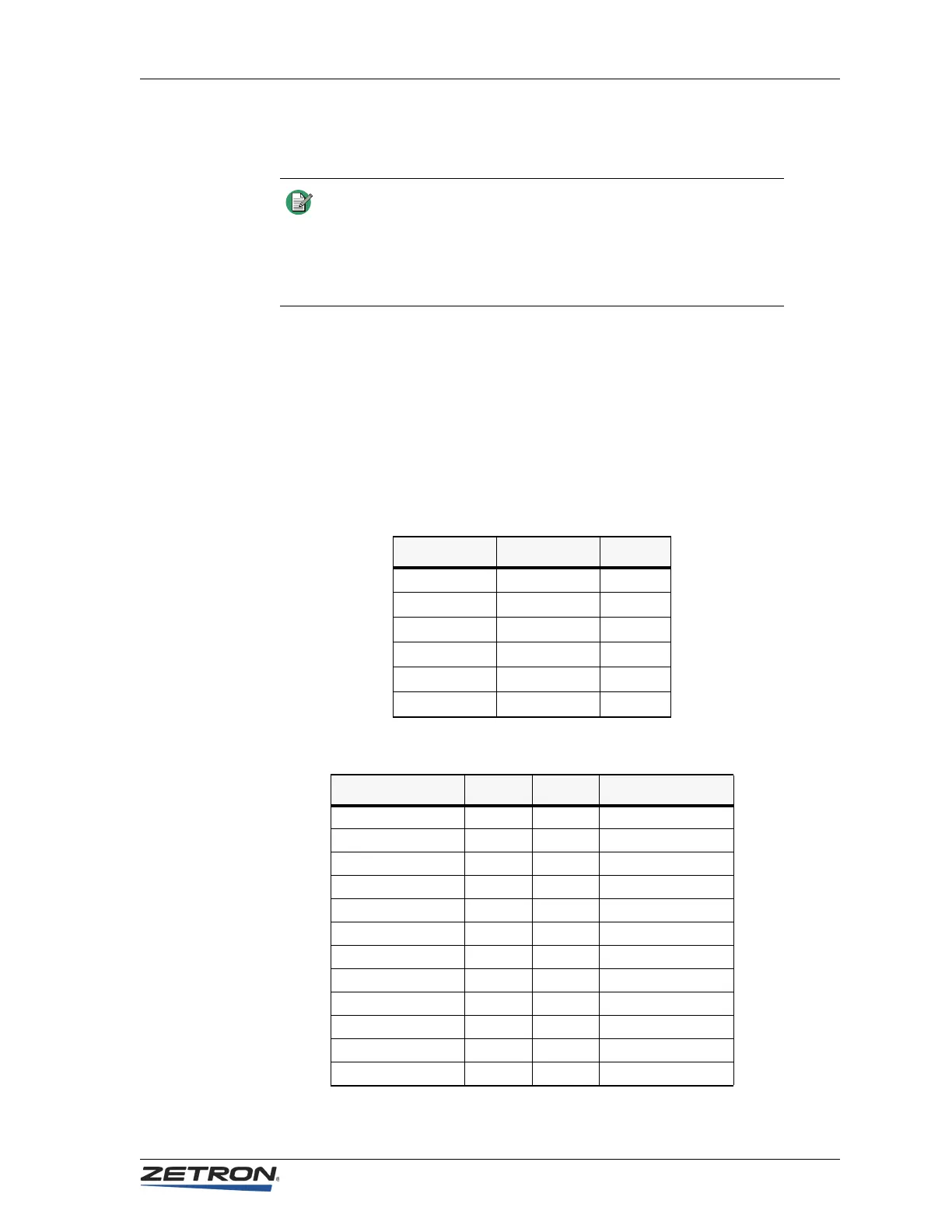
Table 17: Channel Assignment vs. Connector Pinout
Table 18: Signal vs. Pin Assignment — Upper Half
Note The locations of the Auxiliary I/O Boards are sensed during power
up and are assigned the proper sequence. If an Auxiliary I/O Board
is added to a channel slot before an existing board, the I/O
assignment of the existing board will have to be changed via CPSW
to match the new I/O numbers assigned to it by the Model 4010
software.
Channel Connector Half
1&2 (J12) J4 upper
3&4 (J11) J4 lower
5&6 (J10) J3 upper
7&8 (J9) J3 lower
9&10 (J8) J2 upper
11&12 (J7) J2 lower
Signal Pin Pin Signal
open 26 1 Input 1
Analog GND 27 2 Input 2
Ground 28 3 Input 3
open 29 4 Input 4
RLY1B 30 5 RLY1A
RLY2B 31 6 RLY2A
RLY3B 32 7 RLY3A
Ground 33 8 Input 5
open 34 9 Input 6
RLY4B 3510RLY4A
RLY5B 36 11 RLY5A
RLY6B 3712RLY6A


 To Next Page