99
CPSW Menu Structure
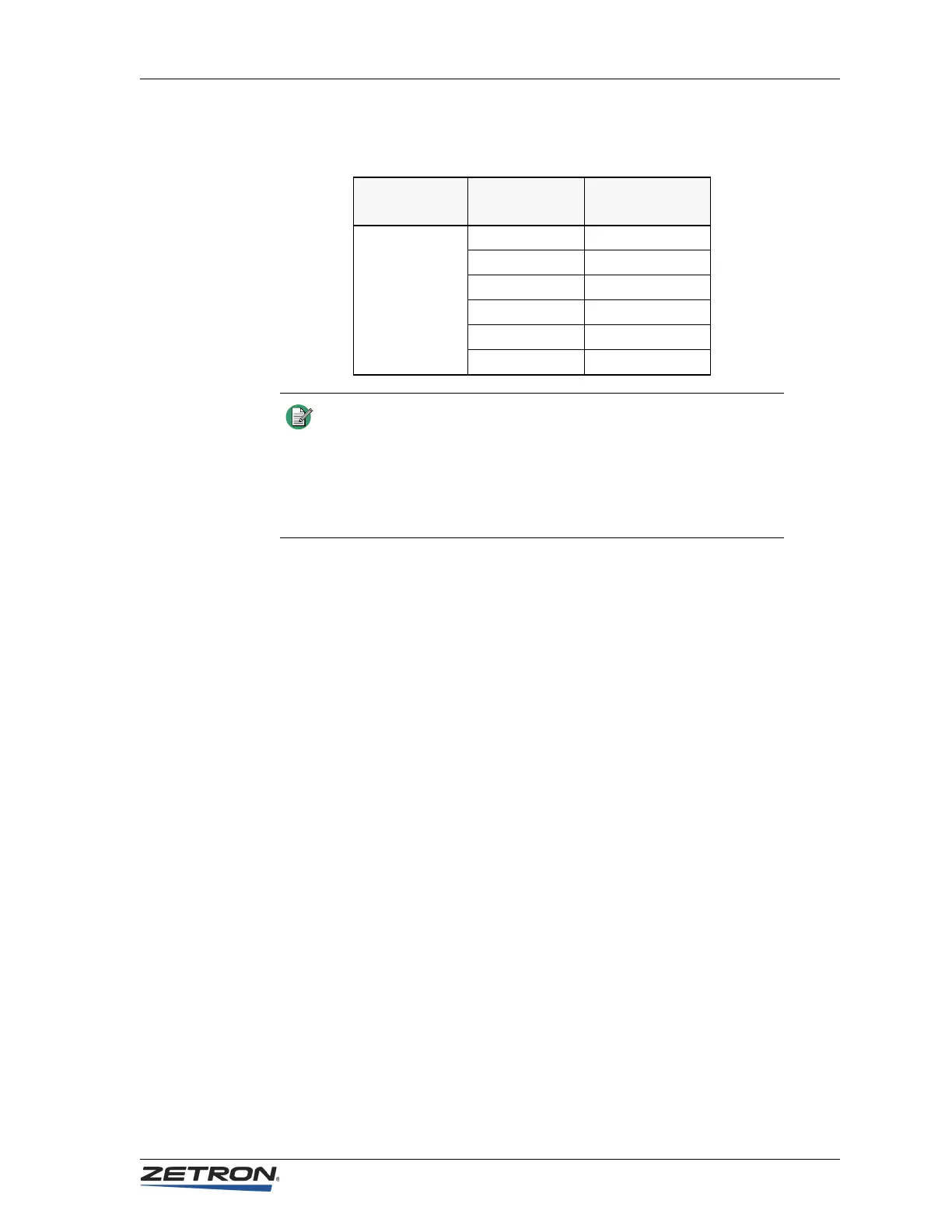
Table 29: Example Results for Primary and Secondary Addresses
Display Operation
The display of each position is configurable to show time of day in 12-hour or 24-hour
format. Alternatively, the display can show “- - - - -” (dashes) to prevent confusion with a
master site clock.
♦ To configure Display Operation
1. Click Edit, Position Configuration.
2. Click Display Operation.
The Display Operation dialog window opens.
3. Choose a display option.
4. Click Done when you are finished.
Miscellaneous
The Miscellaneous button opens a dialog window containing miscellaneous configuration
settings.
♦ To configure miscellaneous settings
1. Click Edit, Position Configuration.
2. Click Miscellaneous.
The Miscellaneous dialog window opens.
Configured
Addresses
Incoming
PTT ID
ANI Displayed
at Console
111 and 123
11155 55
123777 777
12311 11
4411155 55
10166 Nothing
22299 Nothing
Note The Model 4010 is able to decode only the unit identification in a
PTT-ID. ANIs that are configured with fleet or group designation
separated by a dash from the unit ID cannot be displayed on the
4010 LCD. Therefore, end users who have multiple fleet/group IDs
need to insure that the Unit IDs assigned in one fleet/group are not
duplicated in another or there may be confusion as to the source of
the call.


 To Next Page