ZIPWAKE DYNAMIC TRIM CONTROL SYSTEM - FOR INTEGRATION 11
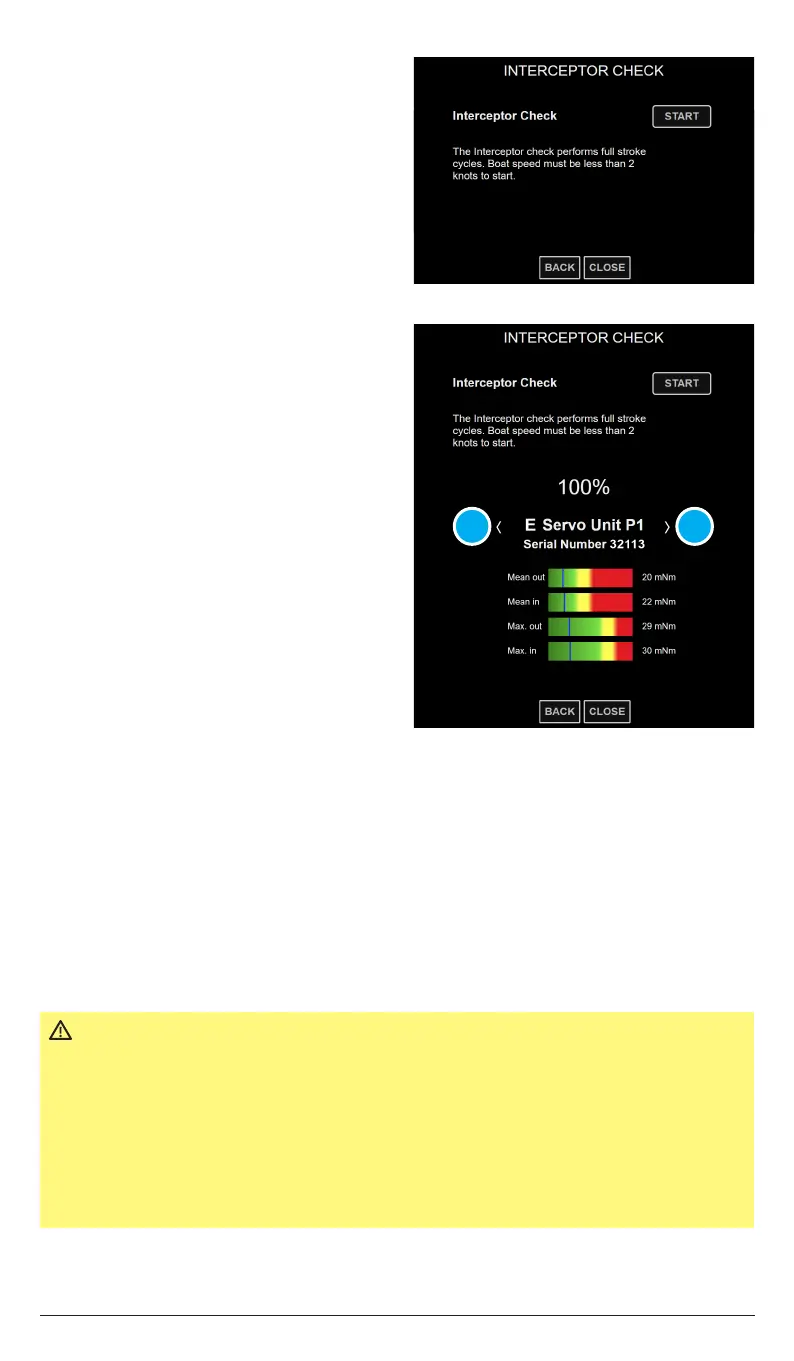
8. Tap START to run the Interceptor Check.
NOTE!
Interceptor Check will not start if no interceptor configuration has been saved to the
system (chapter 9.3).
The check repeats a 5 stroke sequence, where each interceptor blade is extended, one by
one, from port to starboard and then retracted in the same order. Visually confirm that
the interceptors move accordingly during the check. This confirms that the
interceptors are correctly connected to the distribution unit(s).
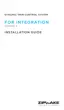
For easy servo torque level assessment, the numerical values are depicted in green-to-red
bar graphs, where green is acceptable and red is too high.
Refer to Interceptor Check (chapter 9.4) for more information.
9. Tap the arrows (A) to toggle
dierent positioned interceptors,
i.e. from Port interceptor 1 to
Starboard interceptor 1.
Tap CLOSE when the Interceptor
Check is completed.
A A
IMPORTANT
All readings must be green!
Corrective actions are always necessary when excessive torque
levels are observed. Verify the flatness of the transom, excess
use of sealant behind the interceptor and/or excess antifouling
between the blades and adjust if needed. Check for blade damage
and marine growth at regular intervals.
Always use the controls to move the interceptor blades.
Never try to force the interceptor blades by hand.


 To Next Page