MultiBio700- User Manual
eSSL Pvt. Ltd. Page 22
3.1 Entering a User ID
The device automatically allocates an ID starting from 1 for every
user in sequence. If you use the ID allocated by the device, you
may skip this section.
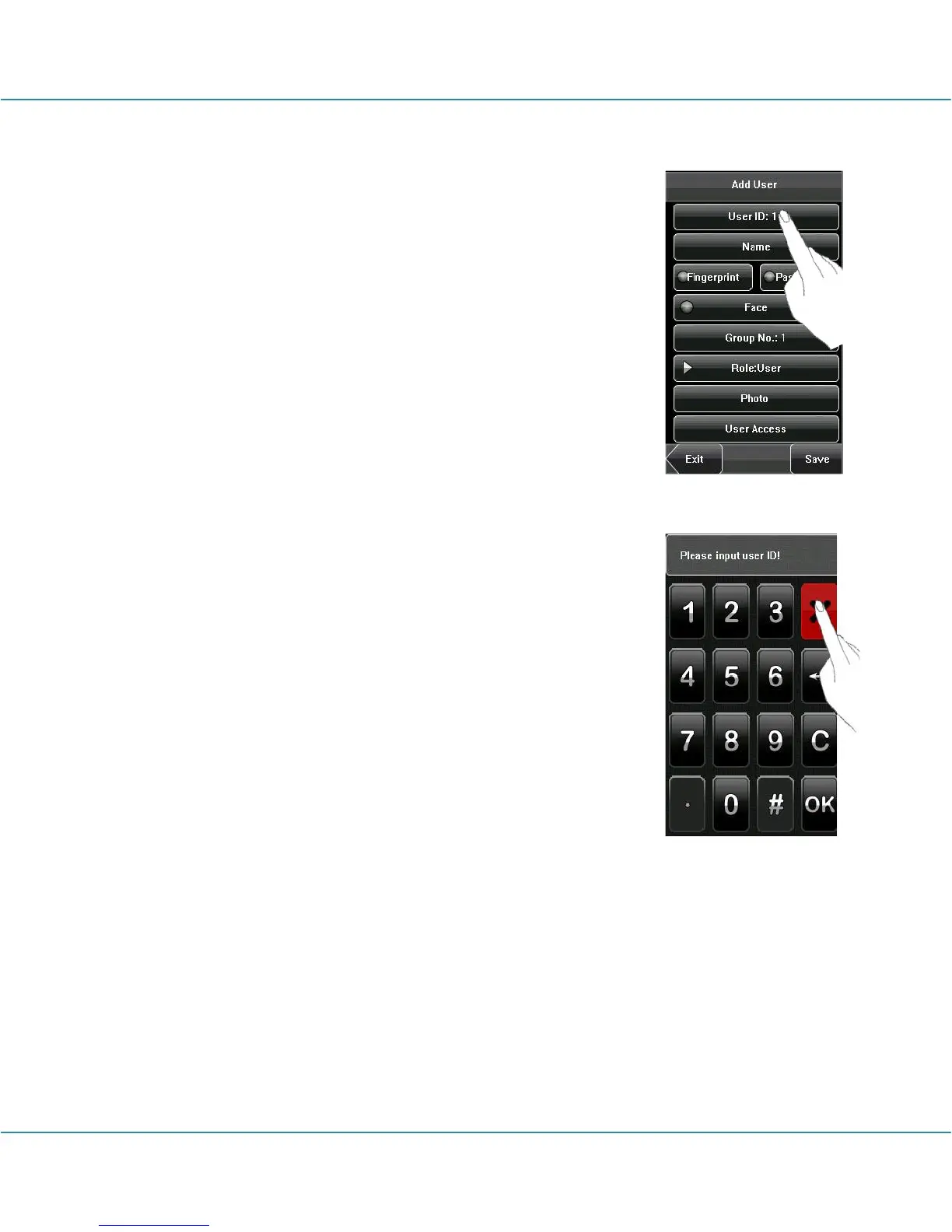
1. Press [User ID] on the [Add User] interface to display the user
ID management interface.
Tip: The user ID can be modified during initial
enrollment, but once enrolled, it cannot be modified.
2. On the displayed keyboard interface, enter a user ID and
press [OK]. If the message “The user ID already exists!” is
displayed, enter another ID.
Tip: The device supports 1 to 9 digits user IDs by
default. If you need to extend the length of current user ID
numbers, please consult our commercial representatives or
technical pre-sales.
3. After the user ID is entered, press [Save] to save the current
information and return to the previous interface. Press [Exit] to
return to the previous interface without saving the current
information.



 To Next Page