MultiBio700- User Manual
eSSL Pvt. Ltd. Page 38
you need to enter this password before connecting the PC software with the device;
otherwise, the connection is unsuccessful. 1 to 6 digits passwords are supported.
Considering the massive data including the fingerprint and
face templates stored in the device, it is recommended to transfer
the data between the device and PC over network to enhance the
transfer speed.
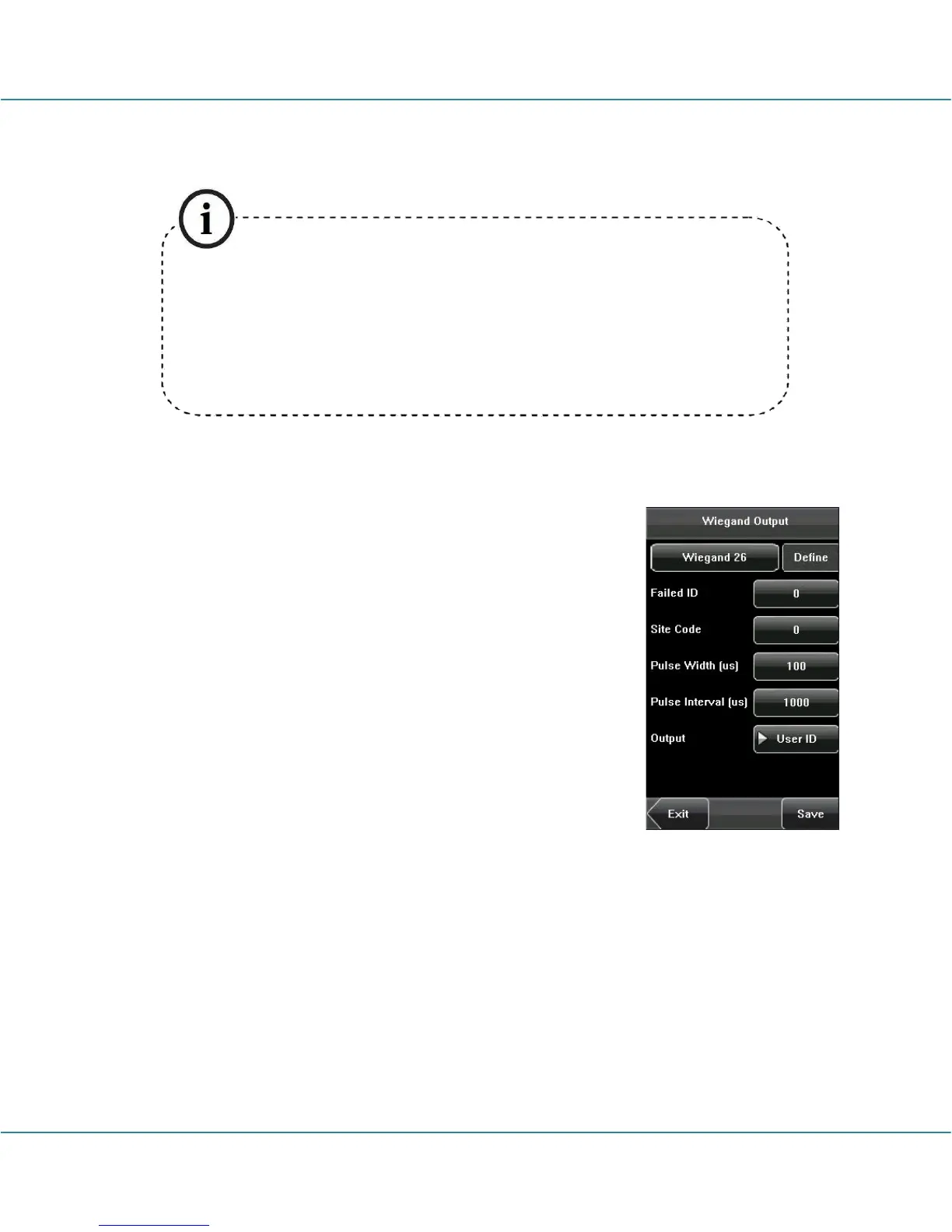
5.2 Wiegand Output
Wiegand Format: The system has two built-in formats
Wiegand 26-bits and Wiegand 34-bits, and also supports the
format customization function to meet individualized
requirements. Failed ID: Refers to the value output by the
system upon verification failure. The output format is subject
to the setting of “Wiegand Format”. The default value scope
of Failed ID is 0–65535.
Site Code: The site code is used for a customized Wiegand
format. The site code is similar to the device ID, but the site
code is customizable and can be duplicated among different
devices. The default value scope of the Site Code is 0–255.
Pulse Width: Refers to the width of the Wiegand pulse in microseconds. The default
value scope of the pulse width is 1–1000.
Pulse Interval: Refers to the interval of the Wiegand pulse in microseconds. The
default value scope of the pulse width is 1–10000.
Output: Refers to the contents output upon successful verification. You can select the
“User ID” or “Card Number” as the output.



 To Next Page