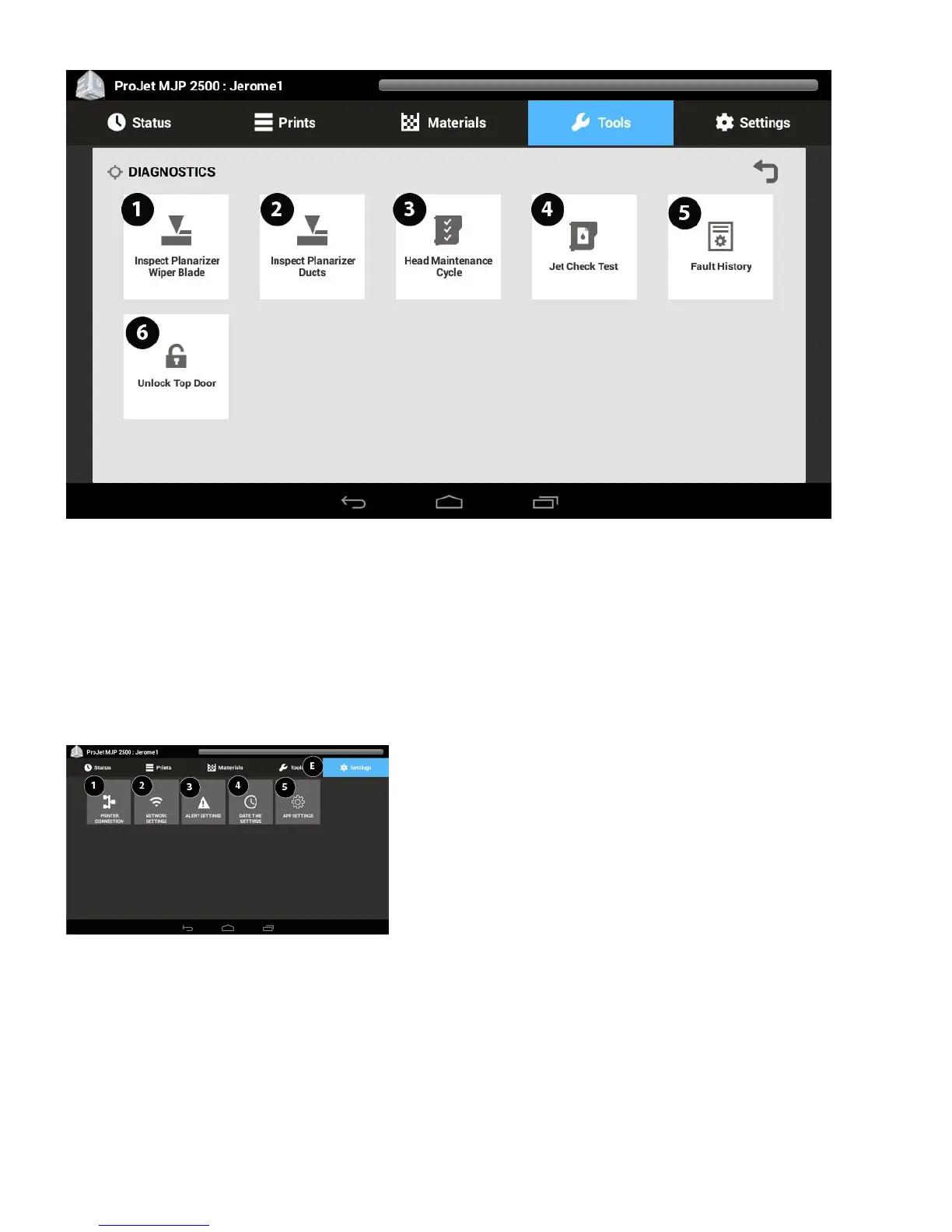
1. Inspect Planarizer Wiper Blade - Select this routine to inspect the planarizer blade for excess buildup. See Troubleshooting section for procedure.
2. Inspect Planarizer Ducts - This is a routine that will allow the user to inspect and clean the ducts in the planarizer. See Troubleshooting section for
procedure.
3. Head Maintenance Cycle - This is the routine that will be used to periodically clean the head waste area. See Troubleshooting section for procedure.
4. Jet Check Test - This is the routine that is used to verify that the jets are all jetting material properly. See Troubleshooting section for procedure.
5. Fault History - A history of fault codes is stored under the Fault History.
6. Unlock Top Door - This button will allow the top door to unlock if the printer is in a Ready or Error State.
Settings Screen
1. Printer Connection - Use this to check the printer connection.
2. Network Settings - The network settings can be verified through Network Settings.
3. Alert Settings - Set up email alerts to be notified about printer events.




 To Next Page