INSPECTING AND CLEANING PLANARIZER DUCTS
Inspect and Clean Planarizer Ducts
Material can get trapped and built-up in the ducts of the planarizer. It is important to periodically inspect and clean these areas. Follow these steps to inspect
and clean the planarizer ducts.
NOTE: Always wear nitrile gloves when inspecting and cleaning planarizer ducts.
To inspect and clean planarizer ducts:
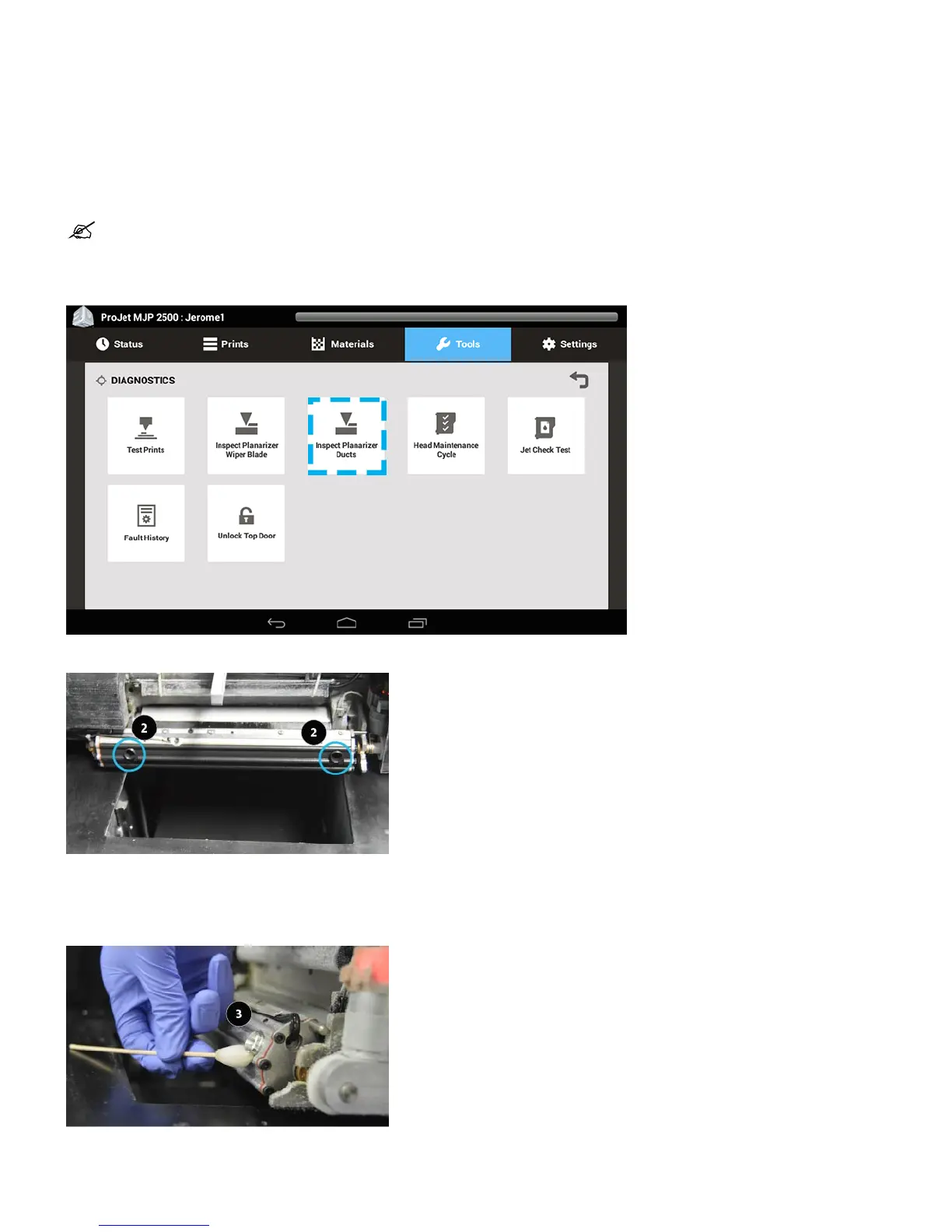
Click on Tools > Diagnostics > Inspect Planarizer Ducts .1.
Carriage will move out of the way and planarizer assembly will tilt, allowing access to the ducts (2).2.
Open planarizer cover to access the planaerizer cover to access the planarizer assembly and ducts.3.
Open Top Door.4.
Take a foam swab with some Isopropyl alcohol on it and wipe in and around the ducts, taking care to remove all excess material.5.
Inspect planarizer housing and if necessary, wipe excess material off with foam swab (4).6.










 To Next Page