RECEIVE IDLE SETTINGS
Radio power consumption in idle mode is lowered by turning off the receiver when remote radios know that
packet reception is not possible. This feature only works with the Access Request MAC as the Listen Before
Send MAC cannot know that packet reception is not possible.
The base station receiver never goes into idle mode and is always on.
When a remote radio’s receiver is in idle mode, the base station must send a series of idle exit packets
before it can send a data packet or allow a remote to send a data packet. This is to ensure that all remotes
can receive the data packet.
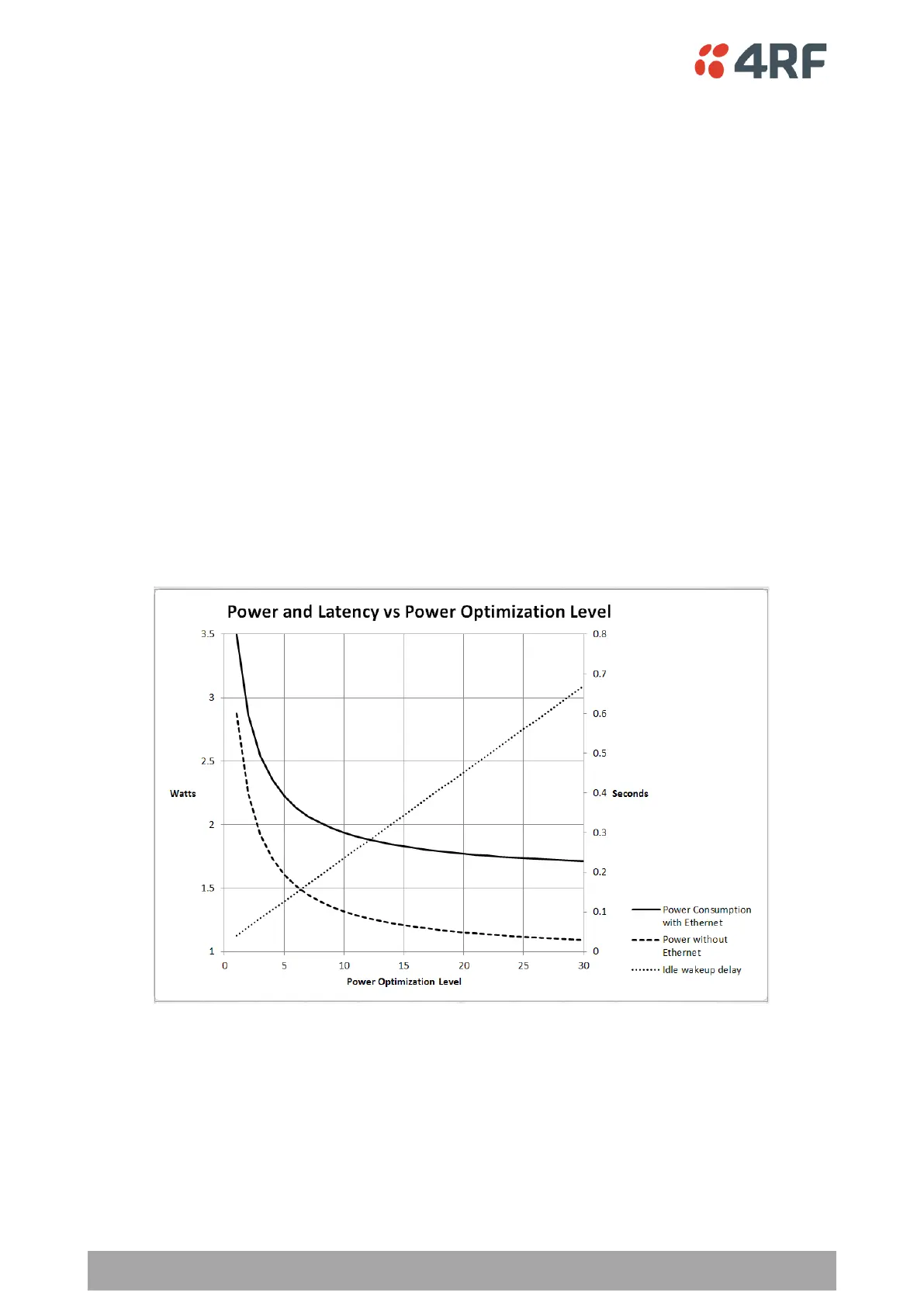
Power Optimization Level
The Power Optimization Level sets the remote radio receiver on/off ratio between 0 (no power saving) and
30 (maximum power saving).
The longer the receiver is off for, the less the idle power consumption but the higher the initial packet
latency.
The shorter the receiver is off for, the more the idle power consumption but the lower the initial packet
latency.
All radios in an Aprisa SR+ network must use the same Power Optimization Level setting.
The default setting is 5.
Inactivity Period Before Idle (ms)
The Inactivity Period Before Idle (ms) sets the delay remote radios configured for Access Request MAC will
wait before entering a power saving ‘idle’ state.
All radios in an Aprisa SR+ network must use the same Inactivity Period Before Idle setting.
The default setting is 4000 ms.



 To Next Page