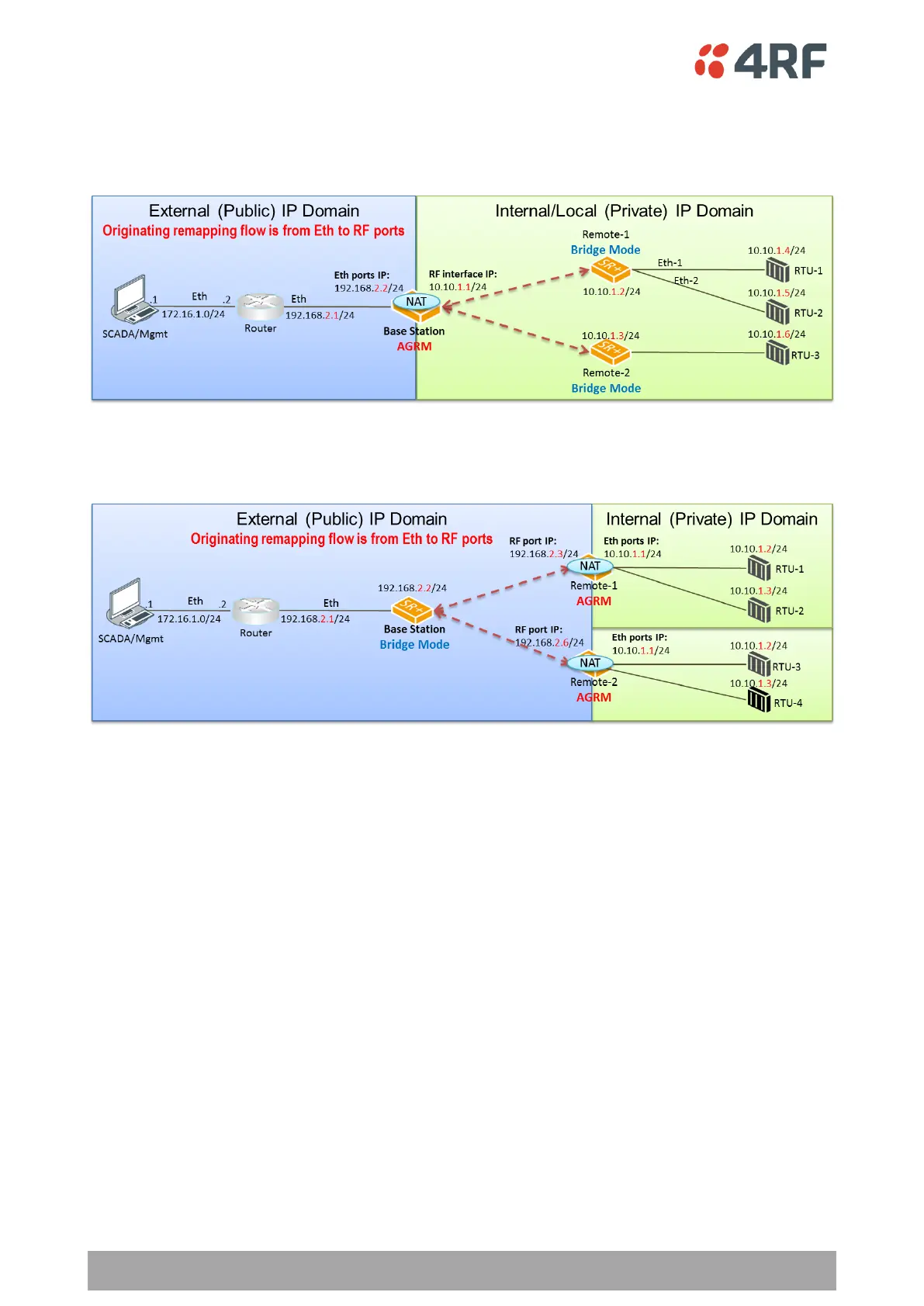
Public (External) and Private (Internal/Local) IP Domains
The following figure describes the Public (external) and Private (internal/local) IP domains in AGRM / ARM-
Bridge network. The NAT IP domains splits at the NAT function enabled device, the AGRM base station.
The following figure describes the Public (external) / Private (internal) IP domains in Bridge-AGRM / ARM
network. The NAT IP domains splits at the NAT function enabled device, the AGRM remote radios.
One-to-One NAT Description
One-to-One NAT method is based on the remapping of external / public IP address space (e.g. radio IP space)
into another internal / private IP space (e.g. RTUs IP space) and vice versa, by modifying the IP address.
UDP / TCP ports will preserve their source / destination port numbers. NAT IP address translation function
is performed before routing for inbound packets and after routing for outbound packets. NAT can translate
and handle TCP, UDP, ICMP query, IP fragments and FTP packet types.
One-to-One NAT is translating inbound session packets per public interface and based on NAT Address Map
Table (Address Map Table), supporting max 20 entries. Outbound session packets are translated based on
the reverse table of Address Map Table. The user can configure the public port and Address Map Table in ‘IP
> NAT’ page. NAT is translating inbound packets (IP address) originating in public network domain and
destined for devices in private network domain. Outbound NAT translation refers to packets originated in
private network and destined for devices in public network. Inbound or outbound packets will be dropped
if it does not match any translation criteria defined for the appropriate public interface and Address Map
Table configuration.
Monitoring the NAT translation sessions is available in ‘Monitoring > NAT’ with max 250 entries in NAT session
table. Entries with a max idle time will be aged in favor of a new entry if the limit is reached. Entries are
automatically removed after a period of inactivity as configured at ‘IP > NAT > Settings TAB’ in ‘Session Idle
Timeout’. NAT packet statistics of inbound and outbound sessions are also reported in the NAT session table
per session basis.



 To Next Page