2-6 System Utilities
Main 0
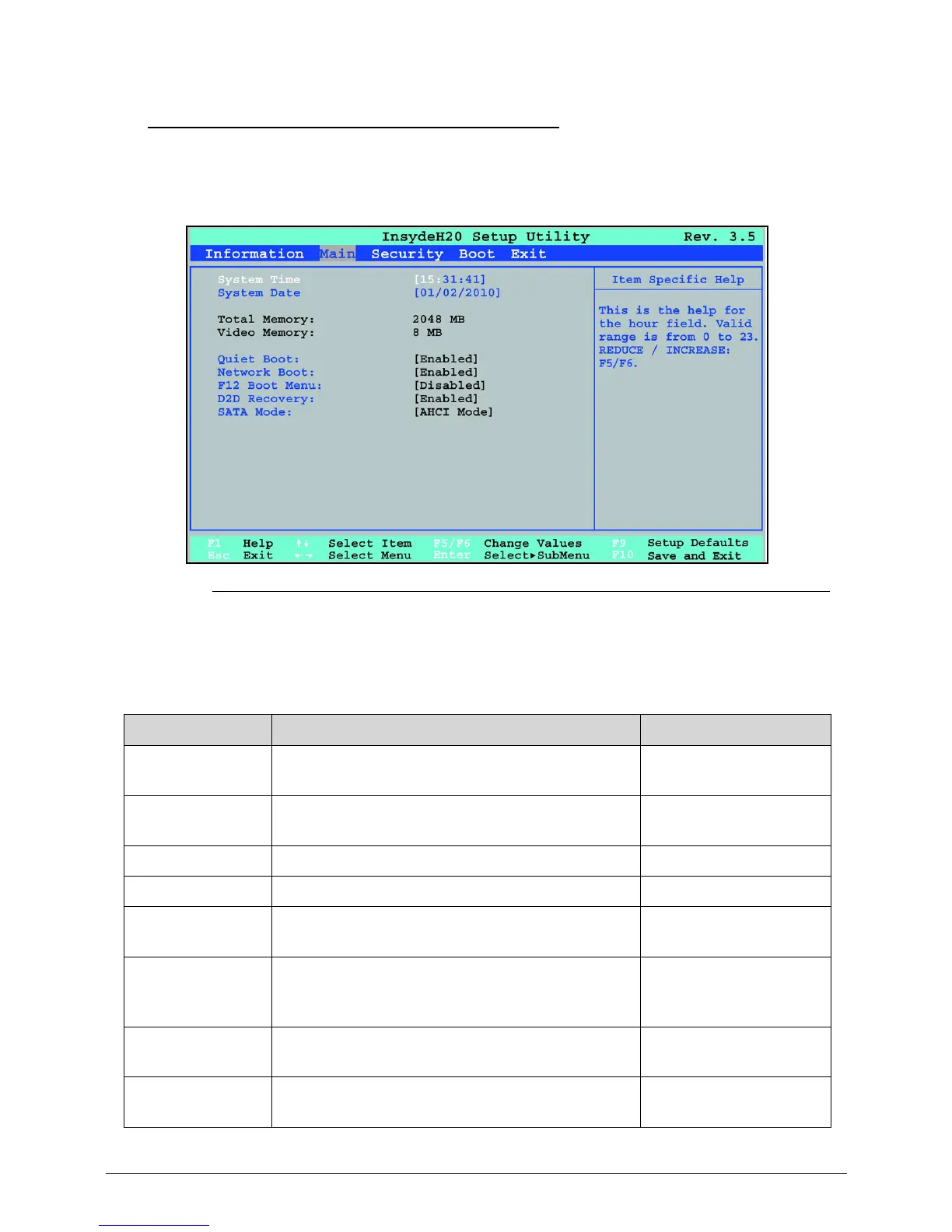
The Main tab allows the user to set system time and date, enable or disable boot option
and enable or disable recovery.
Figure 2-2. BIOS Main
Table 2-2 describes the parameters shown in Figure 2-2.
Table 2-2. BIOS Main
Parameter Description Format/Option
System Time BIOS system time in 24-hour format Format: HH:MM:SS
(hour:minute:second)
System Date BIOS system date Format MM/DD/YYYY
(month/day/year)
Total Memory Total memory available N/A
Video Memory Available memory for video N/A
Graphic Mode Shows graphic mode options Option: Switchable or
Discrete
Quiet Boot Shows OEM (original equipment
manufacturer) screen during system boot
instead of traditional POST screen
Option: Enabled or
Disabled
Network Boot Option to boot system from LAN (local area
network)
Option: Enabled or
Disabled
F12 Boot Menu Option to use boot menu during POST Option: Enabled or
Disabled



 To Next Page