Version 15.0 AF-5000 Series Pilot Guide 52
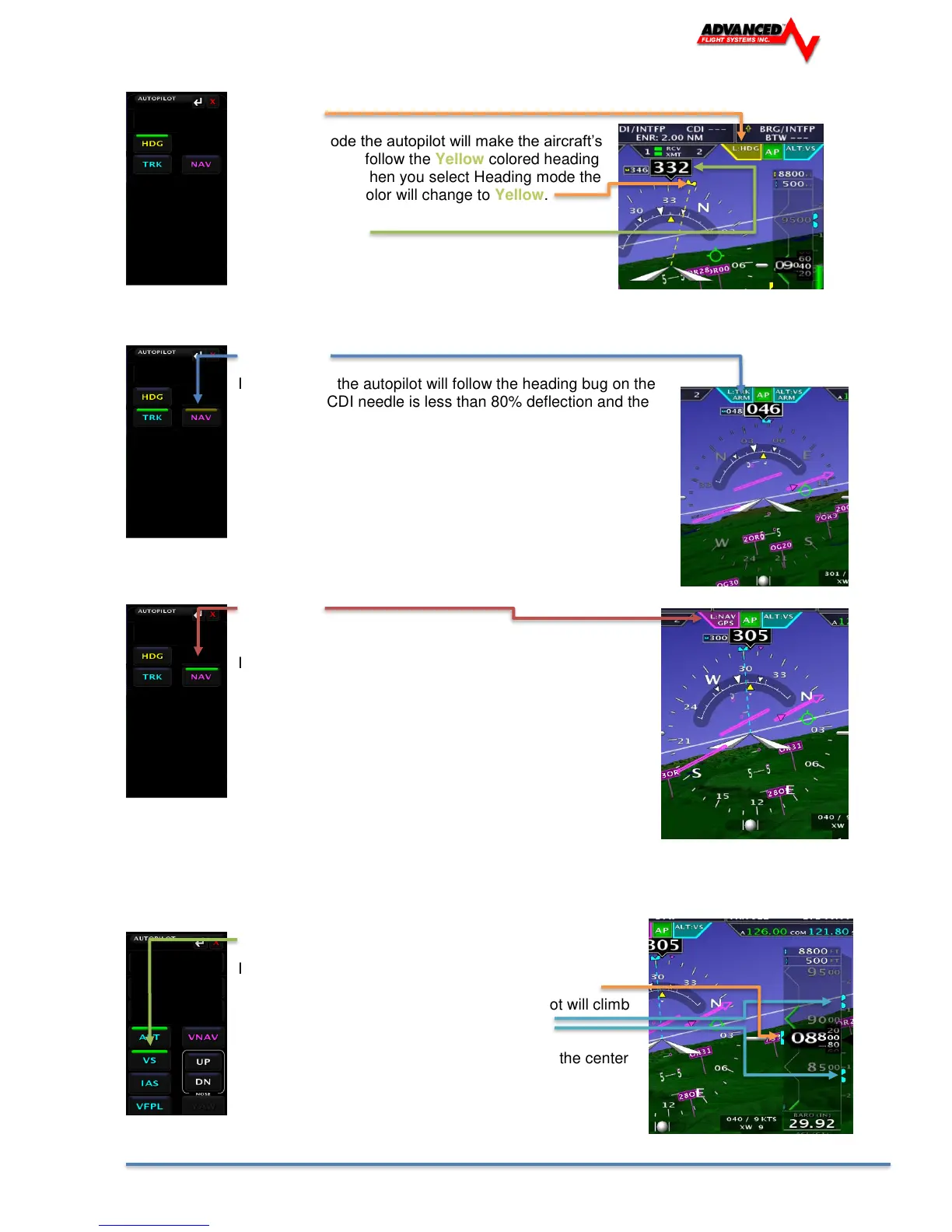
HDG Mode
In Heading mode the autopilot will make the aircraft’s
magnetic heading follow the Yellow colored heading
bug on the HSI. When you select Heading mode the
HSI heading bug color will change to Yellow.
Magnetic Heading
ARM Mode
In ARM mode the autopilot will follow the heading bug on the
HSI until the CDI needle is less than 80% deflection and the
heading is within +/- 30 deg of the CDI Needle. The Touch
screen NAV button will be yellow indicating it is in ARM mode.
As soon as the Heading is within 30 deg of the coarse and the
CDI needle is within 80% it will switch to NAV mode.
NAV Mode
In NAV mode the autopilot will follow the GPS flight plan
and should keep the CDI needle centered.
Vertical AP Modes:
ALT - VS Mode
In ALT - Vertical speed mode the autopilot will make the
aircrafts altitude follow the Teal colored altitude bug.
When you change the altitude bug the autopilot will climb
or descend following the Vertical Speed Bug.
You can change the Vertical Speed Bug using the center
EFIS knob when set to VSPD.



 To Next Page