2 Overview
IST Series UPS (10kVA-200kVA)
User Manual
18
Monitor card includes two network ports: MODBUS port is used for the communication of
MODBUS, RS485 port is used for the communication of RS485.
The definition for MODBUS port is as follows: pin3 is A, pin6 is B.
The definition for RS485 port is as follows: pin1 is A, pin8 is B.
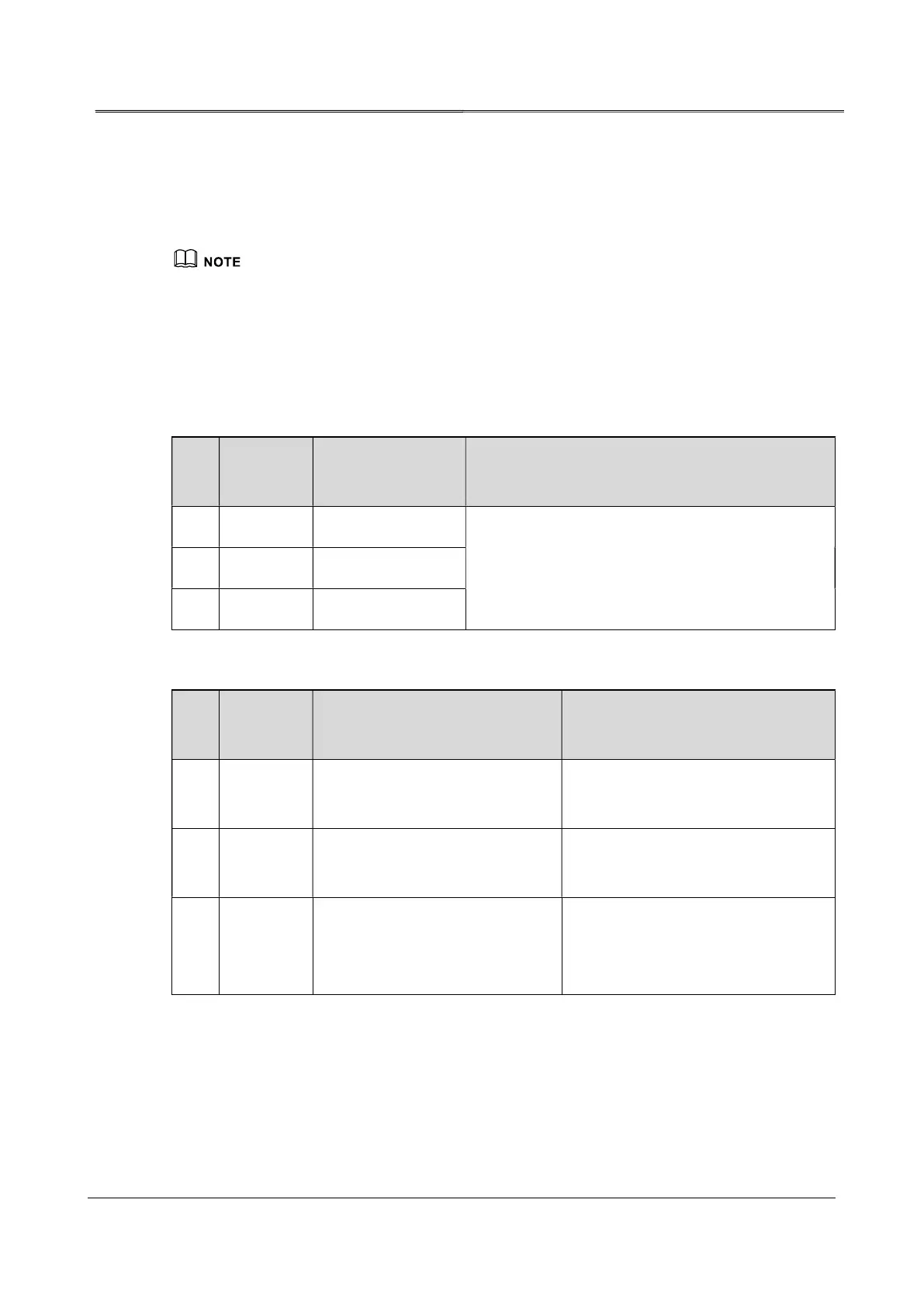
Besides, the monitor card contains 6 standard dry contact ports (3 ports are input dry contact,
the others are output dry contact), detailed definition is as shown in Table2-4, Table2-5.
Table2-4 Standard output dry contact illustration
NO.
Silk-
screen
Signal Function illustration
1 ND1 UPS FAULT signal
When the signal is valid, COM and NO is closed,
COM and NC is opened. The allowable voltage-
withstand is 250V/1A.
2 ND2 Mains FAIL signal
3 ND3 BAT. LOW signal
Table2-5 Standard input dry contact illustration
NO.
Silk-
screen
Signal
Signal
1 EPO1
External EPO normal open input
signal
When the signal is valid, NO and
COM is short-circuit.
2 EPO2
External EPO normal closed
input signal
When the signal is valid, NC and
COM is open-circuit.
3 ND4
It can be set to external battery
breaker or external maintenance
bypass breaker.
When the signal is valid, NO and
COM is short-circuit.
2.3.3 Alarm Function
Once the UPS abnormal, it will send sound & light alarm. Some alarm or protection function
of the UPS is as shown in Table2-6.








 To Next Page