5 Use and Operation
IST Series UPS (10kVA-200kVA)
User Manual
74
5.3.3 UPS Shutdown
When the system bypass is normal, after the UPS shutdown, system will turn to bypass power
supply mode; when system bypass is abnormal, after the UPS shutdown, system will be with
no output. Before shutting down, please ensure that the load is closed.
Shutdown by touch screen
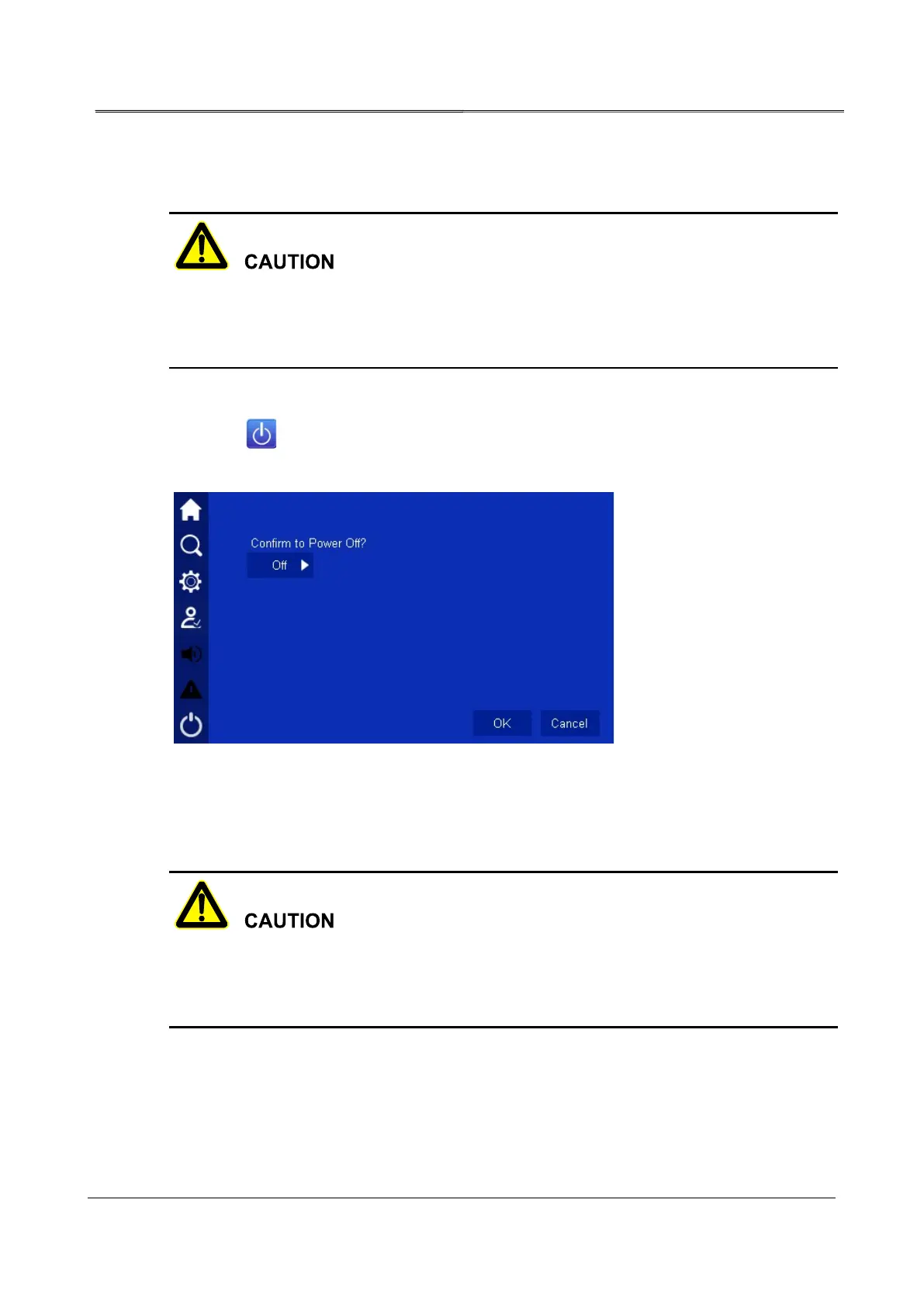
Click the icon in the main page, it will enter ON/OFF page, click OK to perform the
operation, as shown in Figure5-3.
Figure5-3 Confirm to shutdown
5.3.4 Switch to Bypass Mode Manually
Before shutting down the inverter of UPS, please ensure that the bypass is normal. When
bypass abnormal, after shut down the inverter manually, the system will be with no output and
the power supply for load will break off.
Shut down the UPS inverter, please see 5.3.3 UPS Shutdown. The UPS can be shutdown
by touch screen or OFF combination button on the panel. System will turn to bypass to supply
power automatically.








 To Next Page